Every business has some sort of unique information that is important to its operation. While QuickBooks provides the places to store the basic information that every business needs, you will usually find that you need to store additional data such as a customer’s vehicle registration number, or the weight of an inventory item. QuickBooks provides us with custom fields, a way that you can define your own places to store information. Today we’ll talk a bit about custom fields and how to use them in estimates, sales orders and invoices.
While watching postings in the QuickBooksGroup user forums I see that many people don’t understand how custom fields work in QuickBooks. Part of the problem is that QuickBooks handles them in a quirky way that isn’t always obvious. I’ve worked extensively with custom fields while developing my CCRQInvoice invoice utility for QuickBooks, and I’ll run through a simple example here with an invoice. Note that these steps are essentially the same for invoices, sales orders, estimates and sales receipts (and very similar to what you can do with purchase orders).
What we want to accomplish
For our simple example we’ll create an invoice form for a computer repair shop. On each invoice I want to have a field in the invoice header that identifies the particular computer system that was worked on, and for each detail line in the invoice I want to specify (if appropriate) the serial number of the component that was repaired. The following is a screen shot of what I want my invoice to look like.
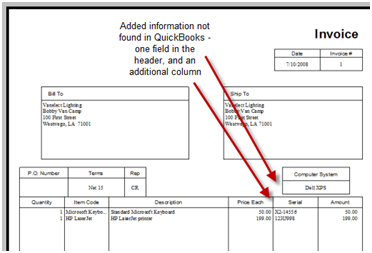
How can I add this field and column? If we go to the layout designer we see that we can add a text box or a data field:

Those won’t help, though. A text box is merely a box of text that I enter when designing the form – it doesn’t let me change it when I am entering an invoice. A data field comes closer, but I can only add a limited number of fields that QuickBooks provides to me. I still can’t change the values of these fields when I am entering an invoice. So what can we do? This is where custom fields come into play.
Creating Fields for the Header
Let’s start with adding a field for the computer system that the invoice applies to. I’m making one invoice per computer system, and I want the ID for that system to show in the top (header) of the invoice. Some customers have only one computer system, others may have several.
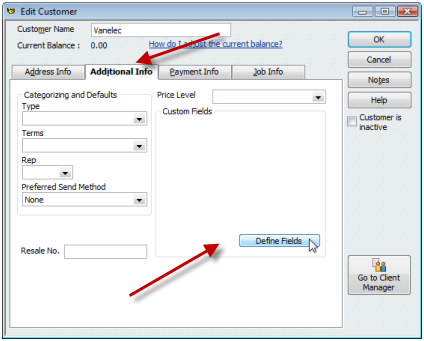
To start, we have to add a custom field to the customer list. Edit any customer in the customer list and select the additional info tab. Click the define fields button.
This opens a window that lets you define custom fields in the customer list (as well as vendor and employee lists). Enter a name for the field you want to define (I’ve used “Computer System” here) and check the box.
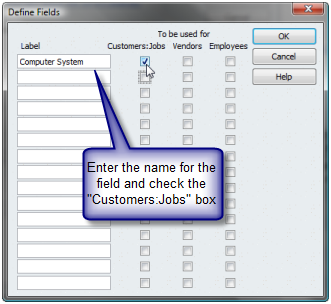
This screen can be a bit misleading. It looks like you can add 15 custom fields here. However, QuickBooks will limit you to seven custom fields for any of the record types shown here.
Click on OK and you will see that the custom field is added to the customer record.
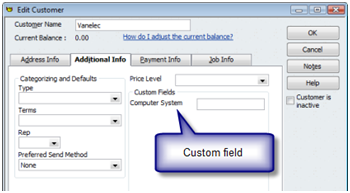
If you have information that you want to always show up in an invoice you create for this customer, enter that value in the field here. You can, however, leave it blank.
Now let’s add this to the invoice template. Edit the template and click on the additional selections (not the layout designer) and scroll to the bottom of the list of fields in the header tab. You will see that your custom fields have been added to the bottom of the list. Place a check mark in the screen and print columns to add the field in both places. You may need to use the layout designer to place the field in the desired location.
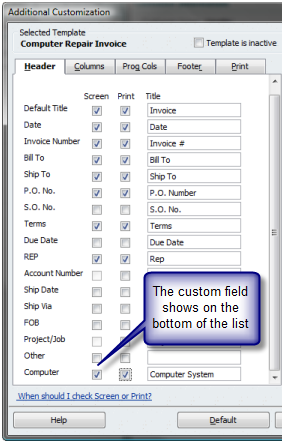
If we save this and look at an invoice that uses this template, you see that there is a field for “computer system”.
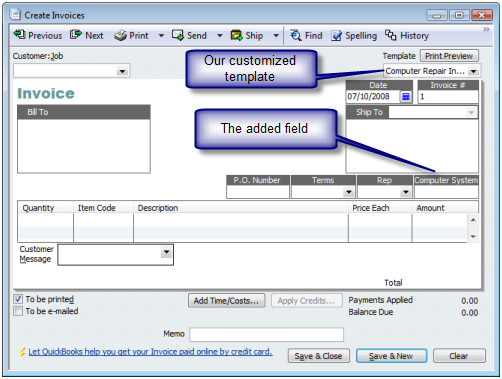
If you create a new invoice using this template you can enter the value of the “computer system” in this field, and it will print on the invoice. If the customer has one computer system we can put the ID in that field in the customer list, and when we select that customer for the invoice the value will show up in this field by default.
Please note the following:
- You can only enter 30 characters of information in a custom field.
- You cannot change the size of the field on the screen, but you can control the size of the field on the printed form in the layout designer.
- It is not possible to create a drop-down list in a custom field, or to have it formatted so that it only accepts dates or numbers.
Creating Columns
Fields created in the customer list can only be used in the header or footer of an invoice. If you want to create a new column in the invoice you must add a custom field to the item list.
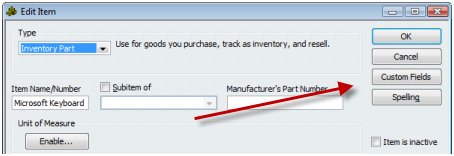
Edit any item in the item list and click on the custom fields button.
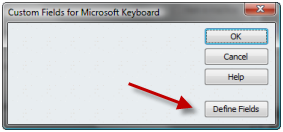
In the custom fields screen click the define fields button.
This is similar to what you’ve seen before. You can create a label for the custom field, and place a check mark in the box. Note that you can only create five custom fields in the item list.
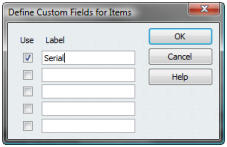
As with the customer record you can enter a value in the custom field for any item on the item list, and it will show as the default value in the invoice. You can also leave it blank. Note that you only have to define this field in one item, it will then be available in all items.
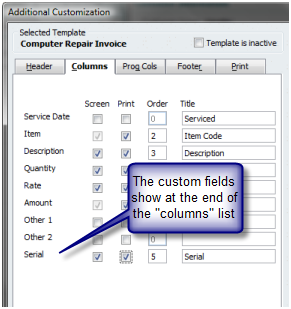
Edit the invoice template and select the additional selections button. You will see that the custom field added to the item list shows on the columns tab. Check both the screen and print boxes.
When we look at our invoice on the screen, you see that the serial column has been added.
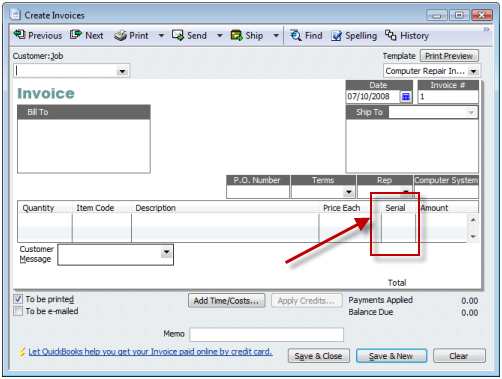
You can enter the values for the serial numbers in this column. Please note the following:
- You can only enter 30 characters of information in a custom field.
- You can change the width the field on the screen.
- It is not possible to create a drop-down list in a custom field, or to have it formatted so that it only accepts dates or numbers.
- It is not possible to create a column that is used in a calculation, such as the difference of two values, or that has an effect on the quantity, rate or amount columns (this is a feature you can get in my CCRQInvoice product).
- Select the item first, before entering a value in a custom field. When you select an item it will replace the custom fields with the values from that item record (which could be blank).
Looking at the finished invoice
Here is our invoice, with the custom fields:
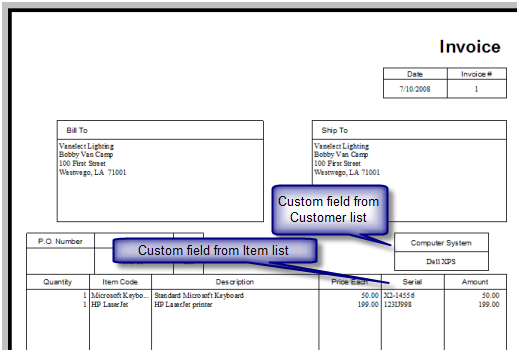
A few last points to make:
- Edit your template before you create the invoice. If you create an invoice, then edit the template to add the fields, your existing invoices might not contain the information from the lists. These fields are “populated” when the invoice is created.
- Values from custom fields show on some reports, but not always where you expect or with the values you want. Some reports will show the values from the list records (the item and customer list). Some reports will show the values from the transaction records (the invoice). Sometimes you will see the fields listed in a report and they never show any value. It is hard to predict.
- You can erase or remove custom fields from the lists, but only if you first remove them from any form template that uses the field.
This has been a quick review of custom fields – let me know if this helps you, or if there are any points that you would like to see clarified.
Note: See the article on QuickBooks Enterprise 10 Custom Fields for an update to how custom fields are managed in that release – the feature has been expanded significantly
Can you extend the number or characters in a custom field? I need to be able to enter driving directions in a cusotm field?
Sorry, Brenda, as I said in the article, you can only enter 30 characters of information at the most. That cannot be expanded.
Is this information that you want to change with each invoice, or is it something that is constant for a given customer? If it is directions for this customer, the best I can suggest is to find one of the larger fields in the customer record, such as the email or alt email. Enter the info there, then add the field in the layout designer. You can’t change it in the invoice, just in the customer record.
Other than that, if it is something that changes with each invoice, the best I can come up with is to suggest that you enter the information in a blank detail line of the invoice. You can enter up to 4096 characters in a description line (in the Windows versions of QuickBooks, not the Mac version).
I am freaking out.
1 – my computer updated lastnight and RESTARTED without me knowing it
2 – lost a LONG purchase order that I had not saved (I save with backblaze online)
3 – since i cannot figure out (in a hurry ) how to get to the backup (and it may have backed up AFTER the restart…) I need to recreate this PO for an impt mtg
4 – so NOW my field when inputting my PO will not let me continue on the next line (eg in “item” firld! It did yesterday! eg – I could continue a field naturally & it would wrap down for quite a few columns…now it not only doesn’t wrap, IT DOESN”T EVEN LET ME CONTINUE. At all. This is the weirdest…weirder than losing data…I can’t even recreate my POs in the way that I need to. AND it did this yesterday!!!
CAN YOU HELP?
(So sorry for CAPS so rude I know but I am literally crying at my desk
THANKS
Kelly
Kelly, I don’t have an answer for you. Hard to say what is going on, without hands on the system. It’s not clear exactly what steps you went through and what happened. You should find someone who can take a look at your system (either directly or via the web) – and from what little you say, I think that you need a QB expert to review how your backups are being done, as it sounds like you don’t have the proper setup for a QB environment.
We renamed the “other” field in the header to “patient name” and would now like to do a report which includes “patient name”, but we can’t figure out how to add that field to any reports – Can it be added? All the info is in QB’s but we can’t seem to get at it.
Hi, Ann. Unfortunately, the “other” fields aren’t well supported. I generally recommend that people stay away from them when possible, and use “custom fields” instead. The “other” fields can’t be used in many (if any) reports, and often aren’t supported by integrated reporting tools.
I’ve never looked at Quickbooks before today, but the company I’m briefly temping for has been trying to get some item-related custom fields to show up on their packing slips. They have managed to get the columns added, but no values show up. From your tutorial, it appears that these values have to be manually added somewhere? (I may not be understanding correctly.) And if so, what’s the purpose of defining the custom fields in the first place?
To say that I’m confused is understating things.
Leanne: If you have created the custom fields in the item list, and added them to the template as columns, there are two places the information can come from. First – if you enter a value in the custom field IN THE ITEM RECORD, then when you ADD the item to the order the value will show up. Note that you have to ADD the item to the order AFTER you have set up the field, entered the value in the record, and created the template. Second – if you have checked the box to show the column on the “screen” then when you add the item to the order you can type in a value directly to that column.
The template was altered to include columns for the custom fields some time ago. The values are in the custom fields on the item record, but when we print the packing list, there is nothing in those columns. I’ve verified that there is indeed data in those fields on the item record, so I’m stumped as to why they are not getting passed to the template.
The fields are populated, usually, when you create the order with a template that includes the columns. This is a packing list, so odds are that when you first created the order you used a different template? If this is a sales order, for example, add the custom columns to the regular sales order template that you use to CREATE the order. You only have to include them on the screen, not the printed version. When you create the order, you should see the values on the screen. Once they are created there, you should see them when you switch to the packing list template.
If not, then there isn’t much more that I can say here in these notes, I’d have to look at your company file directly.
We are instituting QBE 8.0 at our work and have customized an invoice. We added the customer’s telephone and I want to know if there is a way to format the field to read 000-000-0000. Right now all of the numbers are run together instead of being separated by area code, prefix, and number.
Thank you for your reply.
Bob
Bob, the formatting capabilities are very limited. You can’t transform data. You would have to go to a more sophisticated method of printing your invoices with a third party add-on to change this.
However, if you are using either a custom field, or a “data field” for the customer phone, it should just display the information the way you have it stored. So if it is entered in the customer record as 000-000-0000, it will print that way. If it is entered as 0000000000 then it will print that way.
Does the number of available custom fields for a product change depending on which version of Quickbooks you use?
Not really, Ed. In the US editions you have the same number of fields in Pro, Premier and Enterprise. Same in the 2008 Canadian (single currency) and UK versions.
If you have an older Canadian version, or possibly the 2008 multi currency Canadian version (although I haven’t checked that) you may find that you have some more.
I don’t know about the Australian or Asian versions, which are based on older code.
I noticed your article mentioned that it is possible to change the on-screen width of custom columns. For years we’ve been frustrated by the column widths that QuickBooks (currently using 2005 Premier Mfg & Whsle) assigns to our on-screen forms. It seems to prefer to give us very wide columns (e.g. 30%) for columns that need only contain a few characters (e.g. Qty or UOM), while limiting other columns that normally contain a lot of characters (e.g. Description) to a narrow rendition (e.g. 8%).
If you can provide us with a method that would allow us to view our forms on-screen with appropriately-sized columns, we would be tremendously grateful!
Thanks.
Brian, the simple answer to that is to upgrade to the current version of QuickBooks. This allows you to resized the width of the columns in the form that shows on the screen, where I believe that the 2005 version did not.
i have created a custom invoice following your instructions the best i could. the same address that i type into the Bill To field, though, is duplicating to each and every invoice. i cant type in unique addresses on each invoice.
on the last invoice, if i type in a different address then that same address copies over to all the previous invoices.
also, i really appreciate your detail explanation for the custom invoices.
Jesse, usually the bill to field comes from the customer record, so it would be filled in by whatever you have in the customer record itself (without a custom field being needed). How did you create this field, and how do you enter your data into it?
oh i see, well that makes sense that it would pull from the customer record. i dont need a bill to or ship to field really, but i just need a field where i can enter the property address that the specific invoice is pertaining to. i would rather it not be a column field but maybe i have to do it that way.
the point of this custom invoice is to enter our upcoming real estate commissions if the property closes. it seems that this will allow me pull a forecasted cash flow report. then once it clsoes we will go through the rcvd payment process.
so this invoice isnt being sent to anyone. its just for our own forecasting.
I want to include the “account number” on my Statements. But i cannot find where to enter the info into the field “account number” Where is this field located in the customer info.
Roy, that field is in the “payment info” tab when you edit the customer.
This clears up a lot for me. One more question, now that I have added an additional column to our template invoice, how do I get that column to show up on the statements?
thanks so much for your help.
Kirk
Thank you for your comment, Kirk. The short answer is “you can’t”. Statement templates are not very customizable.
The best I can offer is to lok at the “customer balance detail” report. You can add custom fields from the customer list there. You can export that to Excel to reformat.
Or you can write your own statements using the ODBC driver, or get someone to write a custom program for you.
Where do I get the ODBC driver?
I need to generate a statement that has only the invoice details on i.e no invoice total
Thanks
Wendy: If you are using QuickBooks Enterprise then you already have the ODBC driver, you just have to install/implement it. If you are using Pro or Premier you can purchase it at http://www.qodbc.com.
You can also request a quote to have our custom developers create a report for you – email your specifications to custom@ccrsoftware.com
We have a custom invoice template created in QB Accountant’s Edition 2007, with a custom field for an Advertising Code, labeled Adv. Code. Somehow, in the block beneath the field, the word “Orlando” (our city) was put in the block. We need to change that word, but I have been unable to find a way to get into that field. I can get into all the headers–no problems, but can’t get to that single word which appears on every invoice. The word we want to put there will be consistant on most invoices, but we also need to be able to change it when it is not applicable. Right now, we change the word “Orlando” alot. In all the fields that I can get into, I cannot find the word “Orlando”. Any suggestions?
Mary Ann, it’s hard to give you a direct answer without seeing the template. There are several things that can be going on. It’s not clear if this is the custom field itself, or something else. You can go to the Layout Designer and see if that is a separate data block of some sort, and delete it.
Or if this is the actual data field itself, and this is a custom field from the customer master list, then it could just be that the custom field in the order is picking up a default value from the customer record. Find an invoice that has this value showing up. Go to the customer record that this invoice is created for, look at the custom field in the customer record and see if there is a value there. If one is there, it will show as the default in that field when you create an invoice for that customer.
Charles, thanks for the quick response. It is NOT the custom field header. It’s a fill in the blank area below the field, and it is only meant to hold 1-2 words. It isn’t on just some of the invoices; it’s on EVERY invoice. Does that help?
Mary Ann, I didn’t mean he custom field header, I meant a custom field in the header of the invoice (as opposed to the detail of the invoice).
Did you look at this in the layout designer?
Charles–found the answer. Had to go in under Admin in Single User Mode; Select Edit/Preferences/Sales & Customers and the Company Preferences tab. The word “Orlando” was in the field beside the “Usual FOB” header. Just thought I’d let you know. Thanks for your assistance; I’m sure I’ll have more questions.
Mary Ann: glad you found it. There are a million ways that something like that can show up, it is really hard to figure it out in a comment blog like this. We do offer support services, for a fee, if you ever need help. We would be able to access your computer directly and could easily determine what is going on…
This article was a life saver. I created custom fields in a sales receipt to capture registrant names that were submitted with payment for event registrations. Thanks!
Really impressed with how thorough the article is. Wish I would have read it when I started using quickbooks. Unfortunately we have been putting some invoice data into the ‘Other 1’ field that I now need access to. I read your comment above that the ‘other fields aren’t well supported’. Is there anyway to access that data at all other than double-clicking on each individual invoice? I would be happy with just a list of the data that is in that field. Thanks in advance for your help!
Thank you, Joshua. Unfortunately, I don’t see an easy way to transfer that information. There may be a way, I just can’t find it. If you have the 2008 version of QuickBooks you can purchase the ODBC driver and you may be able to do that transfer with Excel. There may be other tools you can purchase that could handle that, also. I could also write a custom program to do it for you, again depending on what year of QuickBooks you are using.
Thanks Charles. I’m running Quickbooks Premier 2008/09. Is it possible to customise the bill interface to pull up the custom fields created in the item lists as described above? I need to have item information (unique to each occurrence) on supplier bills that I generate. (This information is to record the date and time of each occurrence of the item).
Thanks in anticipation
Andre, the Australian version of QuickBooks is different than the US version, and I’m not very familiar with it so I can’t say anything with certainty. However, in the US version you cannot change that portion of the program. You can only change the printed forms (invoices, sales orders and so forth) and some reports.
I run a trucking company and i need 3 address fields and qb only gives 2. I need a “Bill To” field, a “shipped from” field and a “shipped to” field. I can’t seem to figure out how to do this. i appreciate any help. my version is 2007
T.R., there isn’t a way to add a third address, specifically. You can only have the two address fields. However, you can use custom fields to add four or five separate fields in the customer list, and then use the additional selections/layout designer to stack them up on the form so they look like an address…
Thanks for a great article. I’m trying to add a DUNS # to our statements. I’ve already got it setup as a custom field and am using it on collection letters. It appears that we are able to add custom field to invoices, but not other form such as statements?
Also, how about emails (e.g. add the DUNS# to the subject of the email? Thanks! (FYI I’m currently on ver 2006, but willing to upgrade).
Chris, statements in QuickBooks are not very flexible. You have very limited options. Custom fields cannot be added to the statement template.
Emails are also somewhat limited. You cannot change the email subject or text to add custom field information. You can add FIXED information to the subject line – info that you want on EVERY email, but not info from the invoice itself.
Another approach on statements is to use the Customer Balance Detail report as your statement (you can export it to Excel to modify), it has most of the info (no aging summary) and you can add the custom fields…
Hello,
I have been able to get the custom field on the invoice however I want it to show up when I double click on a list item. I need the custom field “Price list” to show up on the same screen as the Type, Purchase Info, Sales Info, and Inventory info. Any help you can give me would be greatly appreciated. Thank you.
Paula, if I understand you correctly, you can’t do that in QuickBooks. If you are talking about having it show in the Edit Item window when you double click on it in the list, you can’t change that, it only shows when you click the “custom fields” button. If you are talking about somewhere else then please clarify – but odds are you can’t.
You can get the custom field to show as a column in the item list by right clicking on the headers of the list and selecting “customize columns”, though.
Great Information Here.
My question: Is there any way of adding a Previous Balance (the amount of any outstanding invoices) to an invoice. I can get the Total Account balance but I wanted to show three things. 1) Current Invoice total 2) Total of other invoices 3) Total Account balance. I prefer not to send statements to customers with unpaid invoices (as it would be most of them).
Tehjay, you can get 1 & 3, but not 2. You can have the total of the current invoice, and the total balance of all open invoices, but not the total of OTHER invoices.
Thank you for the article. I have added custom fields to a number of suppliers, specifically their bank account details for payment. I then created a custom transaction listing to list payments to suppliers and ticked the custom fields for inclusion in this listing. While the field names appear at the top, none of the data values appear. I’m not referring to any template so shouldn’t the data values automatically list? I’m using Quickbooks 2008 Pro
Barry, did you create a NEW invoice after you modified the template? The fields won’t be populated if you take an existing invoice and modify the template – they are populated when you add the customer to the invoice…
Yes, I posted transactions to simulate payments to the suppliers in question after creating the custom fields. I then generated the required transaction listing but still no joy. I have noted that the inclusion of the same information in a STANDARD field (e.g. phone field or fax field etc) automatically appears as I would expect and without a problem. For whatever reason, QB is not picking up the custom fields data. I think I will just include the required info in standard fields even though it is less than ideal. Thank you for your response.
Charlie, also fyi, when I export the full supplier list to Excel, neither the custom fields nor the custom data is exported but all other fields and data are.
I have another unique situation with a new client. They are a hunt club and raise their own birds. They offer 5 birds with an annual membership. So……with a membership fee of $150 each year clients get 5 pheasants. Then they keep track of the birds they kill and take off of the reserve. A pheasant is $23 and that is the 5 birds they pay for each year. But there are other birds they can kill, such as chukars. These smaller birds are a lessor charge.
Is there a way that I can keep this “bird bank” record in quickbooks? Clients can add to the bird bank also. It accumulates fees already paid and then deducts from the “bank” as withdrawals are made.
Do you have any suggestions?
Barry, I suspect you are using a non-US version of the product – possibly the UK edition? I work with the US editions, and they differ from the non-US editions in many ways. If you are using the UK edition, consider moving to (if you aren’t already) the 2008 version. That is closer to the US edition and has a better chance of performing properly.
Mary, that is a bit “off topic” for this discussion. Not being a CPA or accountant I don’t know what makes sense financially. One thought that comes to mind is that you create an inventory item for each bird type for each member and assign it the quantity (probably at no cost????) and then invoice the client, which would reduce the quantity????
I have successfully created a custom sales receipt form for my client. All the fields on the additional customization side have the ability to be renamed and appear on the receipt form, and most appear correctly data entry screen. however on the reports, modify reports, only te original field name appears, not the newly renamed fields.
This confuses me, why give the ability to rename these fields, have it appear correctly on the form, but not appear correctly on the data entry screen and reports? Is there yet another method to make sure that these fields are named?, I have made sure to only change/modify those fields that hold text data (not any accounting data) i.e. I changed (original) Due Date to Start Date, (original) FOB to a Time Stamp I enter manually. These appear as the original names on the reports. I am using Premiere Professional 2008 w/o payroll.
dkriese: What you did was to change the “label” for the fields in that template. You are only changing what shows on the screen for the template itself. The field isn’t being renamed, so the reports will still show the original names.
The only fields that you could rename would be the custom fields, and you would rename them in the place that you define them. Item custom fields would be renamed in the place where you define those fields, off of the “edit item” window, for example.
Hi
I am using Quickbooks Premier 2008/09 with multicurrency. We have multiple lines of items in each sales order, and likewise in purchase orders. Is there an easy way to identify in a report which line item in a PO belongs to a particular line in a SO?
Ivan
Ivan, you must be using the Australian version, and this blog primarily is concerned with the US version. And your question is off the topic discussed here. However, it can be complicated. Which PO report are you looking at? Most of the “purchasing” reports are based on RECEIPTS, not PURCHASE ORDERS, and you can’t carry custom fields into receipts. You may be able to get the info you want via the ODBC driver or programming SDK, but that would be complicated.
Charlie, First of all I would like to thank you for the time you spend helping us here on the blog. I have two questions. 1. Can you create a 2-page Estimate in the layout designer? 2. Can you create custom fields that will show up in all estimates regardless of customer? I am using 2009 pro and appreciate your help.
Shawn:
1) The form designer in QuickBooks lets you lay out a single page format, and all pages in the order will use the same format. If I understand what you are looking for, you can’t do that in QB itself. You can get a third party add-on product that will do this, several are available. My company produces CCRQInvoice (http://qbblog.ccrsoftware.com/) which can do this, although you aren’t specific about what you want. Contact me via the email address in the “about this blog” page and we can discuss the details (the web page for the product doesn’t discuss this issue in detail).
2) That depends on what you want to do. Custom Fields are tied to the customer and item records. But if you want some static text on each form, go to the layout designer. Click the “add” button and add a text field.
I’m trying to add to the bill the fields I add to the item, but seems there isn’t any way to do it. Overall after 3 months working with QB and POS, their programs are the worst I’ve see…moving to a custom solution
Can I have this custome field print on the statement. I am truing to get the description of the transaction printed and I have not been able to figure it out. You instructions, however, for the invoice were great for my invoice template, Thank you.
Consuelo: As you have found, custom fields cannot be added to statements. There isn’t a way in QuickBooks to get around this, really. You can export information, or try to work with the Customer Balance Detail report (that report lets you add some information, but doesn’t have the aging).
Hi Charlie,
Is there any way to retrieve the XSD of the object to which custom fields are added?
Thanks,
Vinod
Hi charlie,
I want to export the custom fields into an excel document along with the rest of the customer data. How would I do this?
Thanks!
Anh
Vinod: It isn’t as simple as getting an XML schema – you have to use the programming SDK to import or export information with the QuickBooks database. Look at the Intuit Developer Network page for information on the SDK, which includes documentation. http://developer.intuit.com/
Anh: For some reason Intuit didn’t add the custom fields with the customer list Excel export (they include them in the item list Excel export). Your best bet is to get the ODBC driver (www.qodbc.com), which Excel can use to limited degree, or one of several export/access tools from the Intuit Marketplace.
Charles-
So from what I understand in this article, it is NOT possible to really make the “other” column fully functional? You cannot customize it to change a rate, and to essentially have a function? You have to get extra software to do this?
Brittany: The “other” column, as well as any custom columns, are simple text fields that you can enter a value into. QuickBooks does not have a way to use them in calculations. Depending on what you are looking for, I would suggest that you look at our “CCRQInvoice” product, which performs a variety of calculations with custom fields (but not the “other” fields, which have limited usefulness). http://www.ccrsoftware.com/CCRQInvoice/InvoiceQ.htm
Our company manufactures electric ATV’s and for warrentee purposes we will need to have serial numbers on each vehicle. My question(s) is, so there is a way to add a custom field but is there any way to pull that information from a report and pull that information up. Kind of like doing a search by item number. Or is there any way to create another field like the item number field. Thanks
Lucinda: Custom fields will only be simple text entry fields, 30 characters in length. You cannot make them a lookup or any sort of formatted kind of field. You can either try to use one of the other fields for a different purpose (such as taking the sales rep list and using it for this instead), go to a third party product that has this capability, or have a custom program written for you that interfaces with QuickBooks.
Minor warning, I once added a custom field in US Premier 2006 Contractor, and it broke something. The only thing really effected, was, when I would export an entire transaction data journal to excel, it would crash when it got to a custom field, and so I could never get a full pure exported journal. I would have to isolate the dates before and after I’d used that custom field. Sorry, don’t recall much else about it, other than I finally started a new company file.
I work with custom fields extensively and have not run into that specific problem myself, nor have I had any of my clients run into it. Without seeing your database I can’t really say much about what happened, but I would guess that the database had a broken link or other problem in the file that needed to be cleaned up, rather than just the custom field itself causing a problem. That is speculation on my part, of course, without having your data in hand…
Our company has just started using QB Premier 2009 after using QB Basic for years and then Pro for a year. We went to Premier in order to use the Sales Order to Invoice option and Inventory tracking of assemblies. We have created Custom Fileds on our Items that correspond to Customer part numbers. When we create the Sales Order the Customer numbers come up correctly and when we create the Invoice from the Sales order they appear as well. However, when the Invoice is saved prior to printing, the Custom Field column loses it’s data. Can you tell us what we should do to prevent this from happening?
Mary, I’m not sure what to say. I’ve not seen this kind of behaviour, and I can’t come up with a way to duplicate it. There are lots of preference settings, perhaps there is something that I’m not seeing. Without access to your company file there isn’t more that I can do.
One thing to look into – create a test company from scratch, recreate your custom fields and templates, see if it happens in the test company…
I am having trouble with job costing as far as the estimate to the sales order to purchase order. In order to get job costing I have to data entry 2* to get job costing reprots accurate. I do have customized templates for each estimate sales order and purchase order. Do they need to be the same as far as how the program works?
Becky, as far as job costing, that isn’t something we are addressing here. I’m not clear as to what you are asking about on sales and purchase orders – are you referring to “custom fields” in the two forms?
Great web site and blog. Really informative. Our company sends field service technicians to customer sites to do testing and repair work. I am trying to find a way to generate “work orders” for the technicians. I am not aware of any work order feature in QB. My thinking is that the sales order feature provides a suitable solution but I am missing an ability to add a memo field for special work instructions (ususally 50 to 100 characters) to the form. Is there some feature in QB Premier Multicurrency 2009 that will allow me to incorporate a “memo” field or am I out of luck and need to look at third party options?
Bobby: Thank you for the compliment. “Work orders” means different things to different people, so I can’t say if the program will provide you with what you need. You don’t mention what edition/year of QB you are using…
The 2009 product won’t add what you are looking for – but what you CAN do is to just type in your text in the “description” column of the sales order – don’t enter an item, quantity or rate. This turns it into a “comment” line essentially, in the body of the order. This works for Windows vesions, might not be too good for Mac versions. You can enter up to 4095 characters in a description field – and you can add as many descriptin fields as you wish.
I need a custom field to enter the plan type that my customers are on. I need that to export to excel so that i can calculate overages on their plan. When i export customer information to excel it does not include the custom fields for some reason. Any suggestions?
David, the short answer is that the Excel export doesn’t include the custom fields, and I don’t now why they didn’t decide to include it. Take a look at the IIF export (I haven’t checked to see if it includes the custom fields) or use a third party export tool.
I am a new QB user. We need to add a second “ship to” address to our Vendor records similar to what is already set up for Customer records. What is the best way to accomplish this?
Paul – you normally wouldn’t be “shipping to” a vendor, but I don’t know what kind of business you have. In any case, you don’t have any really good options in QuickBooks itself for a second address for a vendor, if you want that to show on a PO
I have an invoice in quickbooks and i want to know in the customization, Other 1, where does that info come from? The time sheet? I can’t figure that out.
Diane: You will find “other 1” and “other 2” in the “columns” tab in the “additional customization” section of the template editor (and “other” in the “header” tab). These don’t come from anywhere – you can add them to your template by checking them to show on the screen. Then you can type information in to those fields when you use that template, and it will be stored in the invoice.
I generally don’t recommend using them in most cases – they are a holdover from the “old days” before custom fields. They rarely are available to be used in reports that print info from invoices, while custom fields are often available to be added to reports.
On 08-06-08 Brian asked “…a method that would allow us to view our forms on-screen with appropriately-sized columns,…”. Charles responded with the suggestion to upgrade to the latest version as it allow this. We are using QB Premier v2009 General and I can’t find a place to do this. Can anyone please help.
Sherry: If you are using the Windows version (US edition) then you should be able to resize the width of the columns, on screen and in the printed form. On screen, hold the mouse pointer over the vertical line that separates the headings, IN the heading bar, and you should get a different cursor. Click and drag the bar to where you want. SOME PEOPLE find that if they make a change and then exit, when they come back the settings aren’t saved. It varies from user to user, I’m not sure why.
is custom fields also available in simple start 2009? i cnt seem to find it there.
I believe that you have to upgrde to Pro or higher to get custom fields.
I am trying to figure out a way to print a form from QB that I need in conjunction with each invoice. It’s a affidavit. I need it to print things like a court name, index #, defendant, respondent, date, time, individual name from the job, etc. It’s a standard form that also has some legal language I need to put in it that would be standard on every one I print. Can I redesign a estimate for this? Or a invoice. Anyway to accomplish this directly from the software would reduce a huge amount of duplication of information. any ideas?
Russ, there are limited places to store information in an estimate or invoice. You can add 7 custom fields in the header/footer, and you can use the “Other” field, and you may be able to use some other unused fields for other purposes (sales rep, for instance, if you don’t use them). Legal language – depends on how much there is. A little, you can add easily. A whole page, doesn’t work well unless you go to third party products or a custom solution.
I followed your instructions for adding customized fields in the “additional info” section of the customer info. I added the two fields, filled out the info in each, inserted them into the sales order and purchase order templates we use, and created a new one. Problem is the info i typed in the fields does not appear on the purchase order or sales order. Am I missing a step, or does the type of template I’m using have something to do with the fact that the info does not appear? Thanks for your assistance.
Lisa, it’s hard to tell without seeing your system. These are field in the customer list or item list? Is this data you are adding in the order itself, or data you have in the list record that should appear?
Thank you for the information I got of this article.
and I have a concern about if I can automatically create a unique account number for my customers.
Any ideas will be highly appreciated.
Doctor: If you are asking that QuickBooks automatically create the customer ID for your customer records – it doesn’t do that.
They are fields in the customer list on the “additional info” tab. I’m not adding the data on the order itself, rather I have a template set up to merge the customer list info with the template. Thanks again.
Lisa, hard to pin things down without seeing the company file. Make sure that the record in the customer list has the data, make sure that you have added the field to the template (put it on the screen version at the very least), make sure that you are creating a new transaction with that template.
Thanks. New question: on my letter template, i have inserted a field called “estimate detail”. It takes the information in the table from my estimate and inserts it in my letter. The problem is that I want different columns to appear. It seems there are pre-set columns for the estimate detail field and i want to change these. Is this possible? Thanks again for your help.
Lisa: Are you talking about the Microsoft Word export? I’ll be very honest here, I don’t usually work with that. I’m not sure if you can change that.
Is it possible to resize the receipt so that I can get 3 receipts per 8.5×11 sheet and populate each receipt with different data sets. i.e. 6 receipts for 6 customers would print on 2 sheets of paper with 3 receipts on each ??
Since we ONLY have one line item receipts it would save us on paper costs !!
Thanks
Gary, that is a bit off topic for this discussion. It is difficult to do that in QB – the best I’ve seen is to change your printer settings (in the printer options itself, in the driver) to print multiple copies per page. But that may only work well if you are printing multiple receipts at a time. You have to play with things on the printer driver side of the issue, I believe.
QB 2009 Premier –
We are in the process of creating a new invoice format. Two questions – We are using a column for “Backorders” but will enter to it manually. We will not be using sales orders. These numerical entries are left oriented and we would like them right oriented to look like real numbers. Second question – I am using data boxes in my header. I can’t seem to enter a label in these boxes that has two separate lines, one above the other. Is this possible?
Thank you
Jay: You can right justify in the print form, not the screen form. Use the “layout designer”, right click on the column, select “properties”, and one of the properties is justification.
For data boxes – I don’t think you can put a line break in the value – why not two boxes, one for each line?
QB Premiere – Manufacturing –
Sales Order and Invoice templates
Change column size with layout designer – looks ok in print preview – but when actually printed changes back. Have created new templates and always the same thing happens. How to keep the columns where I want them? Thanks
On our single entry time sheet, there is a box called “billable” which is defaulted with a check mark. I want it defaulted as unchecked. Where do i go to make this change?
Lisa – that is off the topic, but for a quick answer I don’t think that you can change that behavior – at least not that I’m aware of.
We are using QB PRO 2008. In the Item List, we are trying to display the “Location” field. We added the column in the Item List. Also, we went into specific items and added the contents to the field (“Location”). However, when we go back to the Item List, the “Location” field column does not display any data. Are there any other steps required to display this custom field on the Item List?
Thanks in advance.
Juan: Is this a “custom field” that you added yourself in item list, in the “custom fields” section? Or, is this the “location” field that you can see in the item list itself, if you add columns to the item list display? If it is the field that you can see in the item list, not a “custom field” you added yourself – you can’t use that here. That is the “location” field that only applies to “fixed asset” items. It shouldn’t be allowed to be added to the item list display, because you can’t use it in regular items. It’s a bug in QB that lets you see that field in that place…
Hi,
I am using quickbooks pro 2008. I am faing a problem with the currency symbol being shown before the total amount. Earlier whenever i would prepare a quotation/invoice in the total just the total figure wiuld appear, but lately a dollar symbol occurs before the total figure. How do i remove the dollar symbol?
Hi Charlie,
I have solved the problem. Got it done after going through your articles. Now i have another problem that is preparing a delivery note and an partial invoice. Quickbooks pro does not have a feature of preparing a delivery note. so i have to do it manually. if we invoice for partial delivery the price gets divided and not the quantity. so how do i solve this issue?
Samantha: I was going to refer you to the “currency” article when I read your first comment – glad you found it.
Your latest question is off topic, having nothing to do with custom fields. I’m not sure what you mean by a “delivery note” – something like a packing slip? I generally don’t work with Pro, I highly recommend moving up to Premier if that is possible. Then you have more of the tools you need to run a business.
I read the article “Custom Fields in Quickbooks” and attempted to add two custom fields to the Item List. I click “Custom Fields,” get the message that “Currently there are no custom fields defined for items. To define them, click on ‘Define Fields.'” I click OK and get a window where click the Define Fields button, and I add the two fields: “Domain Name” and “Website Expires Date.” I check the “use” box for both and click “OK” but when I look at the item again, the two fields I just added aren’t there. What am I doing wrong?
Steve: After setting up the custom fields, did you edit an item, and click the “custom fields” button again? You won’t see the fields in the item window itself, they always are found in the “custom fields” button…
Im using Quickbooks Premier 2009/Manuf edition. I am trying to edit a bill of materials/inventory assembly form. I can’t quite figure out how to edit this form. I added my custom field for Vendor Part #, but do not know how to add this custom field to print on a Bill of Materials?
Adriane: The reason you can’t figure out how to do that is because you CAN’T edit the BOM printout in QuickBooks. They don’t provide a way to change that listing. You have to do one of the following:
Export the data to an outside file and try to create your own BOM listing. Please note that this would be very complicated to do.
Purchase the ODBC driver (www.qodbc.com) and use an ODBC compliant reporting tool to create your report. Simpler than the first option, but STILL very complicated because of the way that Intuit organizes the database.
Go to a third party product that works with the BOM.
My company, CCRSoftware, produces a third party product that lets you modify the BOM layout. See information on this at CCRQBOM. However, please note that if you download a trial version, the publicly available release (at this time) won’t let you add the custom field to the report. That is a feature that will be available in the next release, due out in April. If you want to see more on this release you can go to my CCRSoftware product blog – or you can contact me directly and I can get you a preview version.
Charlie,
Delivery Note as in when we first prepare a quotation and once we deliver the goods we have to prepare a delivery note and than invoice the client based on delivery note as at times we deliver partially.
Hi every one,can some one please help me customizing the BIlls and WRITE CHEQUES in quick books pro,i have added custom field but the report is not able to display the information entered.
Shailen, I’m assuming you have a Canadian version? There are differences between the non-US versions and the US versions, and the differences are greater the older the year of QB you have. However, regardless of what you have, custom fields are often very limited outside of the invoice, estimate, sales receipt and sales order screens in QuickBooks.
Hello Charlie.
I tought will be easy to modify the invoice template…. but had been very difficult for what I need. Basically is a Subtotal, after that 10% Discount we call Retainage and then the total. I saw a couple Templates with Discounts but are based on previous information, not on something I can get at that moment. And this three numbers should appear in the invoice like the total does. Could you please guide me where to find this kind of format? Or how make it by myself? Thanks!
Diana, if you mean that you want the discount to show in the report footer, you can’t do that with QuickBooks. You have to put it in the details section. In summary, you would add a subtotal “item” after all the detail lines, then a discount “item” after that to apply to the prior subtotal. But you have to add these two items to the bottom of every invoice when you create it.
I charge my customers the shipping costs associated with shipping the ordered products to them. Is there a way to add a “shipping costs” line in the footer of an invoice? Thank you
Keith: Sorry, there isn’t a way of doing that (and having it show up automatically) in QuickBooks. You can add a custom field and manually enter the cost in the field, and have it show there, but if you want it in the total you would have to add the charge as a detail line, so it would show twice. I’m going to add the ability to handle this in an upcoming release of my CCRQInvoice add-on product, but that feature won’t be out until later this year, probably end of summer.
Hi Charlie,
Well we normally quote in euro but being based in UAE we would like to quote in Dirhams. Is there a possibility that we can save prices in euro in quickbooks and than convert it into dirhams as per the exhange rate available??????
Samantha, both of these questions are off topic. I also don’t know what version/year/nationality of QuickBooks that you have. The US 2009 edition supports multiple currencies, but there may be problems getting it to work properly in your system in UAE (I’m not sure, as I’ve not tried the US version on a non-US computer). Some people in the Intuit Community forum are pointing out problems if your Windows system (assuming you have Windows and not a Mac) has it’s currency settings to something other than US settings. For invoicing, I would normally create an estimate for the full amount and invoice for the partial amount.
Hi Charlie one more thing. When you invoice a client, i face difficulty in invoicing for partial delivery. Say Overall amount is 100000. you want to put payment terms as 25% advance payment, 25% on confirmation and 50 % on delivery. And now i want to invoice for only 25% that is 25000. how do i do it?
Hi Charlie,
I am using Quickbooks Pro 2008.
Enjoying reading your blog. Hard work always pays off.
I have to create an invoice in Quickbooks Pro 2009 where we are paid a commission on products we source for our clients. I have to show the amount upon which the commission is based, the commission % and the amount of commission. I have been able to do all this however the problem is that the total of the invoice can only be the sum of the calculated commissions. If I place the amount upon which the commision is based into the AMOUNT column that amount is included in the total with the calculated commission but the percentage calculation in Quickbooks Pro only calculates from an amount the the AMOUNT column.
Is there a way to create an invoice that will calculate the commission but only total the commisions and not include the amount upon which the commission was based?
Michael, this probably isn’t an issue relating to custom fields, so it is a bit off topic. The total amount of the invoice has to be calculated in the “amount” column. You can address this in several ways – I’m not sure I understand exactly how you want things so this might not work for you.
Just a few thoughts, there may be other ways. If you want something more sophisticated you may have to go to a third party product. QB only calculates the amount in a line by rateXquantity, and the total at the bottom is the sum of the line amounts.
Hello,
You seem very knowlegeable on custom fields. The problem I am having is that I created a “Cost” custom field for all items in quickbooks, then I went to the report “Sales detail by item” and nothing shows in the field. Will creating a column on the invoice as shown in your demonstation show the default value I entered in the quickbooks items and then show up on this report? I hope you can help me and save manally entereing cost on 1000 plus records each month. Thanks Much Tim
The Sales by Item Detail report is based on the transactions – invoices – so the information must be included in the transaction. When you see your custom fields listed there, the values are going to be taken from the invoices, not from the item list. So you need to add the custom field as a column in your invoice template.
When you create a new invoice, the value that is in the field in the item record will automatically populate into the column. And when you save that invoice, the value will show in the report.
The problem is, if you create a template, the values will only show in NEW invoices you create, it won’t go back and show in all of the existing invoices already in the company file.
Thank you Charlie, I realize it will not work on past, but at least is will save me many hours in the future. Thank you again for your time.
One more quick question if the cost is say 10 for an item and a one line quanity say 5 of said item will it show up as $50 in the sales by item detail or will it just say 10. Either way it is a work around which I can do a simple calculation once exported to exel. Thanks again, Tim
Tim, if you are entering a “cost” in a custom field, it isn’t going to be used in any financial calculations. When you sell the item, the “rate” or “price” column value will be used to calculate the amount that is posted to sales (quantity X rate = amount). The “average cost” value of the item, if it is an inventory item or assembly, will be used to post to COGS. Your custom field is ignored.
I added a custom field called agent in customer additional info. Each time I set up a customer I add the agent name. What I wanted to do was have an AR report by customer but sub totalled by each agent. I cannot seem to find a way to run the aged receivables by this field (or at least subtotal it)
Colin, you won’t be able to modify a report in QB that way. You may have to send the report to Excel to modify, or use the ODBC driver to extract your data and make your own report.
I added a custom field to customer and populated it. I can get the field itself to show on the custom transaction detail report but the field is blank for each customer? Does it matter that the invoices were created before I added this custom field?
Terry, the report is taking the information from the invoice, not the customer record. So you have to add the custom field to the invoice itself. When you create the invoice, the value will auto-fill from the customer record, and then it is saved in the invoice. You don’t mention that you added the custom field to the invoice template itself?
I did add it to one invoice itself before my original post thinking that might be the problem. Even though the invoice is “old”, I can still add the field and resave the invoice and it should work?
Got it to work. Even though I had put it onto the invoice, I did not have “all my ducks in a row”. Thank you so much for the help.
After you add a custom field how do you automatically update the field with data from the database?
I want to put a timestamp on the invoice.
It seems like it should be easy enough because I know you can print it on reports. So, I know the data is there…
Thanks,
Joel
Joel: If, for example, you create a custom field in the customer record, and then you add it to the invoice header: If you put some information in the field in the customer record for a particular customer, and then create a NEW invoice for that customer using the modified template, the information from the customer record will show in the invoice as the default value for that field.
They key issue is that it works when you create a new invoice. If you have an existing invoice, and then modify the template to add the field, it will not add the info into the custom field. It happens when you first create the invoice.
Our small consulting company invoices clients by consultant and project. If we have consultants working on three projects for the same client in a particular month, we will issue three invoices to that client and I need to display details of the project as part of the header on each invoice (client task number, approver, internal codes etc.). Given the 30-char limit to custom fields, do I have any options other than to set up several custom fields to display this information, for example Detail1, Detail2, Detail3 etc.? Thanks in advance.
John, that is pretty much your only option, without going to a custom written order entry add-on.
I need guidance please. I created a custom field that does not print on an invoice which is just what I wanted. What I can’t figure out is how to rearrange the sequence of boxes in the invoice entry screen so my new field is at the end after the PO number, terms, ship, etc. entry boxes rather than at the beginning of them. Can it be done? Thanks for your help!
Cara, you can’t control the order in which the boxes appear on the screen.
Hello Charlie,
I have a question that is boggling me. We have a new website and need to bring in a custom field of data. However you cannont import custom fields through an IIF file.
So I had to go to plan B which was use the “Other1” and “Other2” fields – this imports perfect but guess what it does not show up on the Sales by item report or any others for that matter.
My question is do you know a way of making it show up or know of any 3rd party reporting software for quickbooks that can do this simple task that has become a nightmare?
Thanks Much, tim
Tim: The IIF format is an old one and isn’t being updated as QuickBooks advances, it doesn’t work with all the fields you find in QuickBooks, particularly newer ones. There is some support for custom fields in some portions of IIF, but I don’t work with that at all.
The “Other” fields are an old type of field that doesn’t get a lot of support – they should have gone away, replaced by custom fields, but they stuck around for compatibility. As you note, these fields aren’t always available where custom fields usually are.
If you are working with importing data, you should do one of three things:
Use the ODBC driver at http://www.qodbc.com, which will support custom and “other” fields.
Use the programming SDK from Intuit at the Intuit Developer Network (which is what I use), which supports custom and “other” fields (the ODBC driver is based on the SDK)
Use a third party web interface product, of which there are several, that you can find in the Intuit Marketplace. These will also be based on the SDK.
IIF should be avoided in any case, because it is unreliable and has the potential for crashing your database. It is an older format with very poor error checking. Intuit recommends that you don’t use it, and won’t support you if you have problems with it (or due to it).
Hello Charlie,
After reading similar responses in your site, my problem is not unique. Can’t belive quickbooks hasn’t fixed this – seems easy to do.
However I need this to happen, can you write a program or adjust your CCR programming rather than spending money on Qreports which is far too involved for the 1 report I need per month. The reason I need it is because I need the cost to come in on the IIF file so I know what one company should charge the other. One company manufactures and other is sales.
Thanks a million, Tim
I don’t see QuickBooks “fixing” anything here, they don’t consider it broken. IIF is no longer supported – it is still there, but frozen, it is only there because many people use it and would complain if it goes away. The “other” fields are similar – they want you to use custom fields in their place. And, note, that they have a tool that lets you access custom fields, the SDK, which is what they expect people to use (or the ODBC driver). Note that with the ODBC driver you can use tools like Crystal Reports, Microsoft Access, or even Microsoft Excel to access the data. However, I’ll note that their implementation of custom fields is a bit odd from a database standpoint.
If you wish to talk about a custom solution please contact me in the address in the “About” section of this blog. Provide me with the details of what you want and I can generate a quote.
Hello Charlie,
How can I see custom fields in ‘Inventory information’ window, when I want edit item? Is it possible or i will only see it if i click on ‘custom fields’ button?
Thank you.
Kasia, you can only edit the values of the custom fields in the “edit item” window by clicking on the “custom fields” button. To do it any other way you have to use a tool that is outside of QB.
Charlie,
I am doing some work for a local non-profit. When they set up their quickbooks they created a custom field for “Client ID” but then they had a volunteer enter all of their data. They put the data in the wrong field. Now it is my job to move the data into the correct field. Is there a way to do this without going into each record individually? They have over 5,000 incorrect entries and that would take forever. Could I perhaps export all of the data, move it around and then import it back?
Thanks,
Kelly
Kelly, I assume that this is in the customer list?
The Excel export/import won’t work, as QuickBooks won’t export the custom fields for the customer list, as it does for the item list. I’m not sure why they didn’t do that.
You can export the customer list to IIF (File/Utilities/Export), and that includes the custom fields. You can open the IIF file in Excel. However, to import it back in, you might have to make some changes to the IIF file. To be honest, I avoid working with IIF, so I don’t know the details. MAKE A BACKUP COPY before you tryin importing from IIF, as it can create problems.
You can read about the IIF file format in your help file, or at http://support.quickbooks.intuit.com/support/pages/knowledgebasearticle/bde7b06f
You can find a utility that helps work with IIF files so you don’t have to learn all the arcane details at http://www.bigredconsulting.com
You can also purchase the data import and export utilities from http://www.baystateconsulting.com (check the trial versions to make sure that they handle the custom fields properly), although that is more expensive.
Hi, I am interested in making a custom field that has a much larger character limit. This field would need to appear on a print out on the right side of the page, much like the customer name and address appears on the left side. (I can send you an example of an invoice i received from another company that is exactly what i want. I need to use the field to enter instructions to technicians, these instructions will be unique to each service request. Any ideas?
Greg, “custom fields” in QuickBooks are only 30 characters, and you cannot change that.
The best you can do without going to a third party program is to enter your descriptive text as “comment” lines in the body of the invoice. If you just enter the text in the description field with no item, quantity, rate or amount, you can enter up to 4096 characters per line, and as many lines as you want. But they have to be in the detail section of the invoice.
Can you email me at the address I posted with? I would like to send you an example and get your opinion on how it was created.
Hi,
Can we add custom fields in Enter Bills Window? If yes then how?
With Thanks.
Irfan, sorry, you can’t modify that window in QB
HI,
CAN I MAKE CUSTOMIZE FIELDS IN CREDIT MEMO AND ENTER BILL OPTION AND ALSO I WANT TO FILTER ANY ONE FIELDS FROM ENTER BILL , SECOND THING CAN WE REPLACE DATA FROM ONE FIELD TO ANOTHER FIELD, THIRD CAN I DISPLAY OTHER 1, AND OTHER 2 FIELD IN DISPLAY REPORTS
CAN WE REPLACE OTHER 1 AND OTHER 2 FIELD DATA IN CUSTOMIZE FIELD IF YES HOW
THANKS
Shafiq: “Replace”? I’m not sure what you are actually asking to do. You can use custom fields instead of the “other” fields, and then they are available in reports, etc. IF you mean can you MOVE the data from other fields to custom fields – it is possible but complicated. I would look at a third party tool to do it. You can use ODBC if you want to do some programming. You can get tools from Baystate Consulting. I also have done some custom programs that do that kind of thing, but they are a bit expensive.
For your other questions: Custom fields can be used in credit memos the same way as in invoices. They cannot be used in the enter bill screen, as you have no way to edit that screen. And you usually can’t get other 1 / other 2 fields to show in QB reports.
I guess there’s some important reason why Quickbooks limits you to 7 custom fields of 30 characters per field????
Perhaps they still think we’re working with 4GB hard drives on a Pentium 2 with 64mb ram?
We’re looking at alternative software as Quickbooks is severely limited in so many respects. They don’t seem to listen to their customers and refuse to add functionality.
Hi I wanted to get info on the weights and the custom fields. We have set up the feilds as directed but the info is not being processed in our QB’s sales order. Do we need to transfer the info from our QB file to the CCR invoice program to get the weights to calculate?
I generally don’t discuss the CCRSoftware products in this blog, usually you would use our product blog (http://ccrqblog.ccrsoftware.info/) for that. In any case, to use CCRQInvoice to get total weight of an order you need two custom fields in the item list and one in the customer list. You would enter the unit weight in one custom field in the item list. You would add the three custom fields to your invoice template. When you process invoices with CCRQInvoice it will read the invoice, take the quantity and multiply it by the unit weight, store that in a custom field, then total those extended weights for each line and store that in a custom field that you have in the header or footer. All of the data is held in QuickBooks, you don’t have any information stored outside. No transfering. Just tell the program to do the calculation, it reads the QB invoices, calculcates the weight, and stores it back in the QB invoice.
I’ve made a custom field in my item list called Pack from Vendor and under each item we stock I typed in the vendor the item comes from. on my template it’s auto filling the vendor under the column ‘Pack from vendor’ This is what I want now for some reason my other 2 computers which share, won’t show up when they pull up the same templet to fill out! a couple of days ago I didn’t have an issue. Would you have any ideas on what it could be? We are all in multi user mode, everthings checked on the templet correctly. We’ve never had this issue with a custom made field before.
Thank you for your help
Kelly, I can’t say much without having access to your system. It should work if you have your multi user system set up correctly. Make sure that all users are looking at the same file. If all else fails, reboot the workstations and then the system that the Intuit database server is on. But that is just a “push the reset button” kind of answer, best I can do at this time.
I need the quantity column to add the total number of items ordered on a Sales Order. Is this possible? Can someone please help me.
Melody, QuickBooks cannot do that on its own. You can look at my company’s CCRQInvoice product, which is an add-on product that will do that specific calculation for you.
We have many employees and bill by the hour for our services. We record time using QB Timer. Each employee may use any number of service items which are common accross all users. How can we show ‘Employee’ as a field on the invoice? Only ‘Item’ is available as an option.
MikeSelby: I don’t work with QB Timer, so I can’t say much about that. In your invoice itself you could add a column for “Employee” and enter the information directly (add it as a custom field). If you want the “employee” to fill in directly, I’m not sure you can do that with QB Timer (again, I don’t work with that). Perhaps you can check with the Intuit Community forums on that.
When running a purchase report it does not retrieve the value specified in a custom field. It does add the column on the Purchase report, but does not show the value in the field. Any ideas? Do you offer a solution for it?
AJ – do the PO’s have the custom fields added to the templates? And do the fields in the actual PO’s show the data? If you don’t add the fields to the PO template and have them there when you create the PO, the information won’t be stored in the PO and won’t show on the report.
We work on medical equipmwnt & use the custom fields to record serial number,model type & approval date. This allows me to generate a report each morning listing all items that are approved for work along with the details that are in the custom fields . These fields are left blank so that we can add them when we check-in the item.
This all works great except for one annoying problem, I keep getting a pop-up that always says you have changed these fields & do you want this information to appear next time. I never need to have it re-appear on a new estimate. This has caused several problems by accidently inserting a serial number from a previous estimate.
If the pop-up only had one of those “dont ask again” check boxes i would be a happy guy, Is there any way you know of to stop it from displaying the pop-up ? Thank You
KC, I don’t know how to stop that. There is a setting in the preferences that seems to imply that you can turn that feature off, but I’ve never been able to get that to work.
Charlie: Thats exactly what Ive found out,well at least I know it not just me :). Thanks
Can you please confirm whether or not custom fields can be added to a Statement template? I defined three custom fields in my Customer List, but they do not display on the list of fields that can be added to the template.
Sorry, Cathy, but custom fields cannot be added to a statement. You might be able to handle that with a third party addon product. My company produces one that can be used to do that EXCEPT that it won’t include the aging that you usually have on a statement.
My custom field column works on my “dummy file” for a find. But it doesn’t work in our main company file. Why can’t it see the data in this field (much like a serial number)?
Lola, you would have to give me more details. Normally it should work in any company file, but I’d have to see how you set things up. Note also that you need to create a NEW invoice (or whatever) with the modified template for the values to show up – you won’t see custom values if you apply a modified template to an EXISTING order.
Hi there Charles, excellent article, thank you very much! Appologies if this has already been asked: I need to have a cost/amount/price column on my printed invoice displaying the amount EXCLUDING VAT. During the invoice creation in Quickbooks 2008 Premier, I have my amounts displayed as excluding VAT, but on the printed invoice these amounts show including VAT. Your help would be appreciated tremendously!
Werner, I assume you are using the Australian version of QuickBooks. That is very different in several ways from the US version that I work with. I am not familiar with how it deals with VAT. That would be something better asked in one of the Australian forums in the Intuit Community.
Hello Charles,
I run a small export business and my clients require me to include 2 columns
in the packing slip that show the net and the gross weights of each item with a total for each at the bottom of the invoice. I’ve tried to add custom fields but I am not getting anywhere. Can this be done?
Please help!
Thanks,
Andree
Andree, you can add the columns using custom fields, but you can’t get QuickBooks to do the totalling for you. It won’t total any column other than the “amount”. However, if you look at third party add-on products you can accomplish this. My company produces a product that can to the totaling for you, as well as calculate the gross amount if you enter a tare and net weight. See CCRQInvoice for details.
Charlie,
I have estimates that are two pages and more in lenght and need to have only the last page to have the total. I have two templates set up, but unless I print the estimate in both templates and use the last page with the total and signature line for approval, I cannot email the estimate or the first pages will have the total and signature over the items. Can it be done?
Debbie, that isn’t an issue with Custom Fields (this article). You can’t do that in QuickBooks. You can, however, use a third party program. My company produces one, CCRQInvoice, that can help with this. You can see a video that talks about this (and other features) at http://ccrqblog.ccrsoftware.info/, scroll down on the right and look for the print forms with CCRQInvoice video.
Our office enters a job description in the footer area of the invoice. Ever time we create a new invoice for a client it automatically puts the previous description entered on the current invoice. When you change the description on the current invoice it changes all of the previous invoices footer information to what you just typed. How do we get the information to just stay with the individual invoices and not carry over to the next invoice? My boss does not want that information to be in the columns.
Brenda, you don’t mention what kind of field you are using. There are a bunch of ways of doing this – it could be a custom field (but I don’t think so), the “customer message” field (probably, and that isn’t the way to use that field) or you could be editing a text field in the template (probably not, but another lousy way).
You also don’t tell us how long of a job description. If it is 30 characters, you can use a custom field. Customer Messages are longer, but have the problem you describe.
Charlie,
We are using a text box that is a footer. From the invoice we go to customize then select additional customization and then footer and enter that information in the box displayed on that page. The problem is that the footer over writes whatever was typed on the previous customers invoice. The description is almost always more than 30 characters.
We want to be able to save the description per invoice instead of it over writing. But not in the column area.
Could you also tell me what the difference is between a data field and a text field?
Brenda, QuickBooks just doesn’t have a good way to do what you want. You either have to use one or more custom fields (30 characters each) or put the text in the description column of the invoice. Other than that, the options aren’t good. Or you can get a custom program written for you that would let you add that kind of information, but that would be somewhat expensive.
A data field in the layout designer is one of those fields that are found in the QuickBooks database. Unfortunately, if you add it in the layout designer you aren’t going to be able to use it to enter data. You can only add fields that can be used for data entry by using the “additional customization” section. A text field is a place that lets you add static text to the template, not tied to a data field.
Thank you!
Hello Charlie-
Excellent tips on your site! I will be trolling here for sure…
I was wondering if you know of a way to include job description on an invoice or statement? It doesnt make much sense to bill for a job with just the (often internal) job code on the invoice?
We run multiple jobs for the same customer and have many pass-through expenses-
Have you seen anywhere the ability to put the vendor name in the column data?
Thanks very much in advance-
Dee, that is a bit off topic. The “job description” isn’t available -you can use a custom field for that instead to add it to the invoice (but not the statement). There are other ways to get info on the invoice from job related expenses, but that would get into a discussion on job costing which goes beyond what we can do here.
As for vendor name, you don’t mention WHERE you want it – if you mean on an invoice, then QB doesn’t have a way.
Can I add a long description to items, say a paragraph? If not, do you know of any add on software where I can export an Estimate or Invoice to Word to turn the Estimate into an Itinerary for a travel business? Thanks A million, Pat
Pat, a custom field is 30 characters long, that’s it.
However, in an invoice the description field can be 4095 characters long (except in older Mac versions) and you can add as many description lines as you want in an invoice. Just type in the description column, without an item/quantity/rate/amount…
Charlie,
I am creating a Time and Material invoice where I want to include employee name, hours worked, rate, amount. I also want to have a separate subtotal for materials, expenses and time. Is this possible in QB Pro 2009 or any other QB product without manually typing in the information when invoiced?
If each of the items are entered separately, and you group them together so all of the materials are listed together, then the expenses together, then the time together, you can add a “subtotal” item after each group.
Charlie,
I changed my columns in my invoice per your article. Great help! however, now when I print my statements I can do it to pdf, but when I try to print to the printer all I get is the boxes around the data but no data. Every thing looks fine on print preview. I have Quick Books Pro 2009
Terry, I can’t say exactly what is going on without seeing your system, but the most common cause is that you have checked the do not print lines around each field box in the printer settings window, when you ask to print the form.
I am using quickbooks pro 2009, we bill our clients on a monthly basis. Is it possible to use a custom field somehow to show billing month. But I do not want to go thru each of our 100 clients and edit the 1 custom field each month. It would be great if this could be set up somehow. so if I am sending all of my invoices on 12/20/09 for Janurary 2010, the field would show “Month of Service” Janurary.
Thanks.
I’m not aware of any way to do that in QuickBooks, Timm. A custom program could possibly be written to handle some of that…
hi i am using quickbooks Premier 2008 Wholesale and Manufacturing. On my sales order confirmation, i would like to create a custom box displaying at the bottom tallying the Total Number of Items Ordered.
Also, we are having an issue where the Ship To Address Defaults to my company address rather than remaining blank until we select a destination,(generally one of our existing customers).
Not sure how to do this or resolve the 2nd issue and any help is Most Appreciated! Thanks in advance!
MHD:
For the first question, QuickBooks doesn’t have that feature built in. You can use a third party addon to handle that. My company produces a low cost program that will do exactly that, CCRQInvoice. See it at http://www.ccrsoftware.com/CCRQInvoice/InvoiceQ.htm
For the second part – still talking about sales orders? The ship to comes from the customer record. If you are talking about PO’s, the ship to defaults to your company info in the “Company” menu option
I work for a General Contractor, and have recently converted to QB 2009 Premier for contractors. I would like to modify the Time & Material Invoice that I downloaded from QB Forms Library. This form will be an interoffice form only so I would like to see the employee name and the vendor/ supplier name that is associated with the charge to appear on the form
I have defined the field as “Source/Name” in the Emp. list, Vendor List and the Item list.
We edited each employee and vendor to have their name in the custom field box.
Because of the way I have set up the item list, each item can either be labor, material or subcontracted so I have left that box empty.
I have customized the invoice so it has the custom columns for Source/Name and one called Employee (Thinking I might need to set up a separate custom field for employees)
I have not been able to get any of the names to show up automatically when I create an invoice –
The ultimate goal is to have ONE report that I can run that will show a detailed listing of unbilled Material/Sub costs AND unbilled labor, sorted & Subtotaled by each customer/job. All of my searching thru QuickBooks forums have pointed to creating a PENDING Invoice, I just need to be able to identify whose labor hours and where the materials came from.
Any direction or suggestions will be appreciated
Karla, the invoice is only going to let you use custom field information from the customer list and the item list. The employee and vendor lists aren’t accessible in an invoice.
I’m using QB 2009 for Mac. I want to put customer’s phone number and other information (more than just address) on invoice so customer can review and update for us when they remit. The phone is listed in customer info. Do I have to also create a custom field for it in order to be able to include it on the invoice? Do downloadable forms give one access to more fields than the forms installed with QB? Can I even download forms – I found some for QB 2003 but don’t know how to “get them into” QB?
Thanks!!
Susie, unfortunately, I don’t work with the Mac version and I can’t answer that question. In a PC system, downloaded forms don’t give you more fields than you can create yourself. But, in the PC version we have a “layout designer” where you can add “data fields” and the customer phone number is one of those fields you should be able to add. I assume the Mac versions have that, but I can’t say if they do.
I am trying to create a sales report that includes custom fields, but am unable to do so. For instance, three of our custom fields are large – blue – t-shirt. I would like to know how many and the value of the large blue t-shirts I sold without having to go through all of the items in the sales item summary report. Is this possible?
Dean, QuickBooks won’t provide you with a summary of the values in a custom field. You have to export the data or buy a reporting tool of some sort.
Lots of information here. I now know how to add a custom field to a Sales Order. Is there a way to make the field required. IE It must be entered for every sales order.
Then what I need is a way to secure the filed so it can only be read by certain users. it will be used for credit card numbers. I need to take the CC # at sales order time and use it at invoice/ship time. currently it’s in the body of the SO which is a violation of PCI
Or do you know a way a CC# can be taken on the SO. CC#’s can’t be put on the customer list because they tend to be different each time. Sorry for the somewhat off topic question. But I need an expert and you seem to fit the bill
Steve, with Enterprise version 10 you now have the ability to make a custom field required. You don’t have that in Pro/Premier or older versions of Enterprise.
No version of QuickBooks has user permission security down to the field level. You might be able to handle that through a custom program, but it could be expensive.
I don’t have a good answer at this time on the credit card issue, but I’ll give it some thought.
I am trying to change the field names in the “Address Info” tab. I would like to change the field names for the phone/fax #’s to read: Home, Cell, Work and sometime we have 2 cell #’s and 2 work #’s. Is there a way to change those field name?
Jeanie, no, you can’t change those titles on screen. But you can use custom fields to hold the values instead (and then you can name them what you want).
Thanks for the response. if I can make a SO field required and then not have it printed when the SO is printed that will solve most of my problems. That will keep the CC info off the SO’s that are laying around the office. I may contact your firm for some consultation
Thanks again
Can you do a search for contents of these custom fields?
Yes, the custom fields show up in advanced searches, usually. It depends on what you are doing and how you set things up. Add a custom field in the header of an invoice, you can search for values in it in the invoice advanced find…
Charlie,
I’ve set up customized fields for my items, and have added the fields to the invoice, po, and sales orders template that we use.
However, one particular field does not show the data on the invoice, po and sales order consistently. It shows it for some items but not for most. I am very puzzled by this.
Regards,
Joe
Joe, I’ve not had that kind of trouble, and I use custom fields extensively. It is hard to diagnose without my hands on your system to see details. You might want to consider doing a file rebuild (make backups first…)
Charlie,
My company recently updated to Quickbooks 2010 for wholesale. W service large retailers with items like potato chips and beverages. Many of our cooperate customers would like a quantity subtotal on thier invoice. We were on the phone with quickbooks for more than 2 hours today before anyone would say ” we can’t calculate the quantity column.”
I noticed your program, while rewsearching a solution. I am happy with everything about my quickbooks invoice except that it is unable to make this calculation. Does your product allow me to calculate the quantity column directly in quickbooks, or do I have to make invoices in CCRQ?
Megan: CCRQInvoice (http://www.ccrsoftware.com/CCRQInvoice/InvoiceQ.htm) works with invoices that you create in QuickBooks to provide quantity totals on orders.
hi charlie,
i appreciate your relentless devotion to get users functional. i have created a bill of lading for my operation
but i need additional “bill to” adresses. here are the three scenarios; 1.) an invoice ships “prepaid”, my company pays the freight charges, my company “bill to info” gets printed in the “bill freight to” box. 2.) an invoice ships “collect” the ship to customer pays the freight charges, their “bill to info” gets printed in the “bill freight to” box and 3.) an invoice ships “third-party”, that third company pays the freight charges, their “bill to info” gets printed in the “bill freight to” box. So, the selection of: prepaid, collect or third-party should determine which company’s “bill to info” prints in the box.
can you help me. i spent many years writing dbase3+ programs, this was no problem with my previous system, but the owners went to qb8pro, i can’t get into the dot prompt of this system (or can i?). what can i do.
Alfred, a QuickBooks invoice/estimate/sales order/credit memo/sales receipt has room for just two addresses, and they come from the customer record by default. That is about the way it works…
hi charlie,
i should have mentioned my failed attempts with custom fields. i need fields to tell other fields what and when to do something.
thank you,
I want to track if one customer referred a new customer. I created a custom field called ‘referrals’ under ‘additional info’ for customers. I have inputted a few names, but cannot find a report that will display this information or if I’m doing this wrong. Any help would be appreciated.
Never mind….I figured it out.
Charlie,
We buy/sell date sensitive product that I need to track. I have set up a custom field in my items for the product date. I added the field in my purchase orders but the field does not appear when I receive in the item under Enter Bills (can I make it appear there?) Also, I can’t seem to find an inventory report to run that would show the dating of those items. The only report I can find that would list the bills for each item is the Inventory Valuation Detail but I can’t seem to get the Product Date Custom Field to appear.
Kim, you can’t change the screen in Enter Bills to add custom fields. They don’t work that way, unfortunately.
You would have to enter the info in the PO, and then find a report that works off of the PO to get your info. The custom fields are being updated in the PO but that doesn’t carry over to a bill. No way around that.
The Inventory Valuation Detail doesn’t look at PO’s, I believe, so that report won’t work for you. You may want to look at something like the Purchases by Item Detail.
Why does my quantity field get locked out after I type in my description field?
I can type in the quantity field only if I make this entry prior to typing in the descriptio. Is there any way to stop the quantity field from locking out?
Thanks
Paul, that is a bit off-topic, as it doesn’t have anything to do with custom fields. However, the issue isn’t the quantity field, it is the item field. If you don’t have an item selected, you can’t enter a quantity. Select your item first, then you can have a quantity. No item, you can’t enter a quantity…
Understood. Thanks
I need to be able to print the memo on the invoice itself. The special fields are too small for the data needing to be shown.
I am creating invoices via QODBC and they work fine.
I don’t want to create a new item for each invoice in order to use the description line. I can easily populate the memo field so it shows up on the inoice in QBs, but not on the printed form itself.
i would really appreciate some help
thanks
Richard, as you noted, you can’t use the invoice template in QuickBooks to access the memo field. It is odd, because the memo field shows on the statement…
You say you are using ODBC, so what is the issue for you?
You don’t need to “create a new item” to get the description line, though. If you add a line and JUST enter a description, without an item, quantity, rate or amount, then it acts as a “comment” or description-only line, so you can enter as much text as you wish…
Wow, I can’t wait to try that. That will make my life peachy keen
Hi All,
I would Like to know how to process with a quotation on quickbooks without saving the latter and that it does not affect the stock quantity of the items.
Please I wait for your request urgently.
Thanks
Nicolas
Nicolas, that is a bit off the subject of this discussion. General questions like that are better suited to the Intuit Community Forum. I’ll note that if you use an “estimate” form in QB Pro, Premier or Enterprise, the estimate will not affect your quantity of items. Only invoices or sales receipts will do that.
In the quantity field of an invoice I need to be able to see zero decimal points, for example 25.000
Quickbooks Enterprise 10 turns this into 25
Is this possible with your software?
Thank you.
Marsha
Marsha, I generally don’t talk a lot about my products in this blog, but with CCRQInvoice (http://www.ccrsoftware.com/CCRQInvoice/InvoiceQ.htm) you have control over the decimal precision when printing in any field, so yes you could format it to print that way.
Hi,
We would like to export data like the item list, price list etc. from one company file to another. Is there a possibility to do so?
Samantha, that is off the topic of this discussion. There are several answers to your question. Item list and a few others – you can use the “IIF” export and import. Look under file/utilities/export/lists to III files. And then there is an import in file/utilities/import…
This won’t get all of your lists, just some. Price level lists – it won’t transfer “per item” price level lists, as an example. Do do that you have to start looking at a third party tool, such as the one I review at https://qbblog.ccrsoftware.info/2008/05/review-data-transfer-utility/
Hi Charlie,
Thanks for the reply. shall try it out. Also can you help me with the following:
Invoice already generated for 5000 AED. cheque received for 2500AED. Now we need to give credit for 1000 AED as the client does not want the remaining goods already invoiced.
Samantha, this isn’t the place for general questions, I prefer that we stay on the topic. Assuming you use the US version of QuickBooks in the United Arab Emirates, you should go to the Intuit Community Forums at http://community.intuit.com/forums to ask your questions. That is a better place for these kinds of things.
In very general terms, you would issue a credit memo and apply it to the invoice.
Leanne,
I am currently running QuickBooks Pro 2008. I added a column using the “custom” instead of “other” option. The items that are in my inventory list come in several different colors. My new column is to enter the color for them. What I want is to be able to see what colors sell best in what month etc. so that I may keep inventory up to date. I would like to be able to generate a report as to what colors are more popular and such. By using this new column will my reports be generated by the color so that I may see the results?
Thank you so much.
Christina
Christina, if you enter the color in the custom field, it will be a piece of information stored with that detail line of the invoice. In general, QuickBooks isn’t going to give you the analysis you want based on that custom field, it won’t easily pull out summary reports based on colors, etc. You can export reports that have this info into Excel and then use the data to do your own analysis. You can also use a reporting tool of some sort that will access the data in some way to generate the analysis. But it is going to take some work on your part, and possibly some additional software. The good news is that by adding the column and entering the data you are capturing the raw information you need, which is where you have to start.
Charlie,
Thank you so much for the help. I had an inclination that I wasn’t going to be able to get the information I wanted on the
reports, but I was hoping that somebody else, with a better understand of quickbooks, would have a better idea, considering I just started to use quickbooks a few weeks ago.
Thank you again for the help.
Christina
ONE MORE QUESTION:
In my item list, I have several items that have price breaks, for instance, if you buy 5-10 there is a price difference and when you buy 11-20 there is another price difference. Is there any way for me to set the items up so that when I put the amount in the invoice, it knows what price to pop in, or do I have to make a different item for every tier of the pricing?
Please tell me there is a simple answer to this ;o)
Thank you,
Christina
Christina, that is a bit off topic for this discussion. The short answer is that QB can’t do it automatically. You have to go to a third party addon. You can use per-item price level lists (if you have a version/edition that supports that) and create price levels for each increment of quantity, if it is uniform across products, but you have to manually select the appropriate level when entering the item.
We would like the job number linked in the ‘header’ of a purchase order instead of the ‘column’. Is this possible?
From what I read above, I don’t think so but we want to have more room in body of the PO for description.
Holly, is that the “Customer:Job” column in the PO? If so, you can’t move it. That applies on a line by line basis.
Alternately, you could add a custom field to the vendor list, then add that to the PO header, and manually enter the customer:job info there…
Hello,
Does anyone know a way on an estimate to add up a custom column and display the total at the bottom of that estimate. exactly like what happens on the markup column.
Frank, I certainly do know how. You can’t do it in QuickBooks itself, but I have written an add-on program CCRQInvoice that will let you do that. See it at http://www.ccrsoftware.com/CCRQInvoice/InvoiceQ.htm
It should work with the current New Zealand version, but you should test the trial version to be sure.
Hi Charlie, I Want know how can I get the custom fields along with values using the QB API. I am able to retrive a Customer but i am not getting the custom fields in the response. Do I need to configure anything in my QB instance to send the custom fields also in the response.
Satveer, I rally can’t go into all the details of programming with the SDK in comments in a blog like this. You are better off using the IDN forums for that. Read the documentation about “data extensions”
Hi, I have been reading your blog and found a few references to using the description field without an item to allow users to include long descriptions on their invoices. Is there any way to access those descriptions in QB reports or any way to extract that information for use in Excel? Thank you.
Jennifer, probably not without getting a third party tool like the Data Pro Exporter, or using the ODBC driver, as I understand it…
Hi
I have tried to add a custom field in my client list and have gone through all the steps – go to customers, select a customer, go to additional info, select define fields. I enter the information, in my case a new field called ‘conflicts’ in ‘set up custom fields for names’. however when i close it by selecting ‘ok’, it does not appear in the ‘custom fields’ box in any of my customers. can you tell me why? i would like to add this custom field to all current and future customers. Thank you.
Chari, without hands on your computer it is hard for me to say. There are three columns there, one for each “name” type (customer, vendor, employee) – do you have a check mark in the “customer” column?
Charlie, your article has helped a lot. I do have one question. In the Customer Center in the additional info I use many of the ‘default’ fields, however I want to have it show up on the information portion without having to go into edit customer to view that information. Or delete fields that I don’t use in that customer information area. Is there a way to customize this?
Shaylene, I’m not sure if I understand exactly what you are trying to accomplish.
In the “edit customer” window, you can’t change what appears OTHER THAN by adding custom fields. You can’t change what else shows, and if you add a custom field to the customer record, that field will always show on this tab.
When you say that you “want to have it show up on the information portion” – information portion of what?
Delete fields – you can only delete the custom fields, and then they aren’t available anywhere…
Charlie, Is it possible to setup a progressive invoice template with custom fields that will populate values? Specifically, I need a “Total Previous Invoices $ field amount and “Balance of Contract $ amount” field.
Kathryn, custom fields in an invoice will only populate with the value that is in that master list record. So if you add a “total” custom field in the customer list, you can add it to the invoice template, but to populate it with a value you would have to enter that value into the field in the customer record. And it won’t be a calculated value, just a static value that you manually type in.
i really want to include a drop down menu on an added column of an invoice so i don’t know if its possible, please help
Karabo: You can do that (dropdown list) with the US Enterprise version of QuickBooks 2010 and later (Enterprise V10 and later)
Charlie, the other thing that i really needs your expertise on is on the header, i want to include the patient name and other fields rather than invoice to, is it possible
Karabo: On the header – you can remove the “to” address in the form editor, and you can add other fields like patient name if it is a custom field as I describe in the article. It all depends on WHERE you store this information…
hi
Thanks i use customer custom field. but i have issue is that if i make custom field after that i export my customer list into excel the custom field do not export there is only default fields. i need custom fields in excel after export. can any one tell is it possible?
If you export the customer list via Excel, as you noticed, custom fields are not included. Very annoying!
The best I can say is to look at the IIF export (I think it includes the custom fields, but I haven’t looked lately as I hate IIF) or purchase an export tool like the one I review at https://qbblog.ccrsoftware.info/2009/06/exporting-quickbooks-transactions-with-transaction-pro-exporter/
Charlie,
I tried to read the above but I could not find a way to do what I want to do.
On a customer statement I would like to have two columns of the Basic Data “Box”. Currently that box has three internal columns (Date, Transaction and Amount) for each transaction date. This “Box” fills up verticaly quickly and the data “Box” then continues on the next page, wasting paper. How does one get the data “Box” to wrap into another box that is alongside the starting “Box” if it is vertically full in the original “Box”?
Bob – the customization I talk about in this article applies to estimates, sales orders, invoices, sales receipts and purchase orders. It doesn’t extend to statements. You can’t add custom fields to statements in QuickBooks. I’m working on a modification of one of my products to bring more flexibility to statements, if you want to contact me we can talk about that. My address is in the “about this blog” page.
Charlie,
Can I have these custom fields factor into my line total?
For example, if I rent 2 pieces of $100 equipment for 5 days (my custom field)
Thanks for your continuing of replies.
Pete
Pete, no, the only calculation is “quantity X rate = amount”
You can, however, use my add-on program CCRQInvoice to do some forms of calculations using values in custom fields, such as the one you want. See it at http://www.ccrsoftware.com/CCRQInvoice/InvoiceQ.htm
Hi,
Am using QB 2006.Am having trouble with the class field.The data am entering seem to have too many class & I have tried using sub-classes and they are not working.My questions is,can I be able to add an extra field(similar to class field) so that I can be able to sort according to classes on the customer field(The classes appearing in column)
Ken, I can’t comment much about your issue with the class field, as you don’t give me anything to work with. You can add other fields – but “sorting” – QB doesn’t let you sort in the invoice (not by class, either) – so I’m not sure what you are trying to accomplish.
Hi there,
Please help…lol I have added “custom fields” to an item and I have left them blank so I can fill this info in on the invoice. I have choose the “item” first so the customer fields are showing on the invoice and I can enter the information. I am now trying to run a report that will list the information I have entered in the custom field columns. The column titles I created are showing in the report filters and can be selected but none of the information is being pulled into the reports. Am I missing a step somewhere?
Shannon- which report? That may make an issue for you.
Custom fields are blank in most purchase / inventory reports. I set up items with 3 custom fields: Brand, Pack, Priced by. I added them to PO’s. When I convert the PO’s to a bill, there is no column for the custom fields and no way to add them. When I run a purchases by item detail (and similar reports), the custom fields are empty. Quick zoom takes you to the bill where there is no custom field information. I want to know the brand of each mozzarella cheese case I purchase, but I do not want a seperate item for each brand.
Rick, when you work with a report that is based on a transaction, that transaction must be one that supports custom fields.
A purchase order supports custom fields – you can add them to the template. A Bill does not support custom fields, you cannot add them to the template.
So, the “purchases by item detail” report is one that is based on a Bill, which doesn’t have custom fields, so you are out of luck there.
Instead of using the report based on the bill, try the “open purchase orders detail” report. That is based on the PO, and so the custom fields have their info. Modify the report, go to the Filters tab. Change the “received” filter to “Yes” instead of “No” to show the received PO’s.
Hi Charlie..I have figured out. The information from the “custom” columns will not filter into every report. I just found a report that it did and completed altered it to create a report I could use. Thank you for this blog. All of the questions and answers actually helped me figure it.
Shannon, glad you figured it out. That was why I was asking “which report”.
Reports based on an invoice, PO or sales order TRANSACTION will contain the fields. If it is based on a Bill transaction, one that doesn’t support custom fields in the template, the fields will be blank. Often you will find that summary reports won’t show the info, and some list reports.
The frustrating part is that their report designer lists the fields, so you assume that they can be used. They list lots of things that you can’t use…
I’m trying to do progress invoicing. The tuition is $2500, but the participants can pay monthly, bi-monthly, half up front, etc. How do I get the invoice to reflect what they paid, what they owe, and the total amount remaining? I’ve set up an estimate for the first participant I’m working on. I’m using a progress invoice from the estimate. Thanks so much for your help – it’s making me crazy!
Rebecca, that doesn’t have much to do with ‘custom fields’ – you would get a quicker (and more detailed) answer using the Intuit Community Forum. In a very general sense, you may be better off using a billing statement instead of the invoice, but there are several considerations. I can’t really give you a detailed description in blog comments like this…
Can i add a column to my invoice template that is called discount- which i want to use to show a customer that they have received say 10% off a product. Can quickbooks then make the calculation on an invoice. I want the invoice to show the old and new rate and then give the total. Thank you
QuickBooks won’t do calculations with custom fields. It can only be quantityXrate=amount. There may be some third party addons that can help with that…
We used to track things using Excel. And someone sold us on the merits of Quickbook. Having converted the data over, we now realize Quickbook is only good if your business fits Quickbook, not the other way around. How can I do a dump of everything to Excel? The fields are very restrictive so we needed extra descriptions which we put into the Custom Fields. but now, there’s no easy way to view it in any reports or anything making QuickBook – SLOW BOOK! Cuz it takes so long to dig through anything. So as a workaround, we would like to be able to dump everything into Excel and work with it.
This is killing us and costing us $$$$$$$$$.
HELP!
Take a look at the Transaction Pro Exporter, which I discuss in this article: https://qbblog.ccrsoftware.info/2009/06/exporting-quickbooks-transactions-with-transaction-pro-exporter/
Hi , I want to be able to add the a field that shows the TOTAL amount appearing in the invoice to be indicated in words. I am using QB 2008 US version
Nick, you can create a “custom field” in the customer record, then add that as a field in the invoice, and then manually type in the information yourself. Other than that, QB won’t do that.
I’m not aware of any program on the market that would take a dollar amount and change that into words (like “$1.00” being “One Dollar”). It could be done as a custom program.
Hi, I created a custom field in the header of our sales receipt exactly as you described above. It works well as far as the data entry and printing, but when i try to search for the data in that field, the search never comes up with anything. I was wondering if you had any idea what might be going on. We are using QB Pro 2011.
Thanks.
Ashley, apparently the “new” search feature doesn’t search in custom fields. That is disappointing.
You can use the “old” search feature – open the sales receipt window, use ctrl-F to do a “find”, and click on the “advanced” button, and then select the custom field to search on. That worked for me.
How can I add a discount column in an invoice form?
Gennielyn – you can add a column as a custom field and enter some info – BUT it won’t be used as a calculated value. QuickBooks only uses the formula of quantity X rate = amount. Discounts can only be added as a discount item on the next line.
Hi, I just switched to another computer and on the old one I was using Quickbooks 2006. This one has 2008 on it. (moved to a new position with the company) When I did an invoice on Premier 2006 version,I could hit print It would print without anything being placed in the customer:Jobs drop down box. With Premier 2008, It will not let me print an invoice without anything in the customer:Jobs drop down box. I need to print invoices without having to put anything in the customer:Jobs field. I have created a template in 2006 and 2008 for Invoice use. How can I make this happen without the drop down box? Thanks
Mike, that is WAY off topic – has nothing to do with Custom Fields. You are better off going to the Intuit Community Forums for help like that.
In any case, select “Edit” then “Preferences” and the “General” preference. In “Company Preferences” un-check the box “save transaction before printing”. Save the preferences. That should let you print without saving the form, which is where the problem is. Note that this is dangerous, it allows someone to print an invoice and then not record it, and that can open things up to theft of other problems.
Hi, we have upgraded our data files from QB2006 to QB2010(UK)and I am in the process of re-creating all our company invoices from scratch. The QB2010 invoice templates always seem to put the VAT code column to the right of the Amount column. I would like them the other way round so that the amount is on the far right of the invoice and can then be lined up with the subtotals and totals like they used to in earlier versions. Any ideas how this can be done?
I am trying to setup a custom invoice. I have a consulting business. I need to add a cumulative total column after the total column. I want this to show the cumulative total I have charged a client for the same service over the whole job. I tried adding a custom field, but after I click okay to add it nothing shows up. I tried multiple times on both service and non-inventory items. Besides the trouble I am having with the custom field I can not seem to get any column to be after the total column. It seems QB is forcing that to be the last column.
Francisco, QuickBooks templates always force the “amount” column to be the last one (other than the taxable flag if you use that). At least the current versions do this. I’ve not found a way to change that.
My company produces a program, CCRQInvoice, that has its own template editor. You can use it to print invoices. You can place the amount column wherever you like. Note, though, that the template editor in this program is much more complicated to work with (we offer a design service for a fee). http://www.ccrsoftware.com/CCRQInvoice/InvoiceQ.htm
Hayden, I don’t work with the UK version so I can’t give a specific answer. But, I’m guessing that you can’t move it just as Francisco can’t move the amount column. If they don’t let you, you are out of luck. And, the CCRQInvoice product I referenced above probably won’t work for you, as I don’t think it is going to support the VAT column.
I was wondering if I can get my address to carry over in the memo section from an estimate to a sales order. That way it is easier to pick out a specific job from the list of customers’ jobs.
Tony, that isn’t related to “custom fields”…
I’m not sure what exactly you are trying to do. If you have a “memo” field in an estimate, and you create a sales order, the program won’t move the value from one field to a different one…
I’ve been working on trying to show payee/vendor information on invoices for expenses/items that I pass to my client. I’ve tried checking screen/print for payee and even added a custom “vendor” field with no luck. I check the Intuit forum and found 4 other users with the same issue but no one has been able to solve the problem.
Johnette, there is no “payee/vendor” field in a QuickBooks invoice to add, so I’m not sure what you are referring to. You can add a custom field for “vendor”, but it is going to be an empty field that you have to manually enter information into. QuickBooks invoices just don’t include any information from the vendor side of things…
Thank you, you’ve answered my question. I’ve added the vendor field to my invoice but had to manually add the information. I was hoping this could be done automatically but I will work with what I have.
Thanks again, you are the only one that was able to give me a quick to-the-point answer.
Johnnette
I need to create an invoice that would automatically role over to a new sheet if I reach the end of the data field. Can anyone help me with this?
Regards
Viaghn, I’m not sure I understand what exactly you are looking for…
On work orders I have the name, address, etc show up but need to have the email also below the city, state and zip. Is this possible?
Pam, that isn’t a “custom fields” thing.
You can either put the email address into the customer address block in their customer record, or you can use the “Layout Designer” to “Add” a “Data Field” – and pick the customer e-mail address.
Charlie,
I use subtotals in estimates for both labor and materials. When generating a Word Estimate Cover letter, I would like those line items <> to appear in the drop down as available. Any possibilities for this??
Anthony – I doubt that you’ll see significant changes to that feature, but then Intuit does surprise me once in awhile.
we use 5 digit code for our items, which is fine together with the item description on sales orders and invoices. however, when I want to do a items sales summary report I can only get the item code, not the the item code and description. any way i can expand the report to include the item description ??
thank you very much for this tutorial
but i have a problem
i can’t add custom field, i do add them and they disappear,
i don’t know why??
is there some option or something i missed?
hope some one can help.
Thanks in advanced.
I don’t know what QB product you have, and in any case I’ve not run into this, so without having hands on your system there isn’t a lot that I can help you with.
I’m running quickbooks pro 2007. Is it possible to include the po numbers for each item on statements?
Brett, not really. Statements are not very customizeable in QuickBooks.
Hi, my company is running QB Enterprise, and I added a custom field in the item list in order to have a column for item locations in our warehouse. I have successfully created the custom field, and it shows up in the list as I want it too; the problem is, when I search inventory, the results take a lot longer to get now than before I added the custom field. When I take this custom field back out, it goes back to normal search speed. The location information is only 6 characters long in each item. Is there a way to avoid the slowdown?
Ted, I’ve not noticed that kind of issue. What version of Enterprise do you have? If it is Enterprise 11, are you using the “old” search or the “new” search?
Charlie, we are using Ent. Contractor 11.0. I am using the “look for” section above the item list. I am searching “all fields” and it’s slow. Now, if I narrow it to ‘in “Description(sales)”‘ only, it searches quickly. Same with any other individual field; except when I choose custom field, it takes a lot longer again. I was just made aware that we are running QB on desktop as opposed to a Server, so would this possibly be the issue?
Sorry, Ted, I’ve not run into that issue. I don’t have a suggestion at this time.
Charlie – Hope you can help me! We use QB for Mac 2010 and use “Estimates” as our packing lists, which I then take (once the order ships) and turn it into an invoice. The problem is that I have not been able to figure out how to insert a “Ship To” field on an estimate. Best I’ve been able to come up with is just adding a text box and writing it in every time – which gets tiring! I have considered using the “Invoice” form for the packing lists, but the problem that arises there is that this will affect our sales numbers – orders that are still sitting in the warehouse aren’t actually billed until they go out. Therefore, if I did that, I’d have to go through and make every item $0 when it’s a packing list and change them to their actual billable price once they ship, which will probably be more tedious than just writing the address!
Hope you’re able to suggest something! We’ve also thought about upgrading to 2011 QB for Mac, that is, if we’ll be able to do what we need to do with that version.
Thanks, Amanda
Amand, I’m sorry, I don’t work with the Mac at all. I don’t know if they support “custom fields” like we talk about here or not, or any other feature that might be of assistance to you.
I am using QB Pro 2011. I’ve created a custom template for a customer letter. I’ve added the “fields” I need, such as <> etc., but need to add in one that calculates payments received. That field isn’t in the “add-in” menu on the tool bar. I’ve been in every template for letters and can’t find a “payments” field to insert into my customized letter. Is there a way to create this field?
Stacie, QuickBooks won’t do any calculations with custom fields, you have to use an add-in product like CCRQInvoice (http://www.ccrsoftware.com/CCRQInvoice/InvoiceQ.htm ), depending on the calculation.
If you just want a total of the payments applied to the invoice, you would look at the “Footer” tab in Additional Customization and include the payments/credits field, and probably the balance due field. But that has nothing to do with custom fields…
How would I add that “footer” to a customized letter?
Oops, sorry Stacie, I thought you were talking about custom templates in the invoice (etc) screen. I realize now you are using the “Word Letter” feature. That is very different, and very limited. You can see the fields they provide in the documentation, and they are very limited. I don’t work with that aspect of QuickBooks so I can’t really help there. In general, most people find the Word letter is too restricted to be of use in any other than the basic uses.
I have gone to the vendor center and pulled up a vendor and went to Additional Info and Define Fields and added two fields that I need to be able to track on some vendor/contractors. But, I need to be able to enter this info on the Vendors/Enter Bills screen when I am entering the invoice from the contractor. How can I make two spots or columns on that screen to enter this info on, and once I do, will it show up on the vendor quick reports or will I have to get it from a transaction report. I’m not sure if it can be done and if so, where do I go to edit the way this screen is set up? Thanks
Jamie, the Enter Bills screen isn’t customizable. You can add vendor list custom fields to a purchase order, but you can’t add custom fields to a Bill.
Charlie
Our items are books and we need to record author, publisher, supplier and date received for each book we receive. can i set up custom fields once for all items or do i have to set them up for each item each time? thanks in anticipation
Robyn: I can’t speak about what is possible in the Australian version, as this blog relates mostly to the US version and the Australian version has many differences. I would expect, however, that custom fields should work the same.
You create the custom fields one time – you can use ANY of the items in the item list to create them.
Then when you edit a particular item you will see the custom fields, and you can enter the data specific to that item. The data shows just for that one item, the fields (places to hold data) show for all items.
Charlie
sorry forgot to mention we use Q/B Pro 2009-10 in Australia and we are a SMALL bookshop
Robyn
Once I have created a custom field, will it be available via SDK or QODBC driver?
Ben: Yes – I write SDK apps myself and I use custom fields heavily. Keep in mind that on that level, custom fields are tricky to work with and the mechanisms aren’t always intuitive.
Also note that some of the attributes that are available in Enterprise aren’t always visible in the SDK (and QODBC, which is based on the SDK). Things like the dropdown lists, field masks and such.
Hello, I’m a QB novice. I would like to track customers’ monthly water meter readings in QB Pro 2011 instead of in Excel where it can subtract the monthly values for me. Would your CCRQInvoice software be a good solution, particularly if I most often use Sales Receipts instead of Invoices? Thank you in advance.
Unfortunately, no, CCRQInvoice wouldn’t be a fit for this.
Hi Charlie,
You have a really great article here. I have found multiple answers to questions over the years through your website, but have one that I can’t seem to get answered and am hoping you can at least tell me if what I want is a possibility.
I have a client who uses Quickbooks Enterprise 2011. She purchased the business from another individual and the QB file came with it. The previous owner used the “Ship Via” list for lease data other than shipping information. Now, my client would like to customize her invoice so the “ship via” information is in a column instead of the header. So, for example, currently when she invoices a client who has multiple leases she puts one lease on one piece of paper and specifies the lease in the Ship Via drop down box. What she would like to do is put multiple leases (in the first column) on one sheet of paper.
I know that you can customize the invoice and use the Other 1 and Other 2 columns and have text boxes, but she really needs to link the “Ship via” list when she does this. Is this a possibility?
Thank you in advance for you help.
Erin
Erin: You won’t be able to pull the Ship Via down into the detail, as that is only associated with the invoice itself. That is, one ship via per invoice.
If they have Enterprise, then you can create a custom field for this in the item list, AND you can make it a dropdown list with a set of values to select from (only in Enterprise 11 and later, not in Premier). Then you can create a column for this.
DO NOT use the Other 1 and Other 2 fields, use a custom field. The “Other” fields can’t be added to reports and aren’t searchable.
Ok – I think I got that far yesterday, then thought I must be doing something wrong, so I quit!
With this custom field and dropdown box, can I make it point to my “Ship Via” list that I already have created, or will I need to manually create that drop down list?
You are the best!
Has to be a new list you create for the custom field.
I added two custom fields for type of account and an identifying number. It would be helpful if I could get these to show up on reports but from your blog I am gathering that is not possible?
Karen, that depends on WHICH report you are talking about and where you have the information.
If you are talking about a detail transaction report, and you only have these fields in the customer record, then the values won’t show up. BUT if you add the fields to your invoice template, the values will populate and they will show in that detail report.
Without specific examples of the report I can’t give you much more detail…
i need to add a custom field called “container#” in the items tab when creating a new bill. how do i create this. i am using qbs 2011
Sorry, the “Bill” window isn’t customizable.
[…] If you do not use custom fields today you should consider using them as it allows you to track all sorts of important data. If you are unsure how to use custom fields you can read a great article on this on the Practical QuickBooks blog. […]
Hello, I have a client, using quickbook pro 2010, with two currency. local currency with USD. for VAT purposes when invoices are printed its fine. but with USD Currency(foreign currency) invoices are printed strictly in USD Includint the VAT amount. Now the client wants to display/print the Total USD USD Amount in local currency to assist the VAT people.
I am not sure how to go about t. anyone with an insight?
I appreciate your time, Friends,
Edwin
Hi Charlie, I would like to confirm what you are saying. There is no way for QB (I have QB Pro 2010, but would be happy to update) save individual jobs for a client and have them print on one invoice, yes? For example: I see patients owned by clients. So I might see Joe Smith, who owns Fluffy, Fify, and Fife. If I examine and vaccinate all three animals, I want one invoice that lists Joe as the owner and then breaks down services by Fluffy, Fify, and Fife. If I use the method above, I have to manually type in the names each line, yes? There is now way for QB to remember (without using jobs and creating separate invoices for all three animals with each animals being a separate job) the names of the animals. True? Can your software do this? Many thanks in advance.
Alison, it is hard to give a complete answer through a blog comment like this. I don’t know all the details of what you are trying to do and how your business works.
You might consider using a “billing statement” instead of invoices – then you might be able to work with multiple jobs. But statements are much less flexible than invoices.
You might create service items for each animal, and create them as subitems under a service item for the client. You might play with group items. Lots of different ways to approach the general kind of thing that you are asking about.
I am trying to create a custom footer that will calculate (1) labor and (2) materials separate then (3)subtotal them and add (4) sales taxes and them (5) grand total. How do I get (1) & (2) because qb will do the rest! Thanks a million for the assistance.
Keykey, unfortunately QuickBooks won’t do this by itself. Custom Fields can’t be set up to calculate or total things – they are just places to hold text that you enter.
You may be able to do this kind of operation with a third-party addon product. You can contact me at the email address in my blog profile, I may be able to help you with a variation of an addon product that I’ve created.
On the invoice how can we have a drop down list on Items Custom entry as well as Item/Name entry?
NShah, in the US version you can create a dropdown list for a custom field if you use Enterprise Solutions (V11 or later, I believe). I don’t know if the UK version has that feature or not. Pro and Premier don’t have that ability.
WHAT IS THE CHARACTER LIMIT FOR EMAIL BODY IN QUICKBOOKS PRO 2009… When sending invoices to customers via email, I like to include a newsletter in the body of the email, but it seems as if there is a character limit in two different places, which are not the same. If I try to enter it as ‘default’ text so that I don’t have to edit each invoice it cuts off after 100+ characters (guessing at this number)…. if I edit each invoice and cut & paste the newsletter into the body, it seems to cut off after about 400+ characters (guessing at this number). Is there any way to extend the character limit OR is there any way to add an additional attachment to the invoice email?
Thanks!
LR, I don’t know what that limit is, and since it isn’t a feature in the normal database definition I don’t have a good way of looking that up (other than the empirical method that you have already tried). But there isn’t a way to change limits. If you are using Outlook you can modify or insert text before the message goes out, but that isn’t a great workaround. What email method are you using?
I need more custom field in QB Online. How do I go about this?
Cindy, QB Online is very limited as far as custom fields, and there really isn’t anything you can do to get around that other than to send suggestions to Intuit for adding more.
I have created a custom field to include a customer id #. The column shows up in a sales summary report that I modified but the data will not populate in the report. When I go back to the additional info tab in the customer file the data is there. Any thoughts?
Todd, which “sales summary” report? Some can’t be modified to add the display of custom fields. Keep in mind that “summary” reports pull info from the list record, and “detail” reports pull info from the transaction record.
Is there any way, to get an invoice to print out looking like an actually repair order? I don’t care for it to look like a plain jane receipt. also, I have all the header boxes i want set up, I.E V.I.N, year, make model, millage, (on the template) BUT when i open a customer to start a new invoice, it does not automatically fill that information in, it just remembers the last one i entered in the txt boxes. is there any way to get the vehicle info that is saved to a customer, to just automatically go into these boxes when I create another invoice for a returning customer without having to manually enter this info in every time the customer comes in?
Beth, if you follow the info in this article, then you’ll get it to work the way you want. Create the custom fields in the customer list, add them to the template. If you enter the VIN (for example) in the field IN THE CUSTOMER RECORD, then any time you create a NEW invoice using that template, the VIN will fill in automatically.
Ok, thank you very very much! Im going to try it right now. lol. and thank you for the quick response. 🙂
Is there any way to add the Invoice Description field to the AR Detail report?
Which report exactly?
You can customize reports, but if the field isn’t listed in the customization/modify section, you are out of luck. I would be surprised if you could get the invoice description in any invoice detail oriented report.
You could look at a third party reporting tool, of which there are several good ones depending on what your skills are (and how much you want to pay).
So, it seems I can’t get the field “Other 1” that is being used in our purchase order on to any QB reports because it doesn’t show up in the list as you mention above. What reporting tool would you recommend and how then do you get the data out of QB to use the reporting tool? A brief description would suffice.
Thanks,
Laura
The “Other” fields are old fields that Intuit wanted to go away when they added “custom” fields, but people didn’t want to lose them. They are limited in use – as you found.
If you can switch over to Custom Fields, then you can get them in reports.
I believe that most of the typical third party reporting tools can see the “other” fields. So the question is more “what kind of tool are you looking for” and “what are you trying to accomplish” and “How much money do you want to spend” and “how easy do you want this to be”?
Wondering if it’s possible to have Quickbooks export custom fields to excel, and how I might go about making this happen.
Just use the normal Excel exort – click the Excel button at the bottom of the item list and select “export all items”. That export should include your custom fields, although I’ll note that I’m not sure if all years of QuickBooks support that. I tested it in Enterprise 12 just now, and it worked fine.
Hello I’ve been using Quickbooks enterprise for some time and recently updated to 2011 thinking it might have fixed my problem, but just didn’t work that way.
In my Custom Feilds Comes up when creating Estimate but deletes 1 feild automaticly when save for the first time only. When I create Invoice it deletes both my custom feild, but only for the first time when saving or printing.
Please Help this use to work fine just very fustrating having to retype only the feilds in after done.
Sammy, I’ve never heard of that happening. Very odd! There isn’t much that I can say, without having hands on the file.
If you create a brand new file and set it up, do you see this still happening?
Thank You Charlie, but yes I created a new company and transfered the data over to the newer 2011 from previous 2008 version i was using. Every time i start a new Estimate,or Invoice it shows items as they’re entered. As soon as I press print or save they delete, but only when it is created. I must save then Type in over the custom fields over. the 2nd save does keep it saved.
Thanks for the “how to”. I’ve done everything up to where I now want to add a few more custom fields to my form. I currently have seven in the header. So I should have another 8 custom fields to use. How do I get QB to allow me to add more? How can I tell QB that the addition fields are going to exist in the footer? So far any attempt to add another custom field results in QB telling me I can only use seven. I seem to remember about the layout of the forms where you could see the separate header and footer, but can’t find it again. What is the procedure to continue and add say a remaining 3 or 4 custom fields to the footer?
Rich: As QuickBooks is telling you, you cannot add any more. Unless you move up to the Enterprise version, which provides you with more custom fields.
To move the field to the footer, you still check it in the “Header” tab. On screen, it will always show in the header. However, you can then use the “Layout Designer” and drag the field from the header to any location you want, such as in the footer. This only affects the printed version of the form.
I would like to add a column to our invoices to track freight separately, but I can’t figure out a way to get the amounts from that column to add into the totals for the invoice. I know how to add a column, and I read your article above that states this function can’t be done in Quickbooks. You mentioned some sort of software you have that may enable this function. Is that correct?
Talese, you are correct that you can’t get that to work in QuickBooks itself. As far as an add-on product, please contact me at charlie@ccrsoftware.com so that we can discuss the details of what we might be able to do for you.
Hi,
I’m wondering if you have any experience with getting barcodes to appear in the Item List report? Do I need to enable the barcodes column on the invoice? This seems kind of crazy as I don’t really want the barcodes to appear on the invoice! And there’s no way I can go back through thousands of invoices and reissue them so that my barcode report will work!
Any suggestions are very much appreciated! I’m so frustrated!
Fiona, I assume you are using the Australian version, so keep in mind that this differs from the US version I talk about here, in several ways. However, in this case, it should be similar.
Are you looking to actually print the bar code as a scanable code? Or just the text information?
QuickBooks doesn’t support printing a scannable code in reports. You would have to use a third party addon product to do that.
If you just want the text of the field, if you have added a custom field to the item records, you should be able to add it to the printed “Item Listing” report and have the values show. THis has nothing to do with invoices themselves, you only need to modify invoice templates if you want the information to show on the invoices themselves.
PS – I didn’t explain that I have already added the Product Barcode column to the report via the Modify Report function, but the data is not populating.
Have created a column titled “Job Number.” Is there a way to view all of these job numbers or be able to search and find them? or is this something i need to enable?
Kyle, you can include that custom field in many of the invoice (assuming you are referring to invoices) oriented detail reports – not summary reports, and see the info there.
Values in custom fields can be searched in the new Search box (if you have a 2012 product) or the older Find window (advanced find).
Hi
i am using Custom Fields in estimates, after that i am converting it into a work order where i have to change the item to a diffrent item but i need all info to stay there, when doing so it keeps the customization of the description and price but not for the custom feild!
any help on this problem?
Joel, when you add an item (or change the item) QB reads in the info from the item record custom field, so it sounds like you are out of luck. You could add a new line (or insert one) to add the new item, then copy/paste the other info over…
Hi,
I set up the custom field in Vendor file and named “types”. I marked the field for both trans and list columns. I was trying to run the “vendor transactions report” by types. But when I ran the report, the “types” column was blank. Looks like it would only show up on the “Vendor contact list”. Do you know any way I can make the “types” show up on the transaction report?
Thanks so much for your help.
Christa, a transaction report won’t look at the vendor list itself. It will only pick up the value in the “types” field if you add that field to the transaction. Unfortunately, the only transaction that you can do that with (relating to a Vendor) is a purchase order.
You’ll have to go to an outside reporting product to do that kind of filter.
I have a silly question. I am working on a custom layout for our purchase order, and I need to add pages to include our terms and conditions. I can’t find anywhere that allows me to add my extra pages! I see where I can get it to print page NUMBERS, but no adding pages??? Can you please help?
Thank you!!
Michelle
Michelle, it isn’t a silly question. QuickBooks only allows one page layout for a form. All pages have to have the same layout. The only options are to export the order to a PDF file and then modifying that PDF to add your extra page, or to use a third party product to print your invoices. Take a look at CCRQInvoice (which my company produces) at http://www.ccrsoftware.com/CCRQInvoice/InvoiceQ.htm – and at http://ccrqblog.ccrsoftware.info/adding-contract-pages-to-quickbooks-invoices-with-ccrqinvoice/
I realize this shows how to add custom fields in the template for invoices, purchase orders, etc. I am trying to get custom fields onto my item list so that I may have certain details on the item list itself (separate from any invoice or purchase order). How do I go about doing this?
Thanks,
Jeff
Jeff, in the first few steps in the “Creating Columns” section in this article I show how to define custom fields in the item list. Once you define them, for each item you have a “custom fields” button where you can enter info for that item. Is that what you are looking for?
Ah, yes. I must’ve missed that section. So is there any way to get more than 5 custom fields? Is it 5 per item or 5 total?
Jeff, you can create 5 custom fields in Pro and Premier. Once you define them, each item has a place to hold that data.
If you move up to Enterprise you can get 15 custom fields in the item list.
Hi, I am learning how to Invoice. We have the template already and it works well. I have bought in the time and then the items. Directly under items I have added a line and chase subtotal then directly under subtotal added a line and chose mark up. We like the Invoice to only show the description of the job and the cost on one or two lines but for me I have the subtotal line and the mark up line showing when I do print preview. How do I make it look right so these dont show on my printed invoice. Thank you Thank you Thank you I am stuck.
Cynthia, I’m not sure if I understand what exactly you are trying to do. Also, you probably are using the Australian version, which does differ from the US version.
If you want to have several lines in an invoice to add charges, but only see one total for those charges, try using a “Group” item. You can set the group to not show the details – and you can insert lines in the group right on the invoice screen.
I’m not sure if that is what you are looking for…
I have customized invoices and proposals (adding logos, data fields, etc.) but my issue is that our proposals include a large amount of information that is duplicated to each customer. I included this in a text box and placed it in the description so it appears each time you create a new proposal. However, there is additonal information that I must include in the description which varies per customer. The customized proposal will allow me to add this when I create a new proposal but when I print none of the new info I added shows. Only the customized info prints. And it doesn’t carry the total down to the bottom of the page.
Marianne, I’m not sure exactly what you have done, so I can’t give you a specific remedy. Here are some general comments:
I have a QB’s file (Ent 2012). My customer created custom invoice items fields and then prepared many, many invoices without adding the defined fields to the invoice template. Now the reports are not showing the custom field data. Short of editing every invoice, do you know a way to fix?
Dawn, no way to do that easily, as far as porting the data back to the existing records. Possibly you can do that with Transaction Pro Importer, but it would be really tricky.
I have made 5 Custom Fields for under the Additional Info tab. I do not want these to show up on the invoices so I made sure they were turned off. But I would love for them to show up on the screen in the Job Information section (above the notes and the list of transactions). Can I customize that list? I don’t need the “Terms” or “Price Level” and could probably sacrifice some others for these new fields. Thanks!
Ashley, if I understand what you are asking, no, you can’t change the composition of the informatino sectin that shows above the transaction list. You have to edit the customer and click on the Additional Info tab to see the fields.
Hi Charlie, I am currently first creating estimate number and then invoice from it at later stage. Problem is, my invoice does not contain the Estimate number on it. Just wondering, is there any way to print the Estimate Number at Invoice as a reference? I want to keep invoice number as well but just want that my Estimate number also appear at my invoice to reflect the source from where its coming. Thanks.
You can create a custom field and add it to both templates. Manually retype the Estimate number into that field. It will carry over to the invoice.
I have 2011 Enterprise edition and I created custom fields on the additional info tab for the job. I do not use those fields on the invoice but need to use them for reporting. They are in my column selector when modifying a report and I can add them as a column on the report but when I do the data does not populate on the report. Am I missing something? Please help.
Trey, there are two types of reports in QuickBooks, summary and detail. You don’t mention which report you are using.
I’m guessing that you are looking at a detail report. In that case, the values in the custom fields you add to the report come from the transactions, not the lists. Therefore you have to add those custom fields to the invoice template, which makes the data populate in the transaction, and then you’ll see it on the report. You don’t have to add the values to the PRINTED version of the form, just the screen version.
In what version can I get a custom field that autoincrement when I save an invoice?
Juan, sorry, you can’t. Custom Fields in QuickBooks do not have that capability in any version.
Thanks.-
I work at a law office and I am wondering how to get my invoices to print “client retainers”. It will print payments, amount due and more but I can not get it to print the clients retainer balance. I have been hand writing it in, which I think does not look professional. The retainers are in my chart of accounts. This is going to be different for every client so I need a box I can type into. Any ideas?
There isn’t a “dynamic” way to do that from an “account” in this form. Best you can do is to play with the “customer total balance” or “job total balance”, which shows the remaining amount (and only in certain situations), or manually looking it up and entering each time. Possibly doing something in statements rather than invoices, but that usually isn’t satisfactory. QuickBooks just isn’t set up well to handle this kind of thing dynamically.
Thank you! I would be ok with looking it up and entering it for each client every month but just haven’t found a way to do that on an invoice except for writing it in. Doesn’t sound like i’m going to find a way. Thank you for your help. Much appreciated!
When adding custom field to my invoice template, everything works out ok, until I go to create an invoice, then my custom fields do not show up on the invoice creation screen. MOST frustrating.
Judi, you have to add them to the template using the check box for “Screen” in the “Additional Customization” window.
My husband works at a cotton gin in South Georgia. They have quickbooks on their computer, but no one has ever used it. Crazy I know!! They have a new shop where they work on the cotton trucks, semi-trucks, etc…. cotton modules, etc… They are needing to know how to set up quickbooks to keep up with.
1. Invoics for trucks being repaired, ie..truck #, repairs done to the truck, parts put on the truck, parts #s, etc.
2. They need to know how to set up accounts for other customers bringing their vehicles in for repair.
3. basically just a good shop invoice and being able to SAVE these invoices for future use.
Can you help!!
Thanks
Denise
Denise, you should look for a local person who can help you. One place to start is at this link: http://www.sleeter.com/user/consultant/search?utm_source=Beyond&utm_medium=Widget&utm_campaign=FindConsultant
On that program the cotton gin has installed it’s the PRO 10 series. If that helps any.
Thanks
Denise
Hi Charlie,
Thank you very much for the wonderful article. After following your instructions I successfully created custom fields in my customers forms. I was hoping that I can export this important data into Excel spreadsheet. Unfortunately, I can’t make it work. Do you know any tricks for exporting custom fields into Excel?
I’d really appreciate your help.
Tanya, what exactly are you exporting? Customer records, item records, invoices, or what? And, what method are you using to export?
Charlie, I’m trying to export all info from Customers Center (addresses, names, ph. numbers, etc) I do bookkeeping for a college, so I added custom fields for students numbers, start/end of the course, etc. I want this data to be exported into my spreadsheet.
Please help
Tanya, you can get that if you use the IIF export (in the File/Utilities menu), but that file is harder to understand (but you can open it in Excel). You can get an export tool like the Transaction Pro Exporter, that would include that info. You can modify the “Customer Contact List” report to add the custom columns, and export that to Excel.
Hello,
On my invoices I often have to add information in the description. However, on every line I add a zero dollar amount shows up in the amount colum. Is there a way to stop this?
Thanks!
Emily, if you have QuickBooks for Windows, then if you enter JUST a description – no item, quantity, rate or amount, then you should get a line in the order that just shows that description.
Hi Charlie,
I am with a company in Australia, and we are trying to figure out a way to create a calculating column in QB that can configure the discount amount to the specific line item. So for instance have the column for the item, description, price, Discount, then the tax including amount based on the price less the discount amount giving you a final amount at the end. However after creating columns, it show but is not a calculating column. Is there a way around this?
Sorry, no. Any additional columns you add in QuickBooks are not going to be involved in any calculation. For a discount, specifically, QuickBooks is set up so that you add a “discount” item on the following line.
Charlie-
When adding a custom column to an invoice (in this case, item weight), is there any way to make the column total at the bottom of the invoice?
Travis, there is no way in QuickBooks by itself to do that.
Note, however, that my company has a product, CCRQInvoice, that can be used to do that. You can download a free trial copy from my website. See http://www.ccrsoftware.com/CCRQInvoice/InvoiceQ.htm
Hi Charlie,
Thanks for the great info about Custom Fields, as that explains a lot! I am writing an application that creates an IIF file to be imported into Quickbooks and in the Item, I have created a custom filed called BOL_Number. I am trying to figure out what !SPL column heading in the IIF file needs to be to map to the BOL_Number custom field. I have figured out that OTHER2 and OTHER3 seem to map to Other 1 and Other 2 custom fields, respectively (not sure why…), but unable to figure out the BOL_Number column name. Any ideas on this would be great!
Rich, I can’t help, as I don’t work with IIF at all. It is an older format that gets very poor support (that is, no support) from Intuit, and it is risky due to the poor error checking for IIF input. You can corrupt a QB file quite easily when using IIF.
That is interesting. What are the other options for programatically passing data from my custom application to Quickbooks?
Rich, to import data to QuickBooks, there are several “copy/paste” features in QuickBooks, there are some Excel imports, you can use the IIF method (file/utilities/import). None of those are really “program” interfaces and all have limits.
If you go to http://developer.intuit.com/ you can find out about the QuickBooks SDK (they hide that a bit) or the IPP interface. You can also work with the QODBC driver (which uses the SDK) if you prefer ODBC (www.qodbc.com). You can see some info at http://www.sleeter.com/blog/what-is-the-ipp-and-how-does-it-compare-to-the-sdk-and-what-is-cloud-computing-anyway/
Recently we turned on serial number control. We want to print on the invoice. When attempting to modify the invoice form, I can select to print on the form but when I go to add the data field to the form, ‘S/N’ is not listed in the drop down!
We are using enterprise 12.0.
Any suggestions?
Thanks.
Tom, it sounds like you are in the Layout Designer, looking for a data field. You won’t find it there. Instead, go to the Additional Customization section, and in the Columns tab you will find that Serial Number is an option.
I need to add a free text fields to add notes for an order ranging from 60 – 120 characters. I can’t figure out a way. The largest is Customer Message… but that adds to a database.
You are very limited. You are right, “customer message” isn’t set up for that, and there are several issues.
Custom fields are only 30 characters.
Your only options are the “memo” field, or entering descriptive lines in the body.
Memos are a pain because they don’t show on the printed form, but they DO show on statements (can’t figure out why they show THERE). Note that you can add memos to a printed form if you are printing with a third party addon, like CCRQInvoice (which my company produces).
Otherwise, enter a new line in the order, don’t enter an item, quantity, rate or amount. Just type the info in the description column. 4096 character limit per description, as many description lines as you want.
Great idea. Seems strange…. With all the custom work out there….. Thanks.
We’re a PC repair service that has offered detailed narratives of the services we’ve performed for our clients – often several paragraphs long. In the past we’ve used a combination of Outlook’s journaling function to store the narrative for our records, MS Word to create the invoices containing the narrative for the customer, and Quicken to handle the finances. We’re trying to move to Quickbooks in hopes that we can consolidate all three of these into a single program.
It looks like we can store the narrative as a Note attached to each job we do for each customer, but I cannot seem to figure out how to actually add the Note field to the invoice the customer receives. Am I missing something – or is there a better way to store the data AND get it in the hands of the customer?
David, you can’t figure it out because you can’t do it. “Notes” can’t be added to invoices in QuickBooks using their designer. The “invoice note” also can’t be added using a third party addon because Intuit has not included the invoice note in the programming interface. Very frustrating.
For long narratives your options would be to enter them as description lines in the body of the invoice, to create your own custom program that interfaces with QuickBooks and some outside source of data, or to use the “Word Letter” feature that lets you merge an invoice with a Word document.
Thanks very much for the information. I also played with using the “Long Text” field – but alas, it wasn’t long enough. I’ll stop beating my head against the impenetrable wall of QuickBooks Invoice design and try one of your other suggestions!
Hello Charlie,
Great article, very helpful.
We wrote a small tool that pushes invoices and sales orders into QB. So far so good. However our customer would like to organize the items on the invoice by one of his custom fields (alphabetically) is there a way to achieve that?
Thanks
Nir, QuickBooks doesn’t allow you to sort invoices (etc). Long story behind that. However, my company produces an add-on product, CCRQInvoice (http://www.ccrsoftware.com/CCRQInvoice/InvoiceQ.htm) that can do that.
Thanks. will look into it and recommend to my customer if it’s a fit.
Hi Charlie,
In QB ver 2006 I was able to show my 2 currencies side by side on the invoice as well as a summary of both currency amounts in the footer. Is there a way of doing this in the ‘updated’ 2010 version?
Thanks
Anton
Anton, I’ll admit that I don’t work with multiple currencies that often. From what I can see in current versions, you can see the total in both the foreign and the base currency on the screen, but you only print the foreign currency on the printed form. At least as far as I can see.
Thanks Charlie,
Yup – thats right. I have been working happily with this inclusion on my invoices in QB 2006. But the upgrade does NOT allow it. Strange that an upgrade manages to have less capability than a legacy product.
Will keep hunting…
Cheers
Anton
Anton, was your 2006 version a non-US version? Such as the UK or another? If that is the case, then some things could have been lost – back in 2006 the UK version was a different set of code than the US version, and often features that were added in the US version didn’t carry over to the UK version. It was creating problems. So a few years ago Intuit decided to create one set of code that is the base for all versions. So the UK version is derived from the current US version. It is possible that some things that were available in the UK version years ago weren’t supported in this new merged database. Just guessing.
We buy and sell, and sometimes rent property. The properties are inventoriable. I’d like to create two User Defined Fields. One is Property Address, because we use that as a Key identifier. The other is Trust ID. We should be able to run transaction reports based on them. We want to accumulate cost build the Cost value of the property, identified by Property. Also, we will want to link Receivables (mortgage Notes) with declining balances, and interest income linked to the property and/or Trusts. I didn’t want to use Class, because I wanted to reserve that for true “Class” codes such as: Residential RE, Commercial RE, Auto, Admin, Unassigned CIP.
Jerry:
Keep in mind that custom fields are limited to 30 characters, so a full address might not fit.
Also note that you can’t do calculations or totals with custom fields themselves in QuickBooks reports, although SOME reports will let you filter the report by a value in a custom field.
Hi Charlie,
I am using the Quickbooks Online Enterprise version here in Australia. While generating a Tax Invoice, I am looking to add 2 new fields a the bottom (after the TOTAL). Lets Assume the total Invoice Value is $100, then Custom field 1 should display the following value (Invoice Value + 2.5%) + $2. AND Custom Field 2 should display the value of (INvoice Value + 5%) + $2
So, based on the formula, Custom Field 1 should show an amount of $104 and Custom Field 2 should show the value of $107.
Basically, the custom field has a formula where it takes the invoice value – increases that by a percentage value and then adds a certail $ amount.
Is this possible in Quickbooks and how? Your help will be much much appreciated.
thanks.
Sid
I don’t know the details of the new versions of QuickBooks that you refer to for Australia. I know that Reckon, the QuickBooks distributor in Australia, is breaking off from Intuit. And that Intuit is introducing other products down your way. So I’m not clear what version exactly that you are using.
In any of the Intuit versions of QuickBooks you’ll find that custom fields can’t be used in calculations in QB. You have to look to manipulating that info outside of QB or using an add-on product.
We use Inuit Quickbooks Enterprise Solutions Professional Services Edition 10.0. We are trying to create a way to have recurring notes show on customer documents, internally only. I have tried creating notes at the customer level, in the customized field, setting the location as a data field and checking Screen Only. Is that correct? Will it only work on a new job or will I be able to view it on all previous documents? Also, if I click for this field to print on invoices, is it a deletable field?
Wendy, if you create the custom field in the customer record and add the filed to your invoice template, the value you have in the customer record will be copied to any NEW invoice you create. It will not show up in old, existing invoices. You can choose to have the field show on the printed form or not, as you wish. When you create the invoice and the value shows up you can edit it, or delete it, if you wish.
786
Hello,
Need little help.
We need to add Origin (Name + address) like Bill to or Ship to,
It does not give us input box on invoice, is it possible ?
Looking forward
Ali, if you create a custom field (or several) in the customer record and add it to your template as I show in this article, you’ll have a 30 character field (or several fields if you wish) to enter whatever data you want in the order.
Great post – would be great if you can provide some insight.
I created a ‘commissions’ in the other 1 of columns. Works nicely because now I can add the percentage of commissions per line item in my invoices, but when I run a transaction detail by account report, I can’t get this column to show when I try to customize report . How do I get this to show? I want a report of all the sales made by ‘sales rep’ and with its corresponding commission so I can export this into excel. Thanks in advance.
Becky, that is the problem with the “other” fields, you can’t use them in reports. Use a “custom field” instead, then it will be available in your reports.
OOPS! I don’t know how the submission happened. Here is another attempt:
Charlie:
Please help me determine if I need to upgrade to Enterprise or use your software to accomplish the following objectives:
We are a service company that is typically paid by an insurance company for the work performed.
We have marketing people that receive referrals from Agents as well as other contractors. We advertise on the internet with pay per click and we spend a lot of effort to also appear in the organic section.
We want to track where the job came from (internet organic, Pay per click, sales rep, etc.)
If through sales rep we want to know what insurance agency, or contractor etc.)
If through agancy or contractor we want to have a subfield of the person from the agency or contractor. (often if the individual leaves to another company, it explains the drop off in referred work)
If PPC we want to track which Site (Google, Bing, Yahoo)
We want to know who the project manager was.
We want to know if the project manager secured additional services we offer.
We want to know if a generator was used on the project.
What insurance company.
What adjuster.
We want to have the ability to run reports that can summarize the information to compare Project managers, marketing efforts etc..
It seems easy enough, but I am hoping your expertise will shed light on the path to take.
Thanks!
Whew, that is a lot, Chad!
Enterprise might be a help, although it might not be required – and that might depend on some details of how you are doing billing. One nice thing about Enterprise (in addition to giving you more “custom fields”) is that you can create dropdown lists for options. For example, you could have a dropdown list in a custom field for “Site” which would have options “Google”, “Bing” and “Yahoo”.
Reporting is the tough part, Enterprise is going to fall short. You would need to get a reporting tool to help you pull the info out. I would strongly suggest considering QQube as a reporting tool, as it would let you set up pivot tables, etc., for all those various combinations, and you would analyze in Excel. But, it would be complicated to set up, probably.
I can refer you to some people who could look at this and help set up QQube (or possibly some other tools) for you.
Charlie:
Thanks for the reply as well as the excellent advice. I absolutely want to track the sales (dollar amount) and the source of the customer and the subcategories described above. Naturally, I want to run reports.
Therefore, if you suggest QQube, I am ready to follow your suggestion. We currently have Quick Books on a remote server and we can certainly give access to anyone available to assist us with the customized set-up.
In the event the customized set up is something you have time to participate in, and a willingness to do so, I will gladly compensate you for the service.
If that isn’t an option, please do put me in touch with someone that you recommend.
Thanks again!
Chad
I don’t do this kind of work, but I can refer you to someone. Contact me via the email in the “About” page in this blog and I can give you some referrals.
Charlie,
Found your blog while researching customizing my invoices in QB. Your info will help, many thanks.
My question is has your company thought about working with QB to come out with an industry specific version? Specifically trucking. There are so many industry specific differences that the number of “work arounds for work arounds” are a real pain, because QB can’t track or do what I need it to do. The UI in my opinion is very user friendly, but the program limitations can get very frustrating. There are many 3rd party applications that are available, but can cost in the thousands of dollars, not to mention an interface for their software and QB can range from 300-800 bucks alone. Thing is, it wouldn’t take much to make it work, and put together a “Transportation Version” covering everything from brokers to truck owner operators to company drivers. If you think about the market, how many owner operators(w/1-5 trucks) are running today? QB for transportation with a retail cost of $300-500, would do extremely well, sales wise.
Just my 2 cents based in frustration with QB, thanks again for the info.
Jonathan, I doubt Intuit will do that. They don’t get down to that level of specificity in vertical markets – and I doubt that they will put that much work into the desktop version anyways. All of their efforts are focused on the Online version these days.
Charlie,
I use Quickbooks Enterprise 2008 Prof. Services Edition. We are exporting the QB database using an ODBC for the purpose of performing calculations (on the invoices) which is not feasible under QBs. However, I am trying to customize the invoices in QBs so that Expenses (entered in the “Enter Bills/Expenses”) have a clear tag we can use to identify them. Currently, our QBs invoices show Item, Description of Services, Amount. The Item column is blank for “Expense” line items, but does identify an item for the services entries. Is there any way to configure QBs so that all Expenses have an Item entry or perhaps a Class that can clearly identify them on the invoice?
When you use the “enter bills” window, don’t use the “expenses” tab, use the “items” tab. Create “service” or “other charge” items for those expenses.
Hello,
Thanks! This was a very helpful article but I still have problem . I want to add columns to my reports and my journal entries. My journal entry form shows only one currency at a time. I am having problems and don’t know what 2 do.
May you help me…?
Maryam, you can’t add custom fields to the journal entry form (or modify it significantly). Reports – there usually is a “customize” button on the report, but some reports have very limited customization options.
My question is about creating a custom field column for Weight but then additionally I would like the ability to get a Total Weight output from this column in my quoting template. Is there a way to do this? We are running QuickBooks 2011.
Thank you.
-Luke Hester
QuickBooks by itself won’t do that kind of totaling. You can, however, use CCRQInvoice, and add-on product that my company produces, that will do that total for you. See info on it (and a trial version you can test) at http://www.ccrsoftware.com/CCRQInvoice/InvoiceQ.htm
yo tengo este mismo problema uso, Intuit Quickbooks Enterprise Solutions Manufacturing and Wholesale 12.0
es imposible crear la columna peso, y que esta se multiplique por la cantidad de cajas? dandome un peso total??
Ericka, if I understand what you are asking (I don’t speak Spanish myself, so my apologies), the CCRQInvoice product I reference above has the ability to calculate the total weight of an order in QuickBooks Enterprise. You can download a demo from http://www.ccrsoftware.com/CCRQInvoice/InvoiceQ.htm
There is only an English version, unfortunately.
I cannot see the additional info tab when I click the Customers. I have Quick books easy start 2013. Please clarify how we add custom fields at this version. Thank you.
You must have a non-US version. Other national versions may differ, and I believe that this isn’t a feature in any “easy start” edition.
Dear Mr. Russell,
Thank you for your article which has helped me a lot.
Why, Sir, does not the value coded into the field when adding it to the customer list not appear in the invoice when creating a new invoice. Surprisingly, when entering a value in the new invoice and upon saving the new invoice, QuickBooks asks if one wants to use the value next time. If answered “yes”, it updates the field value in the customer list. Is there a way to ensure that the value in the customer list automatically appears on a new invoice? Thank you for your help.
Amir
If a value is in the customer record in the custom field, and you add that customer to a new invoice that has a template with that field, then it should show up.
The “save for next time” is annoying, I wish we could turn it off, but we can’t.
Hi, In your example above, can you add the custom field “Computer System” or “Serial” as a column in the reports screen? The same way as class is showing as an option in the columns.
If yes, how?
Thanks!
It varies from report to report. Some reports cannot be modified. Some can be modified but the custom fields aren’t going to have values. Some can be modified and include the value. In general, “detail” or transaction-based reports will have the ability to let you add the custom fields to the report. But not always.
Great tips.
Can I change the look of the SO and PO forms on the screen? I want to modify the size of fields (we have a lot of data entry errors because people can’t see everything in a field). I know I can change it in the printed form, but I can’t figure out how to do it on the screen. Thanks!
You can’t make significant changes to the screen version of these transactions, unfortunately.
Also, can I set it up so that on the SO, the customer PO number automatically pops up in the memo field? That would help reduce data entry errors. And if I do, would I be able to occasionally override it and enter a separate number?
Thanks!!
You can’t do that kind of thing either, with QB by itself
Thank you for your thorough explanation above!
Is there a way to create a column listing the PO# of the corresponding customer invoice under the customer information screen? Customize columns doesn’t give a PO# column creation option.
Thank you!
Anna
Anna, the Customer PO isn’t a column, there is one customer PO for an invoice. You would see that in the “header” section of Additional Customization
I want to add comments at the bottom of the packing slip in a larger and bolder font so it will stand out for the warehouse workers like, “Customer picking up in the morning.” I tried this using the Additional Customization Window. However the message was for a specific customer and I noticed it ended up on all our customers packing slips with an open Sales Order. How do I apply a message just to one Sales Order or Packing slip. I know I can just type it at bottom of Sales Order and it will show up on packing slip. However I am trying to have a Bold and larger font then rest of slip.
QuickBooks doesn’t have a feature that would let you do that easily.
You can do that with an add-on program, like CCRQInvoice (which my company creates), but it is more complicated to set up.
For condo property management, in QB Pro – 2006 Customer List – showing owner name, I want to add a customer field for the unit # and have owner name & unit show up on the A/R report. And then, of course, have the A/R report be able to be sorted by Customer Name or Unit #.
To do that now I have to export the A/R file to .xlsx set up with name, insert column with unit number and than SORT by unit #, ie cumbersome.
I look forward to your reply.
Thank you.
You should be able to do that
Hello,
Is there a way if a custom column has been added that we aren’t required to put in a value? If so, how do I change it so it’s not mandatory?
Custom fields are not “mandatory” unless you have Enterprise, and you mark the field as being required
Is there any way to add a custom field with more than 30 characters allowed, for example adding a field that gives locations of something for that customer?
Custom fields are limited to 30 characters. Depending on what exactly you are trying to accomplish, some people will add customer info into the address fields, but I don’t usually like that approach. You can enter any text you want in a detail line in the description field, but that won’t be called up when you add a customer
Charlie – I hope you can help as I am very frustrated. I am using Quickbooks Premier Contractor 2011. What I want to do is run a vendor report to show open invoices and modify it to include a “custom field” so that if I use the same vendor on multiple jobs I can export the report and sort by that column.(under the vendor center I choose the vendor I want to run the report for. I sort by open bills. Then I view as a report and then modify the columns to include the custom field I created.) I have set up the custom field under customer additional info and in define the field I checked to be used for vendor. My problem is that I can’t get it to populate the data. Any ideas?
You said vendor report, so I assume you added the custom field under VENDOR additional info, not customer?
Custom fields work in odd ways. If you have a report that is based on the Vendor record, you will see the value in the vendor record custom field itself. If you have a report that is based on purchase orders (summary), you would see the value of the custom field as it exists in the PO, not in the vendor record. If you have a detail report, you might not see any value at all, since that is showing info from the details and not the PO.
If you are looking at “open bills” you would be looking at the value that would be stored in the bill transaction header itself. The problem is, you can’t add a custom field to a bill transaction (just to PO’s and sales forms), so the value isn’t stored in the bill, so you can’t see anything.
You have to use some sort of reporting tool, perhaps QQube, to get that kind of report, and it may be a bit complicated to set up.
Hi Charlie
I know this conversation is a little out of date; your website is amazingly helpful! Thank you so much.
I am using QB Pro 2013 UK version (though i don’t think this feature differs from US version)
There seems to be 2 options for adding “long text” (eg disclaimers) to the bottom of invoice templates. One way is through enabling the “long text” button under “additional customisation”, and the other way is simply going into “layout designer” clicking on the page choosing Add>Text Box and then you can fill in whatever text you want! And you can add multiple text boxes, not just limited to one?
My question, is there any point in each separate method? Does either method (long text vs text box) do anything which the other doesn’t?
thanks
Michael
Michael, I’ve not looked at this in detail. The only difference might be in the length of the text you can enter, but given that there is limited space on the form I doubt that is going to be a big issue.
You can have multiple “text boxes” on a form. I don’t know of a limit, I haven’t tested that out.
You can have both “long text” and “text boxes”, no problem. The “long text” is just a simpler thing to set up because of where you find it in the editor, and text boxes have more formatting options.
The point is, these are for “fixed text” – every invoice you print will have the same text on it. You can’t change as you create an invoice. AND, if you set the text on one invoice, it will show on ALL invoices that use this template, past or present.
I would like a column in our sales orders to say whether an item is currently on a purchase order, is there a way for a custom field to pull this information?
Thanks, Becky
We use Enterprise Solutions 10.0
Nope, custom fields are just static fields that you enter something into. You could manually enter a PO number yourself, but QB won’t do that for you
Okay, thank you Charlie!
The custom field may be the answer to a customer’s dilemma I have been trying to solve for them. See if my thinking is correct:
They send out Statements, and the statement transaction line will have INV#, Amount. They want any relevant PO# to show up here too, as customers will get the statement and our Invoice #s are useless to them, but they would know their PO#s.
Could I create a custom field, call it PO2. Add that to the transaction line?
Appreciate your answer, but the more I think of it, the more I think it is more about modifying the transaction line…
Any ideas?
Sorry, no, that won’t work. Statements don’t pull info in from custom fields at all.
Try putting the PO# in the “memo” line of the invoice. That, for reasons unknown to anyone, will NOT print on the invoice, but it WILL print on the statement…
hi – great site and great info –
one question about setting up fields for invoicing – you mentioned that custom fields cannot be used for drop down menus – can we change the name of OTHER fields which do contain drop-down menus? -if so – who can we tell a drop-down field from a non drop down one?
would be most appreciative, if you could email your reply back to me as soon as possible –
thanks much
H
Howard, this article could use a bit of an update. Note that in current versions of QuickBooks Enterprise you CAN create dropdown lists for custom fields. But you still cannot do that in Pro or Premier.
In Pro/Premier, you cannot use a custom field or a field identified as an “Other” field as a dropdown. If you want to take some field, like the sales rep, and change the name and use that dropdown, you can, but that means you are taking that field to use for a different purpose, and that isn’t always a good idea.
Hi Charlie. I added a custom field w/ data (task number) to the customer-job form (Add’l Info), then to an invoice template, and then I created a new invoice. While the field appeared on the invoice, the data is blank. Any idea why the task number isn’t being pulled onto the invoice?
Also: I have multiple task numbers per customer, but one task number per job. Can QuickBooks pull data from the job level?
Neil, what year/edition/release/nationality of QB is this?
Thank you so much!!!it’s very useful!
I have other information that I need to see on my estimates for items. Width, Weight and others. I’ve added these as custom fields and included the respective columns in a report but none of the data shows up. Any help? Thanks.
Does the information show on the estimate?
Which report have you worked with? Some reports will show data from the transaction, some reports will show data from the item list. Custom fields can be tricky.
I created a custom field with a lengh of 24. Is it possible to update its length to 30? If so, how?
Field lengths cannot be changed in QuickBooks. 30 is the size for modern (as in, the last decade) versions of QuickBooks for Windows in the US releases. If you are seeing 24 you may be using something else, possibly the Mac version or a non-US version.
[…] https://qbblog.ccrsoftware.info/2008/07/custom-fields-in-quickbooks/ […]
IMHosted, Host – Gator, Dreamhost, and thousands of others are all inexpensive web hosting companies.
Watch out for charges on extra features like, FTP, SQL databases, etc, if they are charging you for standard features like that, chances are they
will cheat you out of your money. Second, your bounce rate will be a lot
higher on slow servers, since most visitors are not willing to wait even five seconds
for your site to load.
Is there a way for delivery tickets to be listed on a statement or report as a delivery ticket? When we mail out monthly statements, delivery tickets will show up as invoices. It’s hard to track whether delivery tickets have been billed out as invoices without physically clicking on every open invoice.
Thank you for any assistance you could provide.
What QuickBooks product are you using, and how are you creating “delivery tickets”?
Intuit QB Enterprise Solutions 14.0
All of our invoices start out as delivery tickets until billed. So we just utilize the create invoices tab under customers and pick the delivery ticket template.
So then they are invoices, and they will show on statements and reports as invoices.
I don’t know what features of QB you are using, or what kind of business workflow you have, so I cannot make specific recommendations. However, if you are not using “sales orders”, I would suggest that you use sales orders for your delivery tickets. You can print those, they won’t show as invoices. Then you can turn a sales order into an invoice at the appropriate time quite easily. Another option is to mark the invoice as “pending” when it is just a delivery ticket, then it shouldn’t show on statements. I don’t like that as well because you can’t get reports on pending invoices as easily, so it is easier to not turn one into a billable invoice by accident.
I see what you are referring to. Thank you very much for your assistance and time. Hope you have a great day!! 🙂