Many manufacturing (and other) businesses send materials out to another firm to perform some intermediary processing of the item. This can be plating of a component part, populating a PC board with circuit components, and many other tasks. I’ll give you some ideas of how you might handle this in QuickBooks.
This kind of work is called by various names, such as “outsourcing” or “sub-contracting”. The concept is that you have some items in your inventory, you give those items to another company, they perform some sort of processing and return a modified part to you. This may be a product that you sell directly, or that you use in the assembly of another item. It is important to track these materials so that you know what you have at the outside vendor and can account for the materials in your balance sheet.
A key point to emphasize – even though you may be sending these items offsite to another company, unless you have a contract that states otherwise you own these items and they are a part of your inventory. When you send them out you are not reducing your inventory valuation, you are just moving the parts to another location. This is tough to track since QuickBooks doesn’t handle multiple locations, and it is important that you be able to track where the parts are so you can audit your vendor and know how many items are in their possession.
Processing with a BOM
One approach is to move the materials through inventory by using assembly items, BOM’s and builds.
I’ll use a very simplistic example (I’m not that great at building realistic examples, sorry about that). We have a printed circuit board called “PCB” that contains 3 “AB451” capacitors and 2 “X91.5” resistors. The parts are purchased, and then given to an outside vendor who takes them and creates the PCB assembly for us. We take that and include it in a higher level assembly. Here is the assembly item:
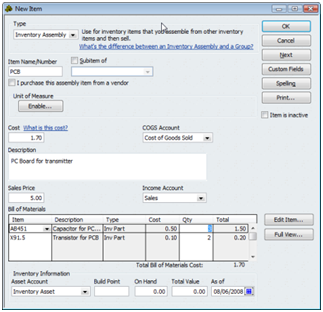
How do we deal with the process? If I issue a build for the PCB assembly, my inventory of components is reduced and the inventory of PCB’s is increased. This doesn’t tell me how many component parts I’ve given to the vendor, and it doesn’t give me an accurate count of PCB’s available to be sold or used in other assemblies.
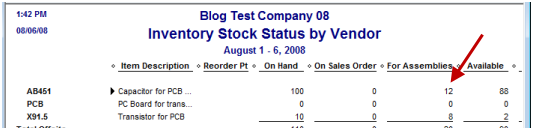
One approach is to issue a build for the assembly, then use the Edit menu to change the build to Pending. In my sample I created a pending build for 4 PCB’s, and if you look at an inventory report you see that we have 12 AB451 capacitors set aside (the “For Assemblies” column).
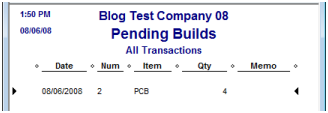
We can go to the Pending Builds report to see that we have 4 PCB’s outstanding:
When you receive the PCB’s back from the vendor you remove the pending status on the builds, and the components are consumed while the assemblies are added to inventory.
This is a fairly simple approach that doesn’t take much work. You can look at the stock status report and see that some items are reserved for the pending build, you can see how many processed items you are due by looking at the pending builds report.
I have two concerns over this approach. If you sell the component items (such as for replacement or repair parts) – these components are still considered to be on hand, but not available. So you have to be careful to not sell more than the available balance. In addition, if you go to issue another build for the assembly, since those parts are still on hand, it will let you issue that build. You aren’t stopped from using the parts that are allocated to a pending build.
An Alternate BOM Approach
Another approach can be used to resolve those two issues, which involves a bit more work and hides some of the information that I would like to see. What we are going to do is to create an intermediate assembly that represents the outsourced item. Take the item “PCB” and rename it to be “PCB-Outsourced”. It still has the same BOM. Now create another inventory assembly item called “PCB”, and give it one component, the “PCB-Outsourced”.
Issue a build for “PCB-Outsourced”, do not make it pending. The build removes your components from inventory and adds the intermediate outsourced item. The components are no longer available to invoices or other builds. You can tell how many of the outsourced assemblies you have by looking at the stock report for the assembly (I recommend that you have the phrase “DO NOT SELL” in the item description, so people know not to sell this item).
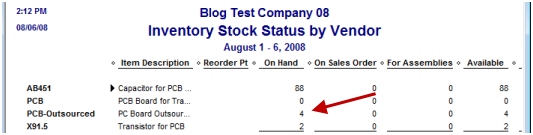
You do not see a listing of how many components you have at the vendor – if there is a problem you would have to go back and delete builds to reconstruct the values, and that could be a bit complicated.
When you receive the assemblies back from the vendor you would issue a build for the “PCB” assembly. This would consume the intermediate assembly and replenish the final assembly.
Another benefit of this approach comes into play if the vendor returns a variable number of finished products to you each delivery. Let’s say that you ask them for 10 assemblies and give them the parts. They return 4 one day and 6 the next. In the first approach it is difficult to handle – you can’t partially change the status of the pending build. In the alternate approach you just issue a build for the number you received each time.
Neither of these approaches fit the bill perfectly, but in QuickBooks we are often looking for workarounds in the inventory system. Both approaches mange the total valuation of our inventory correctly – the cost of the items remains in your inventory asset account.
In an upcoming posting I’ll an approach to this problem that uses a different kind of transaction – a sales order.
Does anyone know if QB Pro 2006 has a user log which tracks logins by date & time?
Mike, you are better off asking “off topic” questions like this in the QuickBooks user forums (www.quickbooksgroup.com). The short answer is “not really”, but if you look at the audit trail report it shows you the activity of each user, so you can infer the logins
Charles,
I have to pat myself on the back with this one because I was totally confused on how to handle this situation in QB.
You see I purchase a blank item and then send it out to get printed which comes back in for the build.
I was doing a diagram on how I would do this. I read the first part of your article and then I thought to myself, why dont I just sell it to the vendor at no cost and then issue a PO and then receive it back into inventory. Sounds good and then I kept reading your article and saw the last sentence.
Now that I am done clapping for myself can you tell me the other half of it so I can complete the process? :):)
What am I missing?
Marty
PS Thank you for the bog it really helps with QB, even though the boundaries are clearly being extended.
Thank you, Marty. The PO approach takes the item out of your inventory valuation, which is why I don’t like it. It may work for some people, it all depends on what you want to accomplish. It does make it simpler to determine what you have available in stock, and you can use the “on PO” column to see what the vendor has.
I’m not sure what you mean by “the other half”?
Well if I do a Sales Order it just sits there. Then I turn it into an invoice as if I am invoicing the vendor for the blank item. This would reduce my inventory and the cost. Then when I receive the product printed from the vendor I increase the price to include the price of the blank item and my inventory valuation is back.
The problem is how do I credit the vendor for the price of the blank items?
See what I mean? But I think once I credit the vendor for the initial blank item it puts a negative in inventory. Maybe I am missing something on that one.
Any help would be fantastic, since I am working on inventory today this week.
What is “on PO”.
I have to tell you your approach to getting clients is very good. Help them grow till THEY understand that QB is to weak and then you have already sold them on support and Customer Service so even if there are other products which may or may not (I dont know) have the better fit they already know about you and your top 3 in the choices. 🙂
Thank you.
Marty
By “On PO” I’m referring to a column in the Inventory Stock Status by Item report which would show you the quantity of an item you have on open purchase orders.
I referred to working with sales orders in my article – that is a different approach to the problem that I’ve not written about yet. It doesn’t involve turning them into invoices – that is another issue entirely. I’m not sure how I would work what you are trying to do into working with invoices – you are going off on a tangent from my recommendation in the article.
You may find that using the Intuit QuickBooks user forums at http://community.intuit.com/quickbooks/answers/tasks would be a better place to discuss what you are trying to do – the comment area of this blog isn’t suited for discussing something that varies so much from the original article here.
Hi Charlie,
The assembly option will definitely get the inventory quantities right but what would be the best way to get the value add charge from the vendor recorded?
In you example the inventory is sent to the vendor and then when the inventory is received I run the build. But the vendor has also charged me a fee for the service which I would also like to include in the cost as well as pay the vendor.
I did not see where the BOM option handled that piece.
Thanks,
Dan
Dan, you can set up a service item (for example – you may want to play with this) for the costs. Add it to the BOM, so it pulls cost from an account and puts it into the item that you assemble. You will be posting to that account when you pay the bill to the company doing the outsourcing.
Hi Charlie,
We have several SKU’s that we purchased as a finished item. We’d set those items up as Inventory Parts. We now buy a number of the raw material components and have them converted to the finished good by a contractor. We wanted to change those SKU’s from Inventory Parts to Assembly Items, create the BOM’s for each item, and be able to track the raw material component inventories and use Builds to track usage of the raw materials.
However, when we changed one of the SKU’s from an Inventory Part to an Assembly, Quickbooks went back and changed historical financial data (cost of goods and inventory values) for closed accounting periods. It did not warn us that prior closed periods would be changed.
Any suggestions on how to avoid this unintended change to prior periods?
Tom, did you change the “accounts” for the item at the same time? Usually that is what triggers the kind of changes you talk about. Or, changing a “non-inventory” part to an inventory part or assembly.
Hopefully you had a backup before you made the change?
In any case, if you are seeing this and you didn’t do any of the things I mentioned, then what you need to do is to make the original item “inactive” and create a new inventory assembly item. You can rename the “inactive” item and give the new assembly item the old name. Then you aren’t affecting any transactions. However, make sure that you transfer the value/quantity of the parts, if they have an on hand balance, into the new assembly part.
this is complex and interesting problem and suggestion,
all are great.
may i know is it work with my idea:
do the subcontract with two bill entries:
1. one for Subcontractor and it’s charges only
2. another one for Combine Finished Good
in 1:
create a Bill as simple,
enter Expense tab, enter the Sub-contract charges over there.
E.g:
Vendor = SubContract-vendor
AP Total = 50
Expense Tab:
Account = SubContract Fee
Amount = 50
for 2:
Vendor = BOM
AP Total = 0
Expense Tab:
Account = SubContract Fee
Amount = -50
Item Tab:
Item Qty Cost Total
Mat1 -1 1 -1
Mat2 -1 1 -1
Mat3 -1 1 -1
FG1 1 53 53
is this ok?
Hi Charlie,
First thanks for all of your efforts—your articles are extremely helpful!
I am an experienced QB Manufacturing & Wholesale user helping a start-up client set up their QB accurately. In my past experience, I’ve never had to use the assembly function in QB so this is a new space for me. After reading your article comparing Groups vs. Assemblies, I’m confident we need to go with an assembly build as the foundation for our inventory management process as ultimately we sell a finished good and we need the ability to reliably track the qty and transactions of that finished good.
Our situation is this: we are not a manufacturer per se because we outsource the entire manufacturing process. For our core product, we direct the work of 3 suppliers that each perform different steps in production process to complete our finished good. We own some of the raw materials (or components) used in their manufacturing process and they own some of the others while charging us service fees for their work
This is a summary of the approach I think would be best suited for this company:
1. Track inventory levels of all of the components that we own that are being stored at our suppliers’ warehouses by setting up the component items as inventory parts and the finished goods as assembly items. Will need to use one of the two approaches you outlined above to facilitate this tracking.
2. Track inventory levels of all of our finished goods being held at our facility by completing “Builds” for these assembly items once we receive the finished goods.
3. When setting up our finished goods as Assembly items, we will create BOM that includes all material costs (which we are responsible for) and manufacturing charges we will pay to our suppliers for their services
4. Reconcile payments made to our suppliers with PO’s issued to them (not sure how to do this).
I’m not sure if I’ve given you enough info to assess this or not, but I have several questions:
1. Does this approach sound like the best route to you?
2. Which of the two approaches you outlined in this article would your recommend for us?
3. Could you explain how the process should work to reconcile POs and payments to our vendors with the assembly builds?
4. Any other suggestions?
Thanks so much.
-Nick
Nick, individual consulting on specific issues is a bit beyond the scope of this blog – particularly when we are talking via “comments” and I don’t have access to your company file.
In a very general sense, I’d say you are heading the right direction. Based on the minimal info that you have provided.
The choice of approach depends on what kind of information you want to get out of the system AND how much manpower you have to run it. I can’t really say which applies to your situation the best, at this point.
Reconciling PO’s with assemblies built this way is tough – it generally is a manual process as QB doesn’t really give you the detailed info. You can see amounts on pending builds vs amounts on open PO, but they aren’t tied directly.
Thanks Charlie. Do you consult on a more formal basis?
Also–as for the reconciliation of payments to vendors related to builds–How would you suggest structuring the manual process for matching payments to vendors who perform specific steps/work with respect to the assembly build process? Does using a the assembly build essentially replace the method of receiving items with a bill against a PO and creating a payable for hte vendor?
Thanks again.
Nick, you can contact me at the email address in the profile page. I do charge an hourly rate for direct support.
The approaches outlined above are based on the assumption that you own the lowest level parts and are just sending them to the vendor for processing. So you aren’t buying the parts from the vendor, you are just paying them for the assembly service. There isn’t a tie between the parts and a PO at all. The bill you pay is for the service of doing the assembly – you can work that in to the BOM costs, but they aren’t a part.
If you are not buying the parts and giving them to the vendor, if they are building the parts, then you don’t own them ahead of time, and we are talking about an entirely different scenario
[…] If you have some work done on an assembly by an outside processor, such as deburring or coating, add this cost to the assembly item using one of these items. When you pay the vendor for the outside processing the cost goes to your expense account. When you build the item, the cost is “capitalized”, removed from the expense account and added to the inventory asset for the assembly. This can be handled in several ways, as I discuss in my article on Outsourced or Sub-Contract Work in QuickBooks. […]