In my prior article on sales tax in QuickBooks I showed you how to set up QuickBooks to properly manage sales tax. Now lets see how QuickBooks displays the sales tax in an invoice. When you add sales tax to an invoice we need it to show somewhere on the printed form so that the customer can see all charges that go into the total.
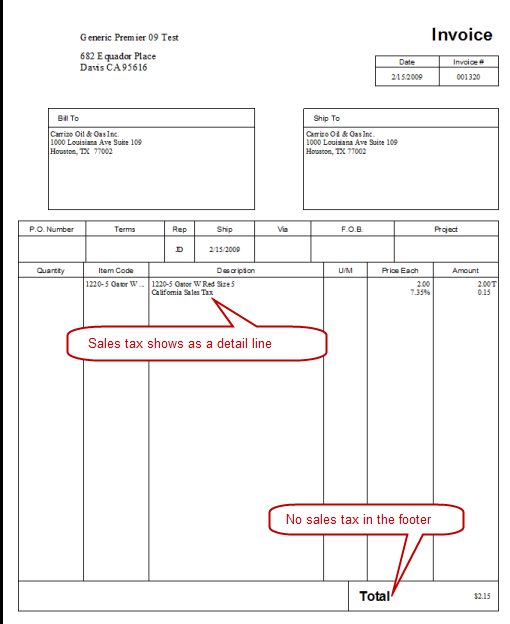
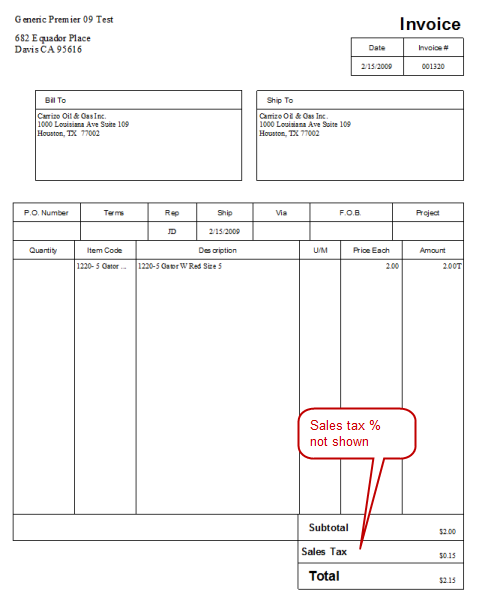
Here is the standard Intuit Product Invoice. It does not include the sales tax in the footer of the order. If you have a form like this, QuickBooks knows that it must add the charge somewhere, so it adds the sales tax as a detail line.
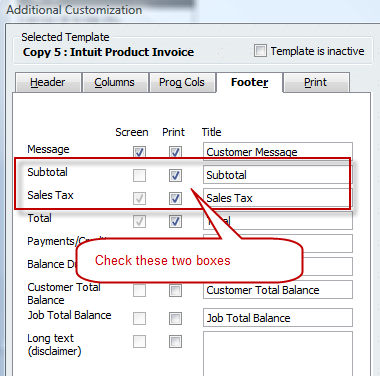
We can use the Additional Customization feature to add sales tax in the footer of the form – I recommend also adding a subtotal.
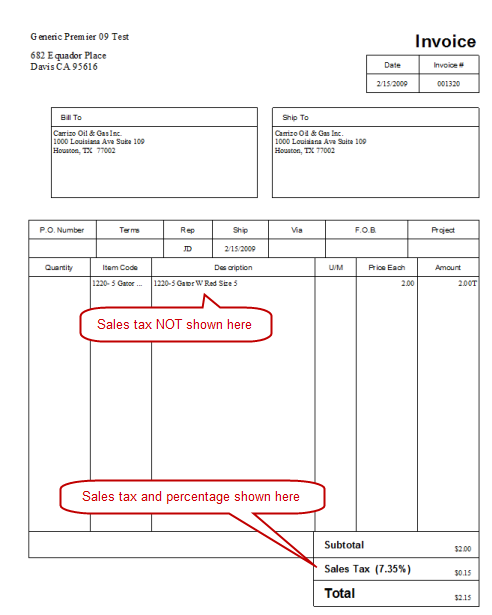
If you make this change, the sales tax now shows in the footer, not as a detail line.
Not Showing Sales Tax Percentage
Several people have asked about not showing the sales tax percentage in the form. If you look at both of the samples above, the percentage always shows. Here is how to handle this in QuickBooks.
Set up a form that includes the sales tax in the footer, as shown above.
Select the Layout Designer and click on the label for the sales tax (not the sales tax field itself).
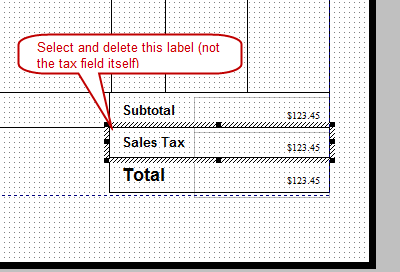
Delete this label by pressing the delete key.
At the top, click the add button and add a text box.
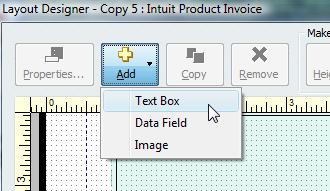
Right click on the text box and select properties and set the font type and font size (usually Arial and 12 pt) and enter the text “Sales Tax”. Drag the label to the footer.
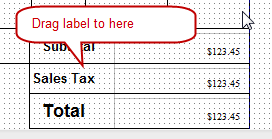
If you add the label this way the sales tax percentage will not show.
I hope that this is clear – if you have any more questions please ask!
i added in the sales tax as you recommended however it did NOT remove the line from the body of the invoice (a detail line)…any suggestions?
Kate: Are you seeing the sales tax in the footer of the invoice? If you don’t see it in the footer, then you haven’t set up the template correctly. If it doesn’t show in the footer, it will show as a line in the detail section.
Also – Kate – is this a situation where you have a zero-rate sales tax item, so there is a $0 sales tax? If so, on screen look for the “Customer Tax Code” box near the bottom and set it to “non”…
yes there is sales tax in the footer, adn no it is not a zero-rated sales tax item. any other ideas?
Kate, sorry, I’d have to see the document (can you email me a PDF) possibly, or maybe even look at your company file. It isn’t something that I can figure out remotely like this. I’m sure it is something simple.
Have you tried using one of the standard invoice templates to see if that works differently?
if you email me you address, i will forward you a pdf of my invoice.
Kate, my contact information is available in the “About” page, link at the top of this page. Note that I might not be able to resolve this just from the PDF…
Charlie,
Is there a way to set up the shipping and handling charge so that the charge can be placed in the footer instead of a detail line and the subtotal excludes the shipping and handling charge? Thank you.
Kathleen, QuickBooks doesn’t have the ability to do that.
My company produces an add-on product, CCRQInvoice, that has the ability to do that under certain circumstances. You would have to contact me directly to get a copy of the program that would allow you to do this, as this feature is in a beta-test release (not the release that you would download from our web site). As it stands now, you would identify a particular item as your “shipping charge” item. Add it to the invoice as a normal line. Then print with our program and we would take that particular item and print it in the footer instead of the detail (and handle the subtotals, etc., properly).
Charlie,
The sales tax amount is being included in the Total Amount on my sales orders. When I run the “Open Sales Orders by Customer”, the sales tax amounts are included in these totals. The only way I can determine my actual sales bookings is to run the “Open Sales Orders by Item” report, not a very elegant solution. The sales tax information also shows up on a Sales Order Acknowledgement form I created and the tax amount is included in the Totals. Is this the way QB 2010 Premier Warehouse & Distribution is supposed to operate? I have posted this on the Community forum but have not gotten a satisfactory answer. Would appreciate your thoughts.
Charlie,
I got my answer from the Intuit Community forum – modify the “Open Sales Orders by Customer” report. I added an item filter that includes only inventory items thereby excluding sales tax amounts from my open sales order totals. Also changed from summary to detail, added and removed columns and got just the report that I want. I am now trying to figure out how to add subtotals to the report.
I hope you have written an article on creating and modifying custom detail and summary transaction reports. The Help information in QuickBooks on this subject is very strung out. Your writing is very clear and easy to understand.
Many thanks.
Kathleen, I’m glad you got your answer from the Intuit Community forum – a wonderful resource.
Charlie;
I have the same problem that Kate explained at the top of this post. I added in the sales tax as you recommended however it did NOT remove the line from the body of the invoice. I’m wondering if you were able to resolve this for Kate and if so, could you describe how to overcome this problem please?
many thanks!
Arie, with Kate, my recollection was that she actually altered the sales tax box in the Layout Designer, so it wasn’t the right box.
If you print an invoice with one of the standard Intuit invoices, such as “Product Invoice Modern” which includes the sales tax in the footer, does that work correctly?
to get rid of the sales tax inside description you have to add “sales tax summery” box to footer.
I ended up having a tiny sts field in a random corner with white text to get rid of it.
Charlie, I have rather unique situation. I have a sales tax item group that I use to assess certain taxes, however I want QB to print the detail of the actual items on the invoice rather than the “description” and total rate reflected on the Sales Tax Group. Is there a way to do this?
You can add each of the individual sales tax items as line items in the invoice, possibly.
Please note that I don’t normally recommend that – and I haven’t tested things enough to know if they flow through the sales tax reports properly if you use them this way. You should set up a test company to play with this before trying it in “production”.
Thanks for that. I actually tried that and it works well if you don’t use the subtotal line item to add together multiple items, but as soon as you add the subtotal line item on the top line of tax rates gets calculated the rest drop to $0.
Yes, good point. My concern is if the values show properly in the sales tax reports. They should, but I haven’t tested that.
how do you invoice an invoice in quickbooks if you have one item at one rate and another item at another rate
Iris, that is an odd situation, because TYPICALLY sales tax is based on the location involved, so you would have one address on an invoice.
The simplest approach is to have two invoices, one at each rate.
You CAN play with putting sales tax items in the invoice as a line item. Add the sale item, put a sales tax item or group under it to apply the tax to that item. Add another sale item, then add the other sales tax item under that. You have to play with this, as there are drawbacks depending on how you set things up. You need a non-taxable rate to add at the sales tax field in the bottom. And you might see things show up oddly in your sales tax liability report (it can be addressed). I haven’t worked out all of the details on this – make a test company and play with it.
awesome! worked for me!
Hi there,
Is there a way to make the line product subtotal (amount in the above template) display the tax total of that particular item?
eg.
item 1 – cost before tax : 23 – cost after tax: 24
as opposed to
item 1 – cost before tax : 23 – amount: 23
Mark: Not all in one line. Each line represents a posting to an account, and sales tax is a separate account from the sale of the item. So QB doesn’t put it on one line.
You could use a third party product (such as CCRQInvoice, which my company produces: http://www.ccrsoftware.com/CCRQInvoice/InvoiceQ.htm ) to give an approximation of that, but you might run into some issues with rounding errors because of the way that QB handles sales tax.
Hi
Were you able to help Kate resolve the issue of tax appearing both in the body of the invoice and the footer? I have tried everything you suggested above and can’t seem to remove it from the body and only show in the footer.
Thanks
Yes, she had made some alterations to the form so it wasn’t set up correctly.
If you use one of the standard forms, unchanged, does it appear correctly?
Hello Charlie. I am having the same issue with sales tax appearing both in the body of the invoice and the footer and have done as you suggested with no luck. I started out using a standard template and copying it. Do you know what I might be doing wrong? Thanks.
Tanya, I don’t have a recommendation. I can’t get that to happen. If you can send me a PDF copy of an invoice that shows this, and export your template as a DES file (from the Templates menu) and send that to me, and tell me what edition of QB you are using, I can look at it and see if there is something obvious. My email is in the “about” page of this blog.
Hi Charlie, I am using a standard service invoice, I have no problem to show the vat column on the body and footer, but when I try to issue an invoice, I only can see the amount column, so i entered the net price, I hoped the vat will show automatically on the invoice, unfortunately it did not. can you help me to have my vat amount to show on the invoice, please!
Shu, what national version of QuickBooks are you using? I primarily work with the US version, which doesn’t support VAT. I sometimes work with the Canadian version, but rarely with the UK and Australian versions. What do you have?
I need help with an invoice a sent to a customer, I did add the tax and made the pdf file. As I was going to send the e-mail I realize that they did not pay tax for machines. So I took the tax off and e-mailed the invoice. The next day the customer answered back to please add the sales tax and send a new invoice. I have tried everything that I know and I can not add the tax. Can anybody help me?
Thank you.
AL
Are the items marked as taxable, is the customer marked as taxable (in the invoice), and have you selected a tax item?
I forgot to add the version. QuickBooks is 2009
AL
thanks
How to avoid adding taxes in an invoice? Subtotal and Total should be the same without taxes.
Tamara: Not sure what you are asking. If there should be tax on the invoice, it has to show in the total. If you are getting sales tax when you don’t want it, then you have to select a sales tax rate that is zero – or turn each detail line to “non” taxable.
Take a look at my basic sales tax tutorial article at http://www.sleeter.com/blog/2011/02/setting-up-sales-tax-in-quickbooks/
How to remove “T” in Amount
Nuwan- I’m not sure which “T” you are referring to. There is a column by the amount in the detail section to note “taxable” or “non taxable”. If you mean the amount at the bottom, that may be a currency symbol. Currency symbols are set by your Windows setting. The taxable status “T” is set in preferences – “Edit” then “Preferences” then “Sales Tax” preference, and on the “company preferences” tab un check the box that says “Identify taxable amounts as ‘T’ for ‘Taxable’ when printing.
Re: Sales Tax in footer
Is there a way to identify the Sales Tax by name
We deal with NJ PA NY
Can the footer be labeled NJ Sales Tax or NY Sales Tax, etc. as appropriate for that customer.
We also deal with Phila and Pa sales tax. We have been combining the percentage of each and charging the total Is there a way to charge and show each sales tax on the invoice?
Thanks
Edward, that kind of notation can’t be done automatically in QB by itself.
For charging sales tax to two different taxes and listing them separately, you can enter the sales tax item as a detail line in the invoice, and enter the sales tax amount directly (rather than use the percentage), but that might not be a useful approach. You can play with that.
I had the same problem as Kate. I fixed it by adding the “Condensed Sales Tax Summary” to the footer. Then I dragged it down to the bottom just above total. I don’t think you can rename the label so in my case it shows as GST/HST but that works for me. Adding the “Condensed Sales Tax Summary” automatically removed the line item showing the tax amount.
Cheers
Thank you, Charlie & Eli – this worked for me, a very workable solution 🙂
Our template recently changed and now the screen shows the sales tax calculating and totaling, but the print and print preview only show it calculating but not totaling.
Mark, what kinds of changes did you make? That isn’t clear…
Sometimes a template can be corrupted and you have to start over (which is why I tell people to make backups of their templates).
I need to set up VAT tax.It’s different rates per item as well as country. How do I show the VAT tax by line item? Can I have it calculate 2 different sales tax items at the bottom?
Thanks
Beth, what national version of QuickBooks are you using, and where are you located? Some non-US versions of QB support VAT tax natively.
If you want to have a tax show on a line by line basis, you can add your sales tax item as a detail line, right after the item it applies to. You have to set the overal tax rate for the invoice to be a zero rated tax. But, note that you won’t get a total of the taxes at the bottom of the invoice.
Hi Beth,
Ive had the same issue. I use qb premier 2012 US Version and I’ve found a way around it. Ill explain it step by step:
1.)Add a sales tax and set it to the VAT Rate (in my country, this is 12%).
2.) In addition to this, also add a discount item (I named this VATdisc), this time set the rate of this item to the percentage being deducted. (I computed it using this formula (VAT/Total Sales) from previous invoices, the percentage i got was 10.7143%). Also add a “Subtotal” item.
3.) When entering an invoice, Enter all the line items. After which, enter the Subtotal Item, then enter the VATdisc right after.
This should basically give you the breakdown of VAT and makes the tax “inclusive”. Still trying to figure out how to hide the VATdisc as a line item in the invoice but so far this has helped a bit. Let me know if it helps you as well.
I’m in the US and using QB Pro 2011. Our business is export so I invoice internationally. It sounds like line by line might be the best for us but I was hoping to also be able to sum it at the bottom by tax type. Is it possible when there is more than one tax rate? Is there a plug in that might help with this?
Beth, I’m not aware of a compatible add-on product that would give you that kind of subtotalling at the bottom of the order.
Charlie,
Thank you for continuing to offer support on this topic. I’m running QB 2011 Contractor Edition but I think this has been the same issue for years. If you look at the photo of step you describe as…
“We can use the Additional Customization feature to add sales tax in the footer of the form – I recommend also adding a subtotal.”
The ability to display “Subtotal” on the screen in the footer section is grayed out, you can’t select it. Do you know how to fix this or make the subtotal appear on the screen? Our new credit card processing machine wants to enter the subtotal and then the sales tax but it’s awkward when you can’t see the subtotal on the screen. Printing it is kind of uncool because I have to print it, then run the card, the mark as paid, then reprint it for the client.
Thanks!
Jeff
Jeff, you can either do a “print preview”, rather than actually printing it to paper. Or, you can insert a “subtotal” item as the last line in the order to get the subtotal before tax – and either remove it before printing or use that to show the subtotal on the printed form rather than in the footer.
It is odd that they don’t show a pre tax subtotal on screen – but that is the way it is. Use the “feedback” option in the Help menu to suggest a change, if enough people ask for it they may consider it.
What happens for tax reasons you want to display foreign invoice and include home currency for tax purposes? how do you go arround this?
On the invoice? Show both? QB doesn’t accommodate that. I’ve not run into a situation where you need to show both on the actual invoice…
I am wanting to import an invoice from another program into Quickbooks. Our invoices do not usually have sales tax at all so there is no problem inputting them from this other program. This particular invoice has sales tax . When I try to input it into Quickbooks it says : “You cannot associate an item with sales tax payable, Undeposited Funds, accounts receivable, accounts payable, or non-posting accounts. Usually, if you sell the item, use an income account; if you buy it, use a expense account.” I have no idea what to do or to change to make it so I will be able to import this invoice. Any guidance or assistance would be greatly appreciated.
Laura, are you “importing” this, or entering it directly from the user interface? If you are importing, HOW are you importing (IIF, or a tool)? When you add sales tax, are you trying to create an item to handle the sales tax?
I’m guessing that you are creating an item in the item list, like a service charge or something, and trying to associate the “account” with sales tax payable? You wouldn’t do that, you would want to create a “sales tax item” specifically.
I am importing using IIF. I just want to be able to import it into quickbooks, but our normal invoices that I import do not have taxes on them. On this particular invoice there has to be sales tax added. From the original source the tax has been added so is there a way that I can bypass this one invoice to import it into Quickbooks.
Laura, I don’t work with IIF, so I can’t give you much help there. I avoid IIF as much as possible, as it is not a great way to import things. I prefer to use the Transaction Pro Importer (www.baystateconsulting.com). I don’t know what method you are using to add sales tax, but it sounds like you are trying to add it using an item, and that item isn’t set up properly.
I almost have the invoice like I want it. Because our services are non taxable I want to use the sales tax box for an Insurance Surcharge we charge customers. How can I get my insurance surcharge to print in the re labeled sales tax box. PLEASE HELP. I need a subtotal then ins surcharge then total invoice is this possible.
I know it has to be. If it is when I bill the insurance surcharge when creating the invoice how do I tie it to the insurance surcharge box so it prints there. I am at my wits end!!!!
R Cates, the sales tax box is only going to print something that has to do with a sales tax. If you don’t EVER have anything that you have to charge sales tax for, you can just use the sales tax feature for your charges perhaps. But to give you specific information I’d have to know a lot more about how you are using QuickBooks.
None of our items will ever be taxable, but we are still required to report sales income as exempt to various agencies. If I over ride sales tax box will it mess up the Ava tax report? I need to have insurance surcharge to print after a subtotal in a box and then invoice total. Our clients will not pay an ins surcharge mixed in the body of the invoice. Insurance surcharge is setup as addl income item. I can put subtotal as a line item, then I would select subtotal on invoice after billing professional surcharges then select the insurance surcharge and bill that amount. To have it print correctly I could go to footer select subtotal but how do I select ins to print after subtotal in footer. I think I am close to getting it. But I don’t know what the accounting implications of just changing the name sales tax to ins surcharge I don’t know how it would know to pull the ins surcharge amount in that field. HELP
R Cates – as far as Avatax, you would need to talk to them (why are you using Avatax if you don’t have tax to report???).
As far as getting a charge to show in the bottom of the invoice, not in the detail portion, you really can’t do that with QuickBooks. It isn’t set up to do that.
However, if you contact the sales department of my company (CCRSoftware) at sales@ccrsoftware.com, we might have a solution that would help you with printed forms, as we have a way to do this with our add-on program CCRQInvoice.
My sales tax shows up as a line item I did everything you said and when I print sales tax in the footer shows $0.00 and still shows as a line item. Please advise.
Michelle, if the sales tax is showing as a line, then QuickBooks doesn’t think that you have the proper sales tax field printing in the footer. Have you tried one of the standard templates from QuickBooks?
Good afternoon,
I am trying to get our invoice to print without it saying out of state sale, exempt from sales tax.
We do not charge sales tax and do not want it to appear on our invoice.
I went to Customize Layout….then Footer….and tried to uncheck the Sales Tax box but it won’t let me.
Could you please help me out on this.
Thanks a bunch!
Laura, if you don’t use sales tax AT ALL, then why not just turn the feature off in preferences?
If you have sales tax enabled, QB is going to print it somewhere. If you remove it from the footer, then it will print in the “body” of the order as another line.
If you want to hide this entirely from the form but want to leave it enabled (risky), you can leave it in the footer and change the field foreground and background colors to “white” so they don’t appear on a white page.
We sent an invoice to a client on completion of contract.
While the progress invoice shows a total of 100% billed on all line items, the total HST charged % shows as 63.64%.
We have checked all the invoices and HST has been charged correctly on each one.
We are puzzled, worse, concerned that we’re not receiving all the HST we’ve charged for and thereby are out of balance with Canada Revenue Agency.
Can you help? With many thanks.
Rose-Marie, I only have a few versions of the Canadian product, and I don’t know if any of them are current enough to support HST. Unfortunately, I can’t help on this one. I would recommend working with a Canadian ProAdvisor (if you contact me I can give you some referrals to some very good people up north…)
I am using QB2013 in Canada. I have invoices that have 3 different taxes on them. HST in BC (12%), HST in ON (13%) and GST (5%). I have set up the tax codes for all three. QB is not allowing me to adjust the amount for each tax. In the past it would give me a box where I can “edit taxes”. Help?
Tax issues are handled differently in the Canadian version, and unfortunately I don’t have my hands on one, so I can’t help in this case, Donna.
I’m using Quickbooks for Mac. Do you know how to do this (have tax labeled in footer) in that version? It lists it in the detail line like you’ve shown, but doesn’t even label it, so people get really confused. I’d prefer it in the footer (subtotal, tax, total) but would also settle for being able to label it as a tax charge in the detail line. There is no “additional customization” option in this version.
Sorry, I don’t work with QB for Mac
Heather – Did you ever find a solution of this. I am having the same issue.
Eric or Heather – same issue – either of you find a solution?
For those with Quickbooks for Mac, I just heard this is now possible in the 2015 version. More info here: https://community.intuit.com/questions/875615-how-do-i-add-sales-tax-to-footer-of-invoice-in-quickbooks-for-mac?jump_to=comment_2215687
I don’t want the sales tax to show in either spot. How do I shut it off completely? I manually put the sales tax in as we have too many factors for figuring tax that we do it through Excel and manually put the estimates in once we are awarded the project.
Donna, if you have sales tax enabled in QuickBooks as a preference, QB is going to have to show the tax in one place or another. You can manually enter your tax with a sales tax item in the detail section of the invoice.
If you don’t want to do that, you can turn sales tax off as a preference, but then you lose all of the sales tax management and reporting
how display sales a/c with invoice total only e.g
sales type date number name debit credit balace
invoice xx/xx/xx 1001 xxx 500.00 500.00
invoice xx/xx/xx 1002 xxx 400.00 400.00
credit note xx/xx/xx 1003 xxx 25.00 25.00
Pradip, I’m not sure that I follow what you are asking, but it sounds like you are describing a statement, not an invoice?
i have quick book pro 2013
I have quick books 2014 for MAC – I not sure if this question was answered for my version. I also need assistance adding the subtotal, applicable discounts, shipping and handling, and invoice total on the footer of the invoice. Any ideas?
Jose, I’m sorry, but I don’t work with the MAC and I don’t know exactly what the differences are.
HI im still working with quickbooks pro 8.0 everything works fine except the estimates wont include or add VAT on the total. how can i fix this ?
thanks
Sorry, Julian, I can’t help you with that old of a version (and non-US also).
Is there a way to add the Sales Tax Group to your invoices? Perhaps in the footer section next to the sales tax?
You can only use a sales tax group as the designated sales tax item in the footer
Hi Charlie
I need to create a template that does not calculate the taxes, sometimes we pay the taxes, but I still need Quickbooks to keep track of the taxes we need to pay on the labor portion of the invoice. So would creating a new template be the best route on this. I hope that makes sense.
If you want it to calculate taxes, it is going to add that to the total and post that to an account. Are you saying there are charges you are accruing that you don’t charge the customer? That can’t be done in QuickBooks invoices.
I guess that’s what I am saying. I want to keep track of the taxes we need to pay to the state, county and city, but that’s paid out of what the customer pay. So say we charge $500, the customer pays $500 and we pay the $50 for taxes. Well not sure that will work, just because the total amount owed would be $550 now. So this Quickbooks cannot do right?
You might be able to use the sales tax adjustment screen and make an entry there for the $50. I haven’t played with that but it might work.
You could create a “Group” item, set it to not show the detail. Charge the customer $450 and add a sales tax item for $50. The customer only sees $500 for the total for that item. Depends on what you want to show in your income, though, as you only book $450 to sales.
What kind of business?
In the very first question of this article, you told us how to take the sales tax percentage off of the sales tax line. I guess there was an update, and now it is no longer showing the percentage. I would like to put it back on. How can I do this? We just bought 2015.
I’m not exactly clear what you are asking, Michelle. In my copy of the 2015 product, updated to the most current level (R5), it works just as before as far as I can see. If I have the tax element in the footer, it shows in the footer. If I don’t have the tax element in the footer, it shows as an additional line in the body of the invoice.
Good Day,
I wonder if there is a way to get the Sales Tax item to print on Invoices. I am trying to get someone to use the correct sales tax item for Wholesale in state and out of state and if I can get the “Wholesale WA” or “Wholesale Out of State” to actually print on the invoice vs. just “Sales Tax (0.0%) that would be great.
Please advise, thank you
Julie
The only way to get that is to add the sales tax item as a detail line in the invoice itself.
Hello Charlie;
I’ve set QB to allow for sales tax in the footer of my invoice. Interesting enough, QB is computing the tax correctly but NOT reflecting the amount of tax collected in the footer even though I’ve checked the boxes, ‘subtotal’ and ‘sales tax’ in the footer customization. I am NOT listing sales tax as a separate line item. Suggestions? Thank you!
How do you know that the sales tax is computing correctly?
Also, try one of the built-in templates that hasn’t been changed, make sure that shows the tax correctly. If so, work on modifying that template.
Hi, I need to display two Sales Tax Items in one invoice. Some of our customers are requiring to display both separately. I have created a Tax Group but it displays only the sum. Thank You
Have a 0% sales tax rate for the “Tax” field in the bottom of the invoice. Then add each of the two sales tax items as detail lines in the invoice, separately (not in a group).
Hello! I want to add VAT amount in price per unit. I don’t want put separate line in invoice.How can I do it? Now I am using Quickbook Version 2013. Thank You!!
I don’t work with VAT myself so I’m not sure of the regulations (and they vary from country to country anyways). If you want to have VAT recorded separately in your accounting system, it has to be entered as a separate item. But, you can play with “Group” items, where you could have the actual item and the VAT item included, but not have the details show on the printed invoice. I don’t know if that will work for you or not.
I want to include tax amount (VAT) in sell price per item not in separate line. My customers don’t want to show VAT in invoice but they want include it in sell price per unit.
Ex: Sell price per unit $10 + VAT $1 = $11
As I suggested, try a Group Item. You can have multiple items included, but have only the group item itself show on the printed form.
WHAT IF ITEM PRICE WAS ALREADY SET-UP THE VAT OR INCLUSIVE OF VAT. HOW WE CAN SEPARATE THE VAT?
I don’t work with the UK version so I’m not sure of the details on how VAT works in QuickBooks. I would guess that you have to have it set up separately, but I don’t know for sure.
or do I need to set-up again the item with no vat in price?
When on layout designer my invoice shows amounts on the Subtotal, Sales Tax and Total but when i print preview invoice or save PDF invoice no amounts are shown. What could be the issue.
Hard to say. Sounds like maybe you’ve changed the color of the text in the box, but that is just a guess. Do you see the values if you do a print preview with one of the standard templates?
Hi,
Is there a way to show on invoice total taxable & non-taxable amounts? example
Taxable Amount: $6.50
Non-Taxable Amount: $23.50
Subtotal: $ 30.00
Tax: $ 0.39
Total Invoice Amount: $ 30.39
Sorry, no, not within QuickBooks itself
Actually, one way to get that, but not in the footer. Separate your detail lines by taxable and non taxable. List all the taxable lines first, then have a subtotal item, and then a sales tax item. After that list all the non-taxable items, and then a subtotal item. That SHOULD work, although I would want to play with it to see how that works as far as the sales tax reports. And it is a lot of work to use QB that way.
Hi
how to set up the Display in print invoice for each items unit price inclusive vat in quickbooks pro 2013
Thanks
I don’t work with the versions that handle VAT, so I can’t give you a direct answer. I assume that VAT calculations are done in a similar fashion as sales tax in the USA. In this case, you can’t calculate the tax for an individual line. QuickBooks totals the value of all items that are taxable, and applies the tax rate to that total. This is a different calculation than applying the tax rate to each line, then totaling the calculated tax values. The two different methods could come up with a slightly different tax amount, depending on rounding of the values. So, in QB itself, there isn’t a way to calculate the correct tax per line item.