I discussed custom fields in QuickBooks in an article last year, and it is one of the most popular articles in my blog. Many users depend on custom fields to add features to invoices, sales orders and estimates (and more). The two most common complaints about custom fields have been there need to be more and I need to define the “type” of the field. If you are a user of QuickBooks Enterprise – good news! Intuit has listened.
The bad news is that these changes are only supported by Enterprise, not Pro or Premier, and that at least in the initial release there are some problems that may affect people who use third party addon programs.
More Custom Fields
Up until now you could have five custom fields in the item list, and seven custom fields in the customer, vendor or employee lists (with a maximum of 15 total for all three lists).
With the release of QuickBooks Enterprise V 10 we now have the ability to add up to 15 custom fields in the item list, and 12 custom fields in the customer, vendor or employee lists (with a maximum of 30 total for all three lists).
This is a significant and welcome increase!
Custom Field Attributes
In prior versions the custom fields were simply a 30 character text field. With this release we have a wonderful range of selections and features that are available. I’ll use the Item List as an example. Here is the Define Fields window (forgive me for the simplistic field names):
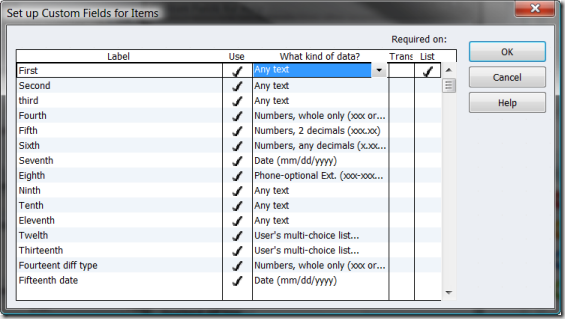 Required On
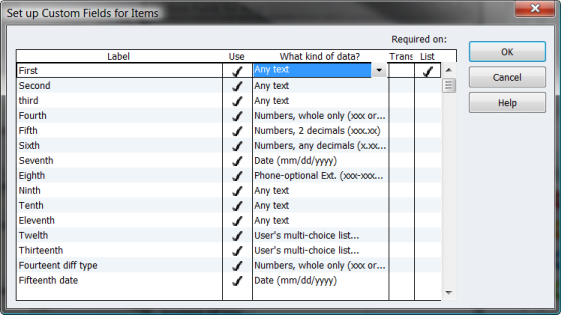
There are two columns that have been added under the heading of required on, Trans and List. if you check these boxes then you must enter a value in the field in the list or transaction, as you specify. If you check this in the item list you are asked what item type this will be applied to.
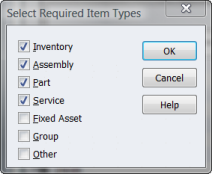 Note that Part in this list refers to a Non-Inventory Part, while Inventory refers to an Inventory Part, which I found a bit confusing at first.
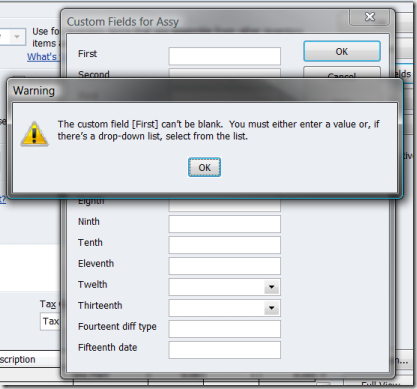
If I try to save the custom fields for an item and leave the required field empty. I get a warning.
 Kind of Data

This is great – you can specify the kind of data this field will accept, from a list of options.
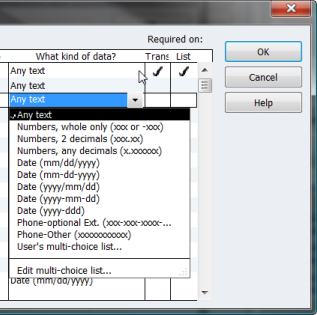 It would have been nice if they provided us with a way to enter our own “mask”, but that would have been complicated. You have options for numbers, dates, phone numbers and a multi-choice list, which I know will excite a number of users.
If you choose multi-choice list you can enter a list of choices that can be used for the field. You have the option of limiting the user to this list or letting them add their own values.
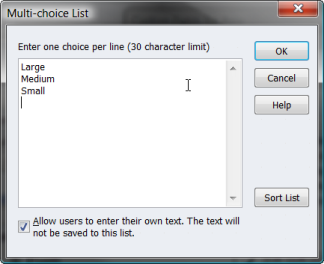 I don’t know at this time if there is any limit to the number of choices for a list.
Is This Valuable?
Yes, this is a valuable addition. It is unfortunate that it is limited to Enterprise, but that is consistent with the Intuit marketing approach for the product (and the more robust database manager in Enterprise may be needed to manage this added data).
I know a number of companies that will bite the bullet and move up to Enterprise just to get these features.
Let me know what you think!
Thanks for the update, Charlie
What’s the deal with the SDK freeze? I haven’t been following that. Are there major architectural changes on the way?
Greg, if you are an SDK developer, contact me directly and I’ll provide you with a LinkedIn group address where SDK developers are talking.
I will be writing an article on this (and related) issues in the future, probably next month.
The VERY brief summary: Since about 2002 the “preferred” method to integrate software with QuickBooks has been via the “SDK”, a programming interface provided by Intuit. Starting this year, Intuit has started pushing a different interface, the “IPP” interface, which is a cloud/Internet oriented method. Look at the new Document Management program as an example. Intuit wants developers to use this. They have frozen all development of the SDK as far as third party developers are concerned. There are some people who are not happy with this. Again, I’ll discuss it in more detail in a future article.
Folks, if there are a lot of you who want to hear my thoughts on this, let me know, and I’ll put that higher on the list of articles to write.
So the new fields are cool but I have a couple of questions. 1) Why not in Pro and Premier? 2) Okay, now we have actual number fields but can we do any reporting with them without exporting to Excel?
Terri, as to “why”, I can’t answer. Only Intuit knows. I can give you two guesses: (1) Because it is another reason to upgrade to the more expensive Enterprise version, and/or (2) Enterprise is a more robust version of the database, and the extra work this requires is better suited to that version.
But those are just my guesses.
As for exporting them to Excel – which kind of export are you talking about? If it is just the Item List export, then the added fields ARE included in the export as columns. If you are talking about ODBC – that is something that isn’t supported by the ODBC driver at this time.
Hello,
For the inventory custom fields, is it possible to add these to your on hand inventory reports? It is great that I can now add more custom fields to inventory, but in some cases I also want to know the quantity on hand of certain attributes. Is that possible?
Thanks,
Dan
Dan, which report specifically? For the most part, Intuit doesn’t let you add columns to inventory reports (at least the important ones in my mind). Since you can’t add ANY columns, you certainly can’t add the new columns.
Usually the workaround for this is to use the ODBC driver or another data extraction method to generate your own report that you can modify. Unfortunately, since the new custom fields aren’t available via the SDK, there is no way for us to get those new custom fields on a report. Very sad.
Can the custom fields be at the job level vs the customer level. Example: I have a customer with multiple jobs under that customer. And each job has specific inputs. ie each job has a different “Permit Number”.
If you add a custom field to a customer/job (specifically a date), will we be able to filter the profitability reports by that custom field?
Don: The custom fields in the customer list are saved for each entry in the customer list. So, a customer:job can have different values than a customer – that is, each job can have its own values.
Cheryl: I’m not sure, you would have to look at the specific report and see if the custom fields show up on the list when customizing the report.
What I was trying to get at is the complaint about the custom fields in the past was that they were only text based and were not able to be used for mathematical functions. The hope for a long time has been that QuickBooks would allow for number fields and then allow for formulas to be added to reports instead of taking the data out to another software.
Terri, the custom fields are still text based, all they have done is put a “mask” in front of the data entry screen. The information is still stored as text, and you will still see it as text in Excel or in third party programs that look at the fields. They aren’t providing any sort of calculation features.
Great article Charlie! FYI–you can add up to 100 for the multi-choice list. We tested it! 🙂
Hello,
Very good Article!
We are just in the process of migrating from DacEasy 16 to Enterprise 10, and are running into some of these shortcomings such as:
1. Lack of a free-form “Note” Field for each Inventory Item (Larger than 30 Charcters), where long specifications can be entered.
2. No ability to assign a link to local file (pdf) on disk. I know they want to sell there document management system, but being able to attach a local file should be rudimentary. (and not charged for over 100mb)
3. Lack of a “Visual” aids in Inventory such as assigning a Picture, etc.
4. Lack of an “Inventory Center”, we have Centers for Employee, Customer, Vendors, Reports, why not something as important as Inventory?
other than that so far, the migration is going very well, and I do believe overall Quickbooks to be the better product.
Rocc
Do these custom fields now show up in the standard report writer for selection/filter and display/printing?
Mike, what are you referring to as the standard report writer?
If you mean the ODBC driver, then “no”. The ODBC driver uses the programming SDK, and Intuit hasn’t made the new fields fully available there.
If you mean in reports like the sales detail report, where custom fields have already been available in the past, then “yes”. Any report in QuickBooks itself that showed custom fields before will show the new custom fields, as far as I’ve seen.
Hi Charlie,
I have qbook premier 2009 and I need help in uderstanding the invoicing system. I have product is bought by case and sold in both cases and units and priced by unit. I want a customized invoice format where, if input cases and it should in other column multiply the and show the number of units being sold and then the price per unit and in the final column the total sale for that item.
I was able to set all other things but the can’t get the number of units automatically and have to manualy input the total units for the price to show up.
thanks for help.
Farhat: You can’t do that in QuickBooks itself. The only formula it supports is quantity X rate = amount.
Depending on how you set things up you might be able to do what you want using an addon product that my company produces, CCRQInvoice. It helps you perform calculations in columns. See it at http://www.ccrsoftware.com/CCRQInvoice/InvoiceQ.htm
I found the unconvinience thing in the custom field. I have an adapter which help add sales order and invoice into most of provided fields and custom field. The issue here is custom field keeps the value from the last enter and will automaticall assign that value to the next document.That’s the one borther most of people. If i have 2 different invoices one has value in custom field and one doesn’t have. If i export the one without custom value first and then the other one, everything is fine. However, if I export the one having custom value first, the same value will be assign the custom field of the other invoice which should be empty.
Annie – that only happens on cutom fields from the customer list (in the header), not in the item list (detail section).
Also note that the program should pop up a window that asks you if you want to have the changed information saved for the next time, and you can say “no”
But I’ll agree that this feature should be more flexible than they have it now
Hi Charlie, thank you so much for the article. We are going crazy here trying to get info. to show on our reports. We just converted at the first of the year. We set up custom fields in the Customer profile that we thought would provide the data of Licensor and Dealer Number on our sales reports.
Evidently, this info is pulled from the Invoice info. as it didn’t show up for our first 500 invoices until I modified the actual invoice form and then we had to go in and put the info. on each invoice prior to that time individually.
Now I’ve got all these columns and headers on the screen.
Is this the only way I can get the custom field data to show on reports?
Thanks!
As you found, reports that are based on the invoice will pull info from the custom fields in the invoice itself, not the customer record. So you have to add the custom fields to the invoice template and use that template when you create the order.
You might want to consider using the ODBC driver to access the data. Then you can access the invoice table as well as the customer table, and the custom field information, to make a report the way you want. NOTE however that the ODBC driver cannot access the NEW custom fields in Enterprise 10, only the original ones. Intuit is ignoring our pleas to make the new fields available.
Or you can get a custom report created for you (it will have the same limitation on access to the new custom fields).
I would like to make the invoice data field larger to enter at least 20 charaqcters, how is this done?
Thx
FMT
FMT: You can’t. All you can do is to add a custom field to hold a reference number, but it won’t be the “true” invoice number…
FMT:…and even then from what I’m learning it’s limited to 30 characters (the “any text” field type on custom fields is limited to 30 characters). So you’d get a small boost in length but not a big one.
will quickbooks be adding more “bill to” fields into their database? when will they add a bill of lading template to quickbooks?
Intuit never announces features in advance, but I wouldn’t hold my breath on either of these…
Oh my god! Your QB shows the “Other” fields as custom fields? How do you get it to do that? We were strong-armed into buying the Enterprise 2010 edition today (we were no longer able to export or e-mail with our Enterprise 2007 as of yesterday), and while it was irritating and took up practically the entire workday, I thought it might be worth it when I saw that this version enables you to search custom fields.
Basically, we need 1 custom field for serial #s. Up until today, we actually repurposed one of the “Other” columns available in the layout customization screen, which we entitled “Serial Number.” This has been going on for years, but unfortunately, it’s never been searchable (the filter for “serial number” or “other” has never been available), so when we need to find an item with a particular serial number, we’d have to run a search for every instance of the item in question, and then manually check each instance to see if that was the one with the serial number we needed.
Obviously, this can take *HOURS*. So today, armed with the thrilling prospect of NOT having to slog through thousands of entries to find the one I want, I went into the advanced search… only to find out that it’s exactly the same!
I called QB, and after about 2 hours spent on the phone with them, the tech support rep I spoke with finally explained how to create a “custom” column, and informed me that there’s no way to search the “Other” columns at all.
I don’t understand why that would be – if they now let you add brand new filters from whole cloth, why isn’t a default setting that they’ve had forever (the “other” column) searchable? It’s mind-boggling – he basically told me that we’d have to either find a 3rd party program that can migrate column data (which of course doesn’t exist – what would be the wider application for something like that?), or manually shift the data from one column to another (meaning that I now need to have 2 “Serial Number” columns showing at a time, and basically have the company grind to a halt for a month or two while we do the tedious data entry).
So I guess what I’m saying is, if you know a way to run a search through the “Other” columns, PLEASE let me know!
Audrey, my apologies for not making this clearer. In the QuickBooks user interface the “other” fields are not treated any differently than before. You still can’t search them, add them to reports, etc. No difference there. It is in the programming interface that a third party developer will use that the “other” fields show up in two places, one being a bug in the system, which is what I refer to above. The “other” fields can be seen by third party programs, and could be for several years. What has changed is that they have added the “other” fields in an additional place, where programmers see the custom fields. The problem is, if we treat them like a custom field, QuickBooks returns an error. So it is a bug in the programming interface. Doesn’t affect the user interface.
The “other” fields are an old, old feature that should have been retired when they added custom fields, which are designed to take their place. They left them in because so many people were using them (before we had custom fields). As with other features that should be retired but aren’t (IIF is another), they haven’t moved forward and are not included in new features. So I always recommend that people stay away from them.
If you have Enterprise, you can get to the “other” fields by using the ODBC driver and writing your own reports (that is a bit complicated). There are third party reporting tools that can get them as well. You can also have a custom program written to generate your report, or even to transfer the info from the “other” field into a custom field if you wish.
The “other” fields are visible to users in some of my products, and I write custom programs to deal with them, so it can be done, it just has to be done with the programming interface…
Our biggest issue with the custom fields, is when we add them, they are not retro-active, so it takes a good year or so to really get the data we need from the newly added fields. For example, we just added “discipline” as a custom field to our inventory list ie: French, Spanish etc. That field is only showing up on any reports done after we added that field. Quickbooks has never been able to go back and fill in the new field in all of the old invoice/transactions. The same thing happened to us with adding a new field in the customer’s entry. Any reports done prior to that field being added do not change, or show that new information. It is very frustrating.
Kern, that is the way it is intended to work. The custom field information is inserted into the actual transaction. The reports that look at transactions will include only the information from transactions. For some people, this is the way it should work. I may have a “total weight” field. I don’t want the same total weight to show up on all transactions, I want the weight of each individual transaction to show up.
If you want the value of the master record to show in a report then you need to build your report using a reporting tool that lets you see this information, and lets you configure the report to include the value from the master record, not from the transaction itself.
Charly,
Is it possible to add a time to the invoices
regards
Derrick
After customizing my invoice in QuickBooks for Mac 2010, then when entering the information in the invoice, the columns on the screen are distorted in width and I want to adjust them to fit my custom needs as I have on the template…in other words the invoice on the screen does not reflect my customized invoice template. How can I change the widths of the columns?
John Mc: I don’t work with the Mac version at all, you may want to ask this in the Intuit Community Forums in the Mac section…
I use Quickbooks Pro 2010. In my estimates and invoices, I need to create a column with the same function as the quantity column to account for days. I need the caluctaution to be Rate X Quantity X Days = Total. Is this possible?
James, QuickBooks won’t do that kind of calculation for you. It only does quantityXrate=amount, and custom fields cannot be included in the calculations.
My company produces a product, CCRQInvoice, that can do that specific calculation for you, workign with QuickBooks. See it at http://www.ccrsoftware.com/CCRQInvoice/InvoiceQ.htm
Hi-
I am using Quickbooks Enterprise, Version 11. I am to understand that for each item set up, you may only assign one general ledger account #. The Company has a requirement to use a variety of G/L account numbers on both the revenue and expense side relating to each item. Is there a way, through the use of custom fields on an invoice, to capture the specific general ledger account # associated with each individual transaction? Is there a way to capture this info, and have it NOT print on a customer invoice, yet have it available for custom reporting purposes (modified p & l, etc.)?
Thanks for your help!
Mary Ann
As you have seen, QB doesn’t let you do that. I’m not sure what exactly your situation is so I can’t make recommendations on how to work around it.
You could put alternate account information in custom fields, and add them on the invoice screen but not on the printed invoice, and they would be available in reports that are based on the inventory detail. However, that info would have no effect on accounting, and wouldn’t be visible in your financial statements.
I have Enterprise, but when I follow your instructions, i can’t get the options for “kind of data”. I need some custom fields with drop down menus for the invoice. Is it perhaps because i’m in “professional” edition and should be in “general business” or something? when I call Quickbooks they insist they don’t have the option to customize fields! Thanks for any help.
Lisa, I believe that you are a Canadian firm? If so, all of this info applies to the US versions. I don’t believe that the Canadian version has this feature. The Canadian versions are always a year or two behind the US versions. Forgive me if I made an incorrect assumption.
Ah, that would explain it. I wish they had clarified that on purchase! Thanks very much.
I am using “Quickbooks Enterprise Solutions: Manufacturing and Wholesale 11.0”
I am trying to search for a Work order number using the search feature but it will allow me to search for it because it is a Custom Field (under “other”) and in the advanced filter in search (F3) there is no check box for “Other”…I tried google desktop and that does not work either.
How can I search this custom field? I have no 0 luck finding an answer to this.
Thanks.
Phil, first of all, a correction. The “Other” fields are not “Custom” fields. Those are two different things. The “Other” fields are an older type of field in a few transactions, I generally recommend that people avoid using them. They can’t be added to reports, they are not always available in third party addons, they have very limited use. “Custom” fields are a different thing – handled entirely differently in the database. They are more likely to be available in addon programs, they are more likely to be available in reports. You set them up in a different way.
Having said that, in Enterprise 11, the new search feature doesn’t work with custom fields. You can still do some searches using the older search feature – instead of using F3, use Ctrl-F. That gets you the older “find” dialog. It still won’t work with the “other” fields, but it will work with “custom” fields.
The “Other” fields should have gone away when custom fields were added, but Intuit left them there for compatibility reasons.
Charlie, thanks very much for taking the time to blog about this feature. We’ll need to spend a little bit of time figuring out if this will help us with our goals but I’m intrigued by the possibilities. If this could help us with QB’s lack of color/size/attribute functionality, that would be huge. I’d really be interested in knowing if any other clothing companies are using this.
Thanks again!
I currently don’t have QB but Quicken Home and Business. I’m thinking of buying QB Enterprise 10 after reading through this blog about Custom Fields. What I am in need of is a Date Column, as I’m a service provider and my customers want to know what date I conducted a visit or activity. Quicken doesn’t allow for customizing columns with a Date field. With QB Enterprise 10, it appears I can create a Date field by review of the “Labels” feature above, under “Fifteenth”, am I correct in assuming this? It appears I could add a date to each of my activities which I bill for. Do I need to have QB Pro before I can have Enterprise? I have Windows Vista Business OS. Thank you for this informative blog.
Debbie, you would be buying Enterprise 12 at this time, but it has all those same features.
Pro, Premier and Enterprise are three levels of the QuickBooks product, each is separate. You don’t need Pro or Premier if you get Enterprise.
However, I don’t know if you need Enterprise based on your brief description of your needs. Even with Pro you can add custom fields and add data to transactions. Pro and Premier and lower cost than Enterprise – and the custom fields allow you to enter any data. You can enter a date there, too. It just doesn’t FORCE the field to be a date.
HOWEVER, note that in Premier (possibly Pro also, I would have to check) there is an optional “service date” column that you can add to your invoice for just the purpose you state. You don’t need to use a custom field for that.
Thank you, that was very helpful. I might check out Premier then, sounds like it may be enough. Each service/activity entry I bill for must have a date column next to it on my invoice form. Thanks again for your help!
I work for non profit organisation. Currently we manage 4 projects from different funding that requires different type of reporting structure.
I can utilize classes feature to separate the uses of money/the spending, but I have no idea how to code each transaction so I can generate every donor report according each reporting structure.
Your help would be much appreciated
Thanks and regards
Hi-
I work for a firm which sells lighting fixtures to decorators. The decorators always ask us to “Sidemark” their items with words like “For Dining Room” or “Smith Bedroom 3rd floor”. So we set up a custom field called “Sidemark”. We use an in-house custom application to create our QB invoices. The trouble is my programmer has always been unable to programattically add a value like “Upstairs Bathroom” to the custom sidemark field. It sounds like what you described in that the SDK cant see or access the custom fields. We were using QB Enterprise 9 and recently bumped up to 11. Am I right and are there any workarounds you can suggest?
Thanks
Rob
Rob, it’s hard to say what issue you have. The current SDK does let you see the values in custom fields, any of the custom fields. If you are just talking about what data you put in the custom fields, most likely it is that the programmer doesn’t understand how custom fields work. They are handled very oddly in QuickBooks and it can be really complicated to update them. They aren’t handled in a normal manner.
But, if you are talking about what data value you push into a custom field, that can be done programmatically. I do that all the time.
Does the “Contact Sync for Outlook” provided as a free download from Intuit provide the capability to map the all the custom fields to Outlook contacts? We are using the Enterprise edition.
Sorry, Silvio, I don’t work with that product. I seriously doubt that you can do that, though, as that is a simple product and the process is a complicated one. But I haven’t looked.
We have QB Enterprise 10 (Man. + Wholesale). We have EDI integrated with QB. We have added a column in Other 1 to our sales order for the EDI to pull into the 940 warehouse order sent to our warehouse. The item number that is being entered on the Sales order in this column sometimes pulls to Open Order report and sometimes doesn’t. Can you tell me what exact steps to take to get this item number on the sales order to pull to the open order report from our Sales orders? We cannot change the column for the item number from Other 1 because we paid extra to EDI people to map to this column for EDI.
Thanks. Sarah
Sarah, the “Other” fields don’t show up in the reports. If you are seeing that value in that report, it must be duplicated in some other field that is in the report. If you look at the “customize report” option for the report you’ll note that the “other” fields aren’t listed as being available.
Hi
I am trying to customize QB for our lodge and i have added a column on my invoices. However the additional column’s figures are not reflecting in the total.How can i correct this.
Was that added column a custom field? QuickBooks by itself won’t include custom fields in any calculations. What exactly are you trying to do?
We have QB Enterprise 2011 and been using custom field option for some time now. We have a custom field created in item as “Birds” and a number is entered in Invoicing window item line. It shows up in Sales By Customer reports and soon.
We are also using ODBC reporting tool with MS Excel.
What I would like to know is, how the V_cf_item table is linked with other tables such as V_txn_invoice_line to build joins ? basically to get Sales by Customers details along with associated “Birds” field data
Thank you.
I don’t work with the ODBC system (there are two, the “custom reporting” feature and the QODBC driver), so I’m not sure how they reorganize things. Note that they don’t have to match the internal QB data structure (which is what I work with, via the SDK).
Custom fields are in a separate table from the transactions and items, in the SDK.
Last I looked, they didn’t provide anything but the tables, no joins or indices, but that could have changed.
I’m preparing an invoice for a customer and would like to include the unpaid balance of a past due bill. How do I do it? OR how can i add “customer balance ” data field to the layout designer in quick book.please help me sir
In the “Footer” tab of the Additional Customization screen in the template editor you can add the customer total balance. That is about it. Otherwise, you can work with some modification of the customer statement