When you create a purchase order in QuickBooks the quantity that you have on outstanding PO’s will show in several reports. If you receive a partial shipment on that PO and the remaining balance will not be shipped, you need to close the purchase order to remove the outstanding items on these reports. There have been a number of questions about this lately, so here is an article.
How a Purchase Order Affects Inventory
In my test company I have entered a simple purchase order for a couple of parts.
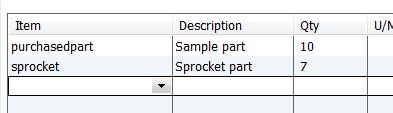 In this simple test case I don’t have any of the purchasedpart items on other PO’s, sales orders, invoices, or pending builds, so all you see is the 10 On PO in the inventory stock status by item report.

How a Partial Receipt Affects Inventory and the Purchase Order
Now let’s enter a bill and receive some of the items. For the sake of discussion I’m going to receive just 4 of the purchasedpart item, and none of the sprocket item.

Here’s what the PO looks like now.

And here is what the inventory report shows.

Closing the PO
The question that I see asked often is how do you cancel the unshipped items? We don’t want to see that value in the On PO column any more. There are a couple of ways of handling this.
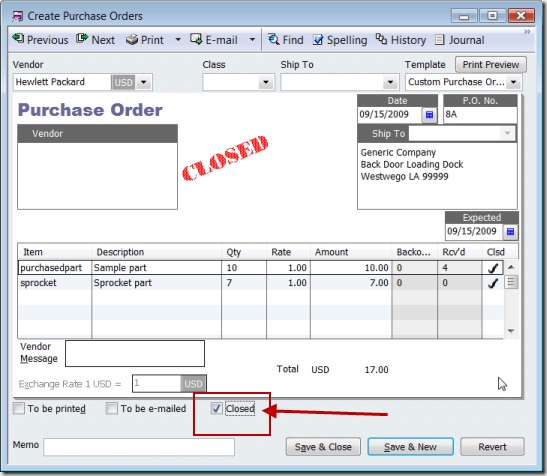
If you want to close out just a portion of the PO, put a check in the Clsd column. This will close just that line, leaving the rest open. Note that the backordered column is now set to zero.

The On PO column in the stock status report will no longer show a value for this item.

If the entire PO is canceled, check the Closed box on the bottom of the form. This closes all lines so that the items don’t show on the report, and changes the status of the PO so that it won’t show on any reports as an open PO.
[…] This post was mentioned on Twitter by CCRussell, Kim Amsbaugh. Kim Amsbaugh said: RT @CCRussell: Posted a Practical QuickBooks article on Closing a partially shipped purchase order in QuickBooks. http://bit.ly/5Dpwsh […]
Topic: Recording Business Purchases with Personal Funds
(I’ve answered this question several times on the Intuit Community Forums.)
Thanks,
We currently only purchase items for a specific order by customer and therefore for the last 5 years all of our parts/items are set up as non-inventory parts but are posted to a COGS account. We don’t generally need to keep track of them other then for items that we have received at the end of a financial qtr and have not yet billed out for. This is currently manually calculated.
We are considering changing all of our items to inventory parts in order to work better with Connectwise and Quosal. What are the consequences of doing so (how will it effect past reports) and is there a better option (such as creating all new items rather than changing the existing ones)?
Thanks in advance!
Kim, I’ll give you a very short answer at this point. In general, don’t change a non-inventory part (expensed immediately) to an inventory part (expensed when you sell it) as that will dramatically affect your finanical statements. The results are usually very bad, although there are times when you can do that. Create new inventory parts…
Thank you, all I needed to know was that I could checkmark an line item to close it. The smallest things can give you a headache if you don’t know the answer. Very helpful!
Glad I could help, Naomi!
I am trying to close out old POs that will not be received on further. Many of these open POS are old, and in some cases, the PO may have been partially received. Others may not be showing as closed, but we’ve received all of the parts against this PO. When we went to clean up the open POs and close them by selecting the “Closed” box at the bottom of the PO, something happened and all of our prior financial statements changed. Changes were in the inventory accounts and in COGS. We use Rapid Inventory in conjunction with Quickbooks.
Do you have any idea why this error may have occurred?
Heather, a PO isn’t a financial transaction so it shouldn’t affect your financials. On the surface, I would say that you need to talk to the Rapid Inventory people first, to see if their product is looking at PO’s and doing something behind the scenes. I’m not that familiar with Rapid Inventory so I can’t say if that is the root of the problem or not.
Heather, I have experienced the same thing but we do not use Rapid Inventory. I use QB without any add-ons. In most cases our items are non- inventory but some were. I closed PO’s and it changed the same accounts. I also agree with Charlie a PO should never affect financials since there is no GL posting but it did. I was on a support call for almost 5 hours and they could not figure it out as I was able to demonstrate through various reports and audit tracking this did happen. I have a lot of open PO’s and partially received PO’s since 2009 that I will not close due to this issue.
I also have not seen a solution to this issue in any forums so if there is one please let me know. I recently upgraded to 2014 Premier and I have not tried it again.
two parts
first the items that were sent , quantity stays as indicated
on order
however the items that were not sent ,(you 0 out the quantity
and save the purchase order.
Now you can receive items
then you have to go back and put quantity back in on the items
that were not sent.
my question were you go back into this purchase do you;
just received and it will only receive the items originally not
received
or no I have to zero out all the items that were previously
received. to receive the few that were sent after on the same
purchase order????
Shirley, I’m not sure I follow you on this. You have a PO, you do a partial receipt. You leave the unreceived items on the order, because you are going to receive them later, and later on you can receive those. Or, if you aren’t going to receive the rest, you close the PO.
We have quite a few very old purchase orders that are open.
When I try to close the orders – Quickbooks gives me an error:
‘You cannot perform this action because this transaction date is before the closing date. You need permission to modify transactions before the closing date to do this…..’
The administrator tried to change a few settings but the error keeps on occurring.
Could you perhaps assist resolving this issue?
Someone has set a “closing date” on the file, which essentially locks you from making changes before that date. There should be a way to enter a password to get past that date, but you might not recall it. And I’m surprised that you got this error for a purchase order.
Make a backup copy of the file, then receive any remaining items. That should close the PO. Then you can enter an adjustment to reverse the receipt. Try that, and if you don’t like the effects (compare your financial statements from before and after these transactions) then you can restore the backup.
Hello. Purchase Orders (PO) and Item Receipt without a Bill:
I am wanting your suggestion on what to do in this situation.
Example: Purchase Order #1234 for 10 Qty of item-X is created.
Scenario 1: Receive more than whats on the PO, 15 Qty of item-X.
* Do I only enter receiving 15 Qty on the Item Receipt. This will reflect on the PO that the 10 Qty has been received, but not show the overage (the Inventory will increase by 15 Qty).
* Do I first change the Qty ordered on the PO to 15 Qty, and then create an Item Receipt with receiving 15 Qty. The only difference is the PO shows that 15 was received.
Scenario 2: Included on the PO shipment is an item that was not ordered, 5 Qty of item-Y, and the plan is to keep the item for inventory even though it was not ordered.
* Do I only enter receiving 5 Qty of this item on the Item Receipt.
This will not be reflected on the PO (the Inventory will increase by 5 Qty of this item).
* Do I first add this item to the PO, and then create an Item Receipt receiving the 5 Qty of this item. The only difference is the PO shows that this item was included (even though it was not ordered).
Thank you for the help.
It depends on your company policies, but to me the simplest is to update the PO, then everything carries through auto. You can always add a comment to the PO explaining the situation
Thank you for the timely reply! Yes that would be simpler and cleaner. Will leave comments as well. Thank you again!
Hi-
We have one item from a 2016 PO that will no longer ship. I can proceed with just closing the PO as per your instructions, but will this affect past Financial Statements since this is for prior period??
I know for a fact that there is a password set since 2017 (and 2017 and 2018 periods) has been closed.
Looking back at this article, I see that I didn’t make one thing clear. Purchase Orders are not FINANCIAL TRANSACTIONS. That is, they don’t affect your financial statements at all, assuming you have set up your QB accounts properly (which is very likely, in this case). You can delete a PO, edit it, do all kinds of things, it doesn’t affect financial statements. So doing what I outline in the article is perfectly safe.
The place where things affect your financial statements are with the ITEM RECEIPT transaction. If you receive items on a PO, that creates an item receipt, and if you do something to change that, then you affect your financials. But, if you haven’t received it, no problem in canceling.