Today’s posting is a quick tip about editing a Bill of Materials for an assembly item in QuickBooks. A client was asking me about a feature in my CCRQBOM manufacturing plug-in program the other day, talking about a problem related to deleting a line in the BOM. There was a detail line in the middle of the BOM that was to be removed, and the only way he could come up with was to delete the item ID in the line. This, unfortunately, leaves a “hole” in the middle of the BOM.
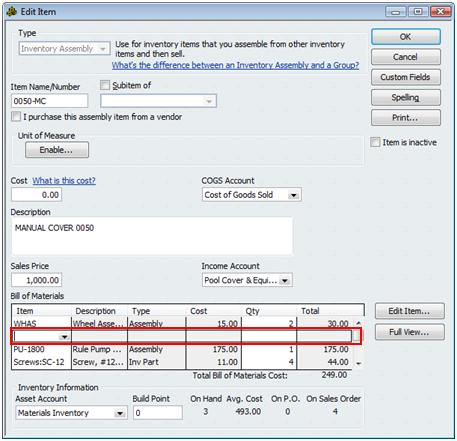
“Why not right click and select delete line to delete the line” I asked, as that is the method we usually use to delete lines from documents in QuickBooks? This is what you can use in an invoice, for example.
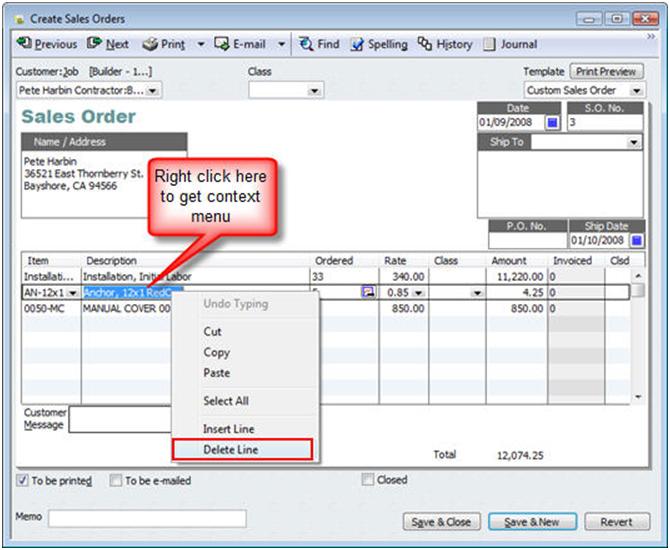
The problem is, as he pointed out, this doesn’t work. For some reason in this particular place, QuickBooks doesn’t provide this method of deleting a detail line.
However, if you click “ctrl-del”, or select the Edit menu and then delete line, this works. This is a much better means of deleting a line from a BOM than just blanking out the item itself. Some integrated applications won’t process a BOM correctly if you leave these blank lines in the middle.
Thank you! Your tips are a lifesaver!
TY!!!!! i hated those holes.. ctrl-delete who would have thunk it
Ctrl-Delete is the only way to do it in 2020, and it isn’t documented. The edit menu isn’t present anymore. The lack of ability to edit the Bill of Materials can cause errors at build time, such as “Quantity required cannot be zero.”
I’m not sure what you are missing – but if I open Premier 2020, in the top menu I see “Edit” as a choice (next to “File”). If I have clicked on a detail line in the Edit Item window, I see the “Delete Line” option listed, as before.
Hello:
Is there a way to delete all the items in the Bill of Materials?
We are creating sub-assemblies for our items now and will only need 1 or 2 lines on each assembly item. And if we have a change in the manufacturing process, we simply change the sub-assembly. However, currently, every assembly item has about 12 to 15 lines in the bill of materials and we want to replace those. Is there a way to delete the entire BOM instead of going line by line? Thank you for your help.
Regards, Susanne Johnson
Not really. You can delete the item itself, then re-add it, but that causes all kinds of problems in most cases (I definitely don’t recommend doing that).