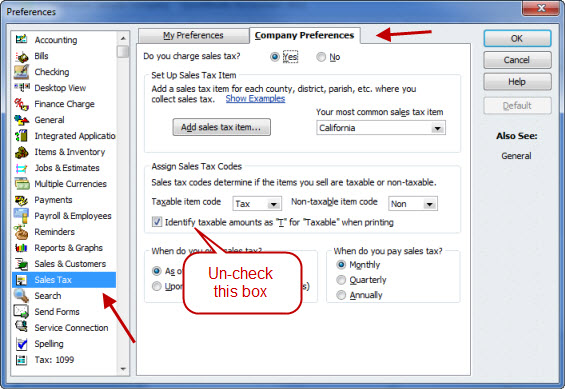
If you are using sales tax in QuickBooks, the program will usually mark the “taxable” items with a “T” right after the amount for the line. Some people would prefer to not have this.
Select Edit then Preferences and select the sales tax preference. Uncheck the box that I point out below.
This was an awesome and helpful article. Thank you very much for sharing..
You rock
Awsome. thank you very much. this article helped me a much
We are using QuickBooks Enterprise and it does not have this selection box, do you know where the box is that can turn it off? thanks
Looking at your email address, are you using the Canadian version of Enterprise? If so, I can’t answer that, as I don’t have access to that product. You’ll have to talk to Intuit Canada about it. I’m working with the US version, and it shows in Enterprise in the sales tax section just as I show in this article, even with the 2018 release. Canadian versions will be different because you have a very different tax system.
Canadian…correct, thanks.
How do I remove the “T” after Total price for Quickbooks on line invoices?
Sorry, this is all about QuickBooks desktop software