If you are using QuickBooks to manage your inventory, you need to understand how QuickBooks deals with the cost of inventory items. I’ve been answering a lot of questions about this in the Intuit Community Forums lately, so here is a quick rundown of how things work.
Cost Fields in QuickBooks
If you look at an Inventory Part item, you will see that there are two cost fields.
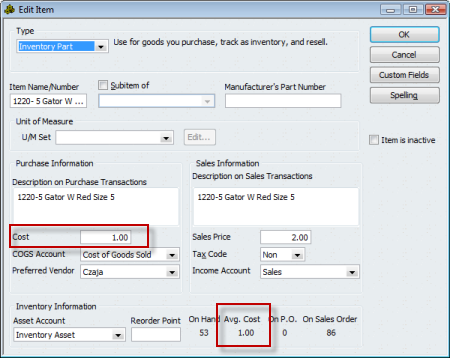
The cost field, on the left, is a “reference” field. That is, it doesn’t have any direct bearing on the valuation of your inventory, the cost of your inventory in your inventory asset account. I wish they had another name, because it is confusing to talk about it. I refer to this as the “last purchased cost”, although that isn’t always exactly right. If you purchase an item and receive a bill for it, the cost that you receive the item at will usually be stored here (but not always, that depends on how your company file is set up). You can edit this cost directly in this window, it doesn’t have a direct effect on your inventory valuation.
The avg costfield, bottom center, is the field that is used in the calculation of the value of your inventory. This is calculated by QuickBooks based on the cost of receipt (and adjustment) transactions. You cannot directly edit this in the window here.
Inventory Valuation
QuickBooks values your inventory using an average costing calculation, as opposed to other types you may be familiar with, such as LIFO, FIFO, or specific costing. If you need another costing method, you will have to use a third party addon program that manages inventory outside of QuickBooks.
This can be a complicated subject – I am only going to go into this lightly. Let’s look at a simple example.
- If start with an item with no quantity, no value, and receive a quantity of 10 at $1.00 each, you will see that the cost is $1.00, and the avg cost is also $1.00. You have $10.00 of inventory in your inventory asset account.
- If I then receive another 10 items, but at a unit cost of $2.00, you will usually see the cost value set to be $2.00. However, the avg cost of your inventory will show as $1.50. We started with 10 items and a value of $10.00, we added another 10 items at a value of $20.00, so we have 20 items with a value of $30.00. That gives us an average cost of $1.50.
If you sell one of these items in an invoice, the COGS account is incremented by the average cost of the item at the time of the sale.
This is a simple example. There are long arguments about the costing calculation that QuickBooks uses – relating to the more complicated situations when you have many added transactions, and other complicated situations.
One thing that I will note, briefly – if you sell all your inventory, and then continue to sell the item so that you go to a negative quantity, the costing calculation runs into problems. It can’t accurately account for a negative balance, and you can see some very odd figures show up in the average cost field, and your inventory valuation reports. Once you bring the balances back to positive these figures should resolve themselves, but it is always a good idea to not allow inventory balances to go negative.
Manufacturing Cost
When you are working with an Inventory Assembly item you have an additional cost field – the Total Bill of Materials Cost. See my article on Understanding the Total Bill Of Materials Cost.
Let me know if this is clear, and if you need more information!
Thanks for the excellent explanation! I’ve found that many QuickBooks users don’t really understand how COGS is calculated and many just “give up” on trying to maintain an accurate COGS.
I’m the product manager for ACCTivate!, one of the “third party addon program that manages inventory outside of QuickBooks”. Some of our new customers will say, “we use a FIFO costing method”, which lets me know they didn’t understand how QuickBooks COGS works 🙂
You have explained it excellently. But I need help in calculating the cost in manufacturing my product when I have many styles and sizes to apply the cost. Also I need help on how to use quickbook in itemizing my products so that I can have finished goods inventory
Emelinda: You have several options, it is hard to give you a direct answer via this blog/comment. It depends on how you want to cost things, and control things. In very general terms, the more detail you capture, the more accurate your costing and reports, and the more work it takes. You have to find the balance that fits your situation. If you create an inventory part for every kind of item you have, it takes more work, but you have a more accurate picture. If you use items one time and never again, you don’t need that level of detail, usually.
Hey, Charlie.
Thanks for this website, I have looked up a few things on here before, and find it very helpful.
I have a question for you — the way our inventory is set up, when we bring items in we end up paying a third party for freight costs. We use a separate freight item which collects into COGS accounts. Then, I manually adjust the ‘Cost’ box to show our true cost for each item. However, of course, the ‘Avg. Cost’ box still just shows what each item cost from the initial vendor.
This is causing trouble in our balance sheet — I have no way to reliably offset the two costs to see how much freight should still be accounted for in COGS, versus what should go away because we’ve sold those items.
I was using an ‘Item Listing’ report, and introducing the ‘Cost’ column that shows up in there into an ‘Inventory Valuation Detail’ report which showed only ‘Avg. Cost,’ and that seemed to be working. However I’ve now run into another problem. I need to have these reports generated for the end of last year. Instead, if any items have been deactivated since the end of the year, they don’t show up on an Inventory Valuation Detail dated at the end of the year! So all my numbers are off. We’ve clearanced and sold quite a bit of materials since the end of the year, so now I don’t know how I’m going to get this information. Do you have any suggestions I can look into?
Heidi, you’ve mixed in a couple of questions here. Let me note first – I am not a CPA or bookkeeper, so I tend to dance around accounting related issues a bit. Sorry about that.
For the “item listing” report you can modify the report to turn off the filter that excludes inactive items (I assume that this is what you mean by “deactivated”). You can’t do that for the Inventory Valuation reports, however. You could get this kind of information out from the ODBC driver and a reporting tool, but it is a bit complicated. Or a custom developer could write a report for you.
As for COGS, that is a bit complicated. Since you are paying a third party for shipping, lots of your options are not available. You can play around with paying the shipping cost to a “holding” expense account, then doing inventory adjustments against that holding account to move the value back into the inventory, but that might not be what you want (and again, I don’t know if this accomplishes what you need from an accounting or tax purpose).
Yeah, I’m afraid it is a muddle. I think I may have worked something out this time, but we’ll see what happens. There is a button in the modify report dialogue that allows you to make advanced changes to the inventory valuation report, which looks to show deactivated items, so I am working with that to see if my numbers will come out close.
Thanks for your answer!
How do I delete an erroneously posted Sales Receipt. I cannot get it to go away!
JES: If you are in Windows – when looking at the sales receipt in the “enter sales receipt” window, press ctrl-D to delete it. If you have already recorded the deposit for that receipt it won’t let you – you first have to delete the deposit (or remove this value from that deposit).
Another question, Charlie — and thanks very much for your help!
When we pull a balance sheet as of the end of a period, and then try to back up that information by pulling an inventory valuation summary, the numbers are not the same. We can’t figure out why – it doesn’t seem to be pulling from different cost boxes. Do you have any hints as to what might be throwing this off? Would deactivation of inventory items since the end of the period have affected reports we are trying to pull now?
Again, make sure the dates match (the same ending date). These can be hard to find – you may have journal entries that would affect the balance sheet but not the inventory valuation summary. The balance sheet is the sum of all transactions to that account, the inventory report only reflects transactions that affect individual inventory items. Inactive items shouldn’t affect either.
Yeah, I’ve gone over the dates several times to make sure they’re all for the same date (December 31, 2008); perhaps it is journal entries that are an issue, but I think the accountant who’s currently working on it had already checked into that. I’ll see if I can find anything, though.
when receiving in items there is somtimes freight , I do not charge this to my customer because when we Bid on a job we always add extra on the Bid amount to cover in freight cost to us , when reading your post regarding freight, Iam now wondering what that is doing in my QB , I pay the vendor for freight charged, When adding this to my bill from Vendor i use Freight from the Expense side (not Item), If i know cost of freight when placing order to vendor I use an item set up as freight under items ( are these the same)
Expensing freight is the simplest method, and very common. You need to talk to your CPA though, and follow the advice they give. The IRS usually wants you to incorporate the freight cost into inventory value rather than expense it, but there are many variations and exceptions. I don’ t know enough about your business to be able to guide you on this, nor am I a CPA.
Charlie –
Do you know where I can get an item listing with the cost, avg cost and price on it? I have tried to modify the item listing report but that does not have the avg cost field. I have tried to modify a inventory valuation but that does not have the cost and it includes the transactions for that item – I am looking for just an item lists.
Ditto
Ditto, that is a tough one, because any of the editable item reports won’t let you add the average cost (at least none that I’ve found). The Excel export doesn’t include it either.
You can get the ODBC driver (if you have Enterprise you already have it) and you can get the info that way (takes a bit of work to get used to). Or you can purchase one of several data extraction tools to extract the item list and then generate the report.
My company has a product that would generate that report for you, but it hasn’t been released to the general public yet (it is being field tested). If you wish to talk about that, send me an email to the address in the “about” page of this blog.
Is there a way to clear the inventory average cost?
Lisa, the average cost is calculated by the receipt costs of all purchases for the item, and any inventory value adjustments. If you think that the cost is not correct, you can try correcting the cost of any receipt transactions that are in error. You can try creating a new item so you don’t have the “history” of costs from the old item. You can use the inventory adjustments feature to do a “value” adjustment and reset the cost, but that requires that you post a value to an adjustment account to take care of the different in valuation. I can’t say what exactly is the best approach without knowing why you want to change the average cost of an item…
Hi,
I have some questions about Costing Inventory Items in QuickBooks.
When we add products in QuickBooks, is it mandatory to fill out the field “Cost”?
Can we leave the field “Cost” empty?
Is the field “Cost” is updated by QuickBooks?
Will we have to change the field “Cost” whenever the costs of inventory items change?
Please give more information about this.
Irfan: Why do you not want to enter anything in the “Cost” field?
If you are adding a new item, and AT THAT TIME you enter a quantity (I don’t recommend doing this), then the “cost” field is used to place a value on that initial transaction. A common mistake is to not have a value in that field.
When you purchase an item on a PO, the “cost” field is what is usually used as the default cost for the purchased item. You can enter any value you want to override it then.
The “Cost” field is only edited when you receive an item at a different cost, and only if you have your parameters set to update the cost.
The “Cost” field is used in the display of the total BOM cost of an assembly item.
You don’t need to update this value, in all cases other than the initial quantity entry it doesn’t affect your actual inventory valuation.
Hi Charlie,
I am new to QuickBooks and have successfully imported my item list with current on hand quantities into the program. However, short of manually receiving each of my 800+ on-hand items, I can’t figure out how to attach an average cost to them. any ideas?
Aaron, average cost is calculated by “transactions” applied to your inventory. Here are your options as I see them:
If you can take a step back to a point in time BEFORE you imported your list, you can update the average cost when you import the list. This only works if you are ADDING new items, not if you are UPDATING existing items. You have to map out the quantity and total value – which are used to calculate the average cost.
You can try to use the IIF file format to import transactions of some sort that would adjust inventory. That is complicated. I’d suggest looking at http://www.bigredconsulting.com to find a tool to help with that (and, test a demo copy to see if it works like you expect, and make a backup copy of your files BEFORE testing).
Get the transaction importer from http://www.baystateconsulting.com, and try to come up with a transaction that would work for you. A more expensive program (not much more) than Big Red, but perhaps a bit easier to work with in some ways.
Enter the adjustments by hand in an inventory adjustment (a pain to deal with) or an inventory receipt.
It is hard for me to say what works best for you without knowing a lot more about your situation. In any case, the only way to get average cost updated is by a transaction – either importing one, or if you do the Excel import with NEW items and the proper fields that becomes a transaction too.
Hi Charlie,
Thanks for the great website. I have a question regarding QBES Manufacturing – our avg cost has been terribly corrupted and I’m looking for a way to fix it.
We have items that should cost $100 and show up at $900 (not actual numbers just example). The changes seem to occur when multiple of the same item are sold, the value of the individual items then takes on the value of the total sales price.
Any thoughts on how to fix this?
Josie, glad you like it!
It can be hard to figure out whey costs go strange. Sometimes you find that running a “rebuild” straightens things out (but unlikely). A very strong possibility is if you allow inventory balances to go negative – such as selling more items than you have on hand in QB on a certain date. The average cost calculation used by QuickBooks goes “bonkers” (that is a technical term…) if you have negative inventory balances. In essence, it tries to compensate for a situation that physically is impossible, and it gives you strange results. Average cost valuations can be very bizarre. Usually it is corrected when you bring your inventory balance back up to zero (or higher), but not always.
Beyond that, I can’t say much without actually seeing your data. You can look at a “Quick Report” for an item to see all the transactions that affect it, which might help. Sometimes you may find a transaction that was entered incorrectly…
Hi Charlie
Thanks for the valuable information you have here
Basically we have couple issues need sorting out
As some of the items cost price change at least once a month, is the average cost in QB ideal for our purposes, if not what’s the alternative
Also should we want to discard historic data in general, what’s the options to do this correctly.. Is it setting up a new company or adjusting the trail balance with journals or something else!
Al: In QuickBooks, “average cost” is the only method of costing that the program offers. If you want to value your inventory another way you either have to track inventory costs outside of QB on your own (complicated) and make adustments to your balance sheet and P&L, or you have to buy a third party inventory add-on that manages inventory totally outside of QuickBooks (like Fishbowl Inventory).
If you want to “prune” your data file and get rid of historical info, you can either start a new company and do some balance forward postings, or purchase one of the utilities from Karl Irvin that can handle all of this for you. Go to http://www.q2q.us and see what he has. I HIGHLY recommend his products.
I am a Business Systems Consultant and have a client that has all their items showing negative inventory. How can they change the inventory to reflect good numbers and not affect costing etc..? My first idea would be to do a physical inventory count.
Thanks in advance for your help.
Pat: I can’t give you a detailed answer as I don’t know all of the issues with your client. If they have negative inventory, then they are selling more than they are receiving. I’d first determine WHY they have negative inventory cropping up (not entering receipts? Not entering accurate numbers?) and first fix that issue. You might find that by correcting those problems the negative inventory goes away. If not, you can do a physical and use inventory adjustments, but you are going to have to post that value to some account, and you need to decide what account to use. Again, that comes back to “WHY”
My husband and I own a butcher shop. I am trying to set up our inventory, but I am running into trouble. Basically, we purchase cattle carcass as a whole, then at the shop, we section it off and sell some as ground beef, ribs, steaks and so on… How do I set up my inventory so that when I sell my individual items, it subtracts it from the whole cattle carcass item? Hope that makes sense. Also, we purchase the cattle from different vendors and the our costs always flucuates, is this going to be a problem with QB’s? Should I just set up everything as non-inventory?
btw thanks in advance for your help 🙂
Connie: The decision to make this an inventory part vs a non-inventory part is something that has a big impact on your financial statements, and it is something that you should talk to your accountant about (I’m not a CPA or accountant myself). I don’t know if there are specific rules or regulations that apply to your kind of business.
Assuming that there aren’t any special tax regulations – how long do you hold the carcass? I would assume that you don’t hold it for a long time. You purchase the carcass, divide it, sell the items. If the amount of time that this takes is small, then I would guess that you can treat them as non-inventory items. Check the box that says “this item is used in assemblies…” so that you make it a two sided item. Then you expense it when you purchase it. And then the component items are income when you sell them. You don’t have any tracking of how many carcasses you have on hand, and so forth, so that may be a problem.
If you hold the items for a period of time then this might not be acceptable. In that case, you have a lot of work to do to handle them as inventory parts. You have to do inventory adjustments every time you section it off. That can be tedious.
As for cost fluctuating, that isn’t going to be a problem.
Thanks for your reply… We buy the carcass and use it within a couple of days. So I guess non-inventory it is. Thanks for the assemblies tip. Someone else suggested I expense it to COGS and use non-inventory for income. But I think your way sounds better. As long as I can have a report at the end of the month as to how much I spent and how much I received, I believe that is all we need for tax purposes (will double check with Accountant). Will the way you suggested provide me with such reports? I believe it will, but let me know if not. Again thanks for your reply!
I’m having difficulties with changing the ‘cost’ of an item. I was able to edit it but it’s not showing up on reports nor is it ‘averaging’ the cost.
HELP????
Thank you!
Cory, you don’t mention which report. Is the report showing the “cost” or the “average cost” field?
The “average cost” of an item is adjusted when you receive an item (the cost of receipt) or build an item (for an assembly, the cost of the component items). Or when you do an inventory value adjustment.
I have just joined the company. They have rapidly grown from garage to plant and the accounting controls have not grown with the sales. Among the several “issues” I am addressing is their inventory conrol. They have the negative number situation you have described in several of your blogs and I am using your input to correct. My question is more of best process… we receive a truckload of product that is used to create several different items, all from the same raw material, typically just by cutting different size or shape. The pieces are then packaged and sold, large size, medium size, small size. Additionally scraps are collected and used in another product. We sell to both retail and wholesale. While I do not expect a full blown solution… can you point me in the best general direction using Quickbooks? Many Thanks for any input.
Dave, it is difficult to give you a good answer without knowing a lot more about your business process, as well as what QB product you are using. QB doesn’t have a good process for handling scrap, and how you manage your raw materials depends on how you measure and count it, what the cost per unit is, and many different factors. Your best bet is to find a ProAdvisor who is familiar with inventory and your kind of manufacturing and sit down with them to discuss your options. It is much too complicated for a quick note in a blog comment like this.
Is it possible to print out a list of the goods that we purchase by vendor that shows part numbers and pricing?
Dawn, you can play with the “Transaction List by Vendor”, adding the “item” column, changing the filter to show detail transactions and only bills…
Charlie,
I’m having some issues with QB Pro 2010. We just started using it a couple months ago, but when we uploaded our inventory from Excel, for some reason, some quantities and costs were jumbled between items, so I had to correct them individually. Now the average costs are way off, which is affecting our inventory value. Is there any way to fix this?
Paige, it is hard to give you SPECIFIC recommendations without knowing a lot more about the situation. However, in general terms, you can either edit the original transactions from the import, or you can make a value adjustment to set things to the value you want.
To adjust the original transaction, select the item in the item list and right click, select the QuickReport. Set the date range to “all”. Look for the very first transaction – it should be an inventory adjustment. That is what is created when you import a value when adding the item from Excel. Double click on it to open the actual transaction – it should be a posting to Opening Balance Equity. You can then change the quantity and value to be the correct one that you wanted to import.
Or, just make a value adjustment. You have to decide what account to post that to. See my article on this kind of adjustment at https://qbblog.ccrsoftware.info/2009/06/quickbooks-inventory-quantity-and-value-adjustments/
Thank you for getting back to me so quickly! Ok, I understand what you’re saying and how to adjust that, but if I want to fix the average cost, should I change those values from the inventory adjustment to zero? I don’t want the erroneous average costs to be used for the inventory valuation, just the current price.
Paige, I can’t give you a full recommendation without having my hands on the file. If you make a Value adjustment with today’s date, you set the total quantity and the total value as of that date. This would set the average cost to be whatever value you enter (you enter quantity and total value, it divides that to get average cost). That would be the cost used from this point forward, and would not affect prior dates, but the adjustment amount is going to be osted to whatever account you select…
In the item list I have my cost filled in but when I process an invoice the cost is posted to my cost of goods account but sometimes the cost is zero – any ideas as to why the cost is appearing as zero to my cost of goods.
Debbie, for inventory parts COGS comes from the “avg cost” field, not from the “cost” field.
Charlie,
In one of your earlier discussions, you had mentioned that you have some information on the Total Bill of Material Cost. Do you have this posted somewhere?
We have a manufacturing add-in (Small Business Manufacturing for QuickBooks) and are completing our integration into QB. We have the need to update the average cost (used in valuation) as we report receipts from work orders from manufacturing side. Any ideas on how this can done?
Ranjit: I’ve not posted anything on that yet, my apologies. Essentially, that cost is the sum of the “cost” values of the components that are displayed at the time. It has no true accounting value in QuickBooks. Note that if you are using multiple level assemblies then the total bill of materials cost that is shown may be misleading, since the “cost” value of subassemblies is most likely not up to date (it isn’t changed in “build” transactions). You can use my CCRQBOM addon product to resolve that issue, though.
First thank you for a great site! Lots of good info!
We have a photography business where prints & notecards are made to order. Sometimes printing is outsourced for larger prints.
In the past I’ve used a rather cumbersome process which includes inventory items (envelopes, notecard stock, paper, ink, packaging), and entering the finished products as inventory items (notecard sets, prints) which then are sold (sales receipt) and expensed (COGs). In a way its like this parts -> whole product -> sale -> COGs. This process has been used for several years now.
I also keep a XLS file that details our printing processes (calibrations, tests, samples & sales), images or notecard sets printed (which photo/series that is) and determines the cost/item sold to aid in pricing decision-making among other things. This XLS basically is where I determine what QBks inventory adjustments (value) need to be made for materials used & products created.
Perhaps obviously, I’m looking for a simpler way of dealing with the whole thing on the QBks side (that keep QBks B/S and P&L accurate) and how to transition to it from this probably “way too detailed” method we currently use (inventory items, inventory adjustments).
We enter all our purchases & sales via QBks (Pro 2007) so the data is there.
Any suggestions for a more sane approach?
Thanks for your help!
Bonnie, I’m sorry, I don’t know that I have an answer for you. There is a lot more that I would need to know. If you are making things to order, every sale is different. Off the top of my head I would think you might want to explore “group” items, as you can modify the content of the item when you sell it, but I can’t say for sure.
We use non-inventory for the materials used in our business. They are set up with the proper expense and income accounts. Why would the cost not be reflected on Profitability Reports or on Item Actual Cost Detail? It just shows .00 so profitability is not accurately reflected in these reports. Thanks!
Laurie, what QB product are you using, and which specific reports are you referring to? If you have a properly set up non-inventory item, the cost of the item is posted directly to the expense account when you purchase it. You won’t see these items in inventory based reports because non-inventory items aren’t reflected in inventory based reports usually.
Hi Charlie,
I am new to your board and I am so happy I have found you. I am an apparel mfg and like Emalinda I purchase fabrics, purchase sewing services, purchase separate freight, customs and duties. I am wondering if I should be using one of the higher level versions of QB so that I can use a “build method” to accurately cost out my items. I currently use QB Pro. And BTW, I assign a separate style no to each of my items by size and fabric. I love it b/c I can pull of reports and know exactly how many of each size in an item I have.
Thanks Charlie
Desiree, I can’t say for sure if Premier would be better for you without knowing a lot more about your business. But it might be helpful. You can look at the manufacturing tutorial articles here to learn more…
I just went through the process of adjusting values on hand, but the new cost figures didn’t show up in the item list. Since I want the accurate value to appear on sales receipts without having to change it each time, is there another way to edit multiple, but like, items without opening each item individually? Also, if the qty and value on hand show zero, should I not adjust the value in that manner?
Bobbi: without seeing exactly what you did, I can’t comment one the results you saw. And when you talk about sales receipts – they don’t show the “cost” they only show the “sales price”. So what you are asking about is a bit confusing to me. You can do some editing of multiple items if you have QuickBooks 2010 and use the Add/Edit Multiple List facility, but it is not clear what you are trying to edit. Some editing can be done by exporting and importing, but that again depends on what you want to edit. For quantity and “value” you would normally use inventory adjustments.
Sorry, but you don’t tell me what QB product/year you have, and you aren’t really specific about what you are trying to do, so it is hard to give a specific answer. You can also read about adjustments at https://qbblog.ccrsoftware.info/2009/06/quickbooks-inventory-quantity-and-value-adjustments/
Charlie, Thanks for your reply. Here’s a bit more information:
Right now I am having to input as a cost of my inventory all charges which means I have to add them up so (fabric, cut & sew, duties, shipping) for a total cost when I enter inventory.
The problem is that I also pay for these items separate and then I adjust the COGS account, so I dont’ want to cause a double entry. I would like to be able to pay for those items and have them automatically be included in the cost of a certain garment.
Which QB system allows me to do this?
Desiree, are you a manufacturer of these items, where you are making many copies of the same items over and over? Or are you making individual items for each customer?
If you are a manufacturer and you have a line of clothing where you are making many copies of the same thing repeatedly, then you want to consider using Premier and the “build” feature.
If each item you create is unique and different, then “builds” and assemblies will cause more work than they will save. It is hard to give specific advice here without knowing much more about your business. A blog like this isn’t really suited for giving specific advice, unfortunately. Unless you are trying to determine what the profitability of an individual item is, I wouldn’t be worrying about COGS in the way you are talking about.
So many variables…
We have started a wine club business and we are working out the kinks with QB. This is my question:
We issued a purchase order, received the items and paid the associated invoice. Now the vendor has come back and issued a credit memo for the purchase to reduce the price per bottle. How do I enter the credit memo against the items without affecting the inventory count of the item? If I enter as an expense against cost of goods sold, then that doesn’t calculate the correct cost of the specific item. How do I handle this?
This is a wonderful site and I am so glad I found it!
And, Cindy, we are glad you found this site too!
Several ways to deal with this. Here is ONE WAY, but you may want to talk to your accountant before setting this up. This is a quick run-through.
Set up a holding account for adjustments in your chart of accounts. It could be an expense account (talk to your accountant). Set up an item in the item list, an “other charge” item for example, and have it set up to use this holding account. Issue the vendor credit (Enter Bills, check “credit) but don’t use the items being returned , use the other charge item. This gives you a credit to apply to the bill to adjust that, and it puts the dollar amount in the holding account. Now, enter a “inventory adjustment” and do a “value” adjustment, keeping the item quantity the same but changing the total value of the item. Post this against that holding account. When done, the quantity of the item is the same, you have reduced your payables, you have reduced your inventory asset, and the “holding” account should have a zero balance showing you that you did everything correctly. Again, note that this is ONE WAY to do it, there are other ways. I can think of several, it just depends on what you want to do.
Charlie, Thanks for the share about inventory cost,
How to change Inventory sale price to different currency because everyday they changes? like usd to euro or etc…
Thanks in advance 😀
Johnwiez: There are many variables involved, such as which national edition of QB you are using, if you are using the “multiple currency” feature, and more. I can’t really give you a direct answer on that here…
I have a basic questions about average cost. When we receive a new item with a receiving voucher should we enter the cost in the avergage cost field as well as the order cost field. We have been putting the cost in both fields, I’m not sure this is correct. This question only applies to new items received through a receiving voucher. QB POS 2009.
Thanks!
Jenny, the information in this blog relates directly to the QuickBooks desktop financial programs (Pro, Premier and Enterprise). I can’t say how cost is managed in QB POS.
If this were QB financial – when you add a new item, you should enter the “cost” value but not enter anything in the average cost or quantity on hand fields. Then, when you receive the item in the receipts program, that function will handle the average cost and quantity issues.
Charlie, I have imported the inventory list from Excel to Quickbooks (10000 items) and three days later after using QB i found out that some items (not all) do not have average cost. I don’t know how it happened. I was trying to fix this issue, but there is a problem to edit such a huge database, besides that QB doesn’t allow to edit average cost. The idea I came up is to delete all inventory and try to import them one more time (I didn’t include the Total Value when I did import). So mu question is there any way how to delete inventory item in bulk, not just each separate line. Another questions, is there any way how to manage inventory database by using some program. Thank you for your help.
I btw I am using QB Enterprise Solution version
‘May 6, 2009
The Excel export doesn’t include it either.
You can get the ODBC driver (if you have Enterprise you already have it) and you can get the info that way (takes a bit of work to get used to). Or you can purchase one of several data extraction tools to extract the item list and then generate the report.’
Charlie, that was your answer back in 2009. I am using Enterprise Version. How to get an item listing with the cost, avg cost and price on it using this driver. Thank you
Ellie:
First, there really isn’t a good way to do a bulk delete of items. And if you have used them in any transactions, you would have to delete the transactions first. When doing imports I always hope that people will make a backup copy first, and then they can restore that backup copy…
You can submit inventory adjustment transactions, using a third party tool like the Transaction Pro Importer. See my article on this tool at https://qbblog.ccrsoftware.info/2010/01/importing-quickbooks-transactions-with-transaction-pro-importer/
Second – for what you are talking about, I would recommend the import tool I just listed rather than trying to purchase and learn ODBC. The import tool will be much more useful to you. They also have an export tool (https://qbblog.ccrsoftware.info/2009/06/exporting-quickbooks-transactions-with-transaction-pro-exporter/ ). There are a number of other products that can be used as well.
I can’t explain how to use the ODBC driver in a short comment, it is fairly complicated. I may write something on it in the future, but it is not something you just jump into. And, updating data with it is really a chore for a programmer.
Thank you so much Charlie for your input. I ended up with value adjustment entries. It seems working.
Hi Charlie. I’m managing an e-commerce website (business to consumer) and we’re using Quickbooks Premier 2010 essentially for inventory management purposes. Basically I generate purchase orders to our parent company to “purchase” my inventory from them at cost, enter the inventory against the PO when I receive it, and also enter our web orders as “invoices” to reduce the inventory for the items we sold.
Now for the problem! I provide our accounting team with an Inventory Valuation Detail report each month so they can match the transactions to our credit card statements, which works just fine. However, they also want the report to show the on hand quantity, avg cost, and asset value. The problem is if none of a particular item was sold during the time range (the first of the previous month to the last of the previous month), the Inventory Valuation Detail report shows an On Hand and Asset Value of zero and the Avg Cost is blank. Is Quickbooks acting as designed or could there be a problem somewhere else that’s causing these zeros and blanks for the Avg Cost and Asset Value? P.S. I’m not an accountant either – I’m just an e-commerce manager. lol Thanks in advance!
Theresa, that is the way it works. “Detail” reports are based on transactions – if no transactions are listed, no values are usually listed. Perhaps you should also print the Inventory Valuation Summary report to go along with it, to get more info?
In QB the COST field….We have an VAT purchased rate and sales rate of 15%. The amount i have put into the COST field for and specifiec artical must it be inclusive of this VAT or must it be without VAT. I do pay VAT for my business to the Goverment…e.g. If i pay a supplier 20$ and that amount includes VAT of say 1.5$ must I enter the 18.5$ as cost or the full 20$ as cost…The “amount is Incl. VAT” checkbox is not selected..
Regards
Haroldt – I’m assuming that you are using a non-US edition of QuickBooks. I don’t know how that works in this regards, as I don’t usually work with non-US editions…
I have a generic inventory item (name is HW) setup to track items that are purchased for specific customers. Here’s my situation: when the initial inventory was purchased everything posted fine to the iventory asset and COGS accounts. But as I have purchased additional items and billed customers for these items I am running into problems with my accounts showing the correct amount. Example: purchased a wireless mouse for $44.99 and server for $39.96, entered vendor invoice coding these two things as items to HW and the balance of the invoice ($2790.63) to expense accounts. When I run my G/L I see one line “wireless mouse” for $44.99 and one line “wireless mouse” for $1061.58; server shows as “server” for $39.96 and another line “server” for $1066.61.
When I billed the customer the transactions show in COGS as “wireless mouse” ($1061.58) and “server” as ($1066.61). All my financial reports are wrong because HW purchases and sales are pulling the wrong figures. How do I fix this? Should the HW item actually be non-inventory?
Marianne, I’m not sure I follow all of the steps you went through sequentially, AND it might depend on what OTHER postings you have made to the HW account.
Keep in mind that for an “inventory part” item when you buy it, the cost of the purchase is added in to the asset account. Then when you sell the item, the AVERAGE cost is going to be posted to COGS, not the ACTUAL cost.
I’m not an accountant, and I don’t have enough info about your situation to give you advice here. But if these are things that you are buying for specific customers and then selling to them in a short period of time, I wouldn’t be using an “inventory part” item. You aren’t worried about tracking how many you have on hand, and if you have huge variations in the cost of the items you are never going to be happy with the way that COGS is managed. I would look into non-inventory parts, but there are also some things to watch out for there. But it depends on what exactly you are doing.
Charlie:
I need to input costs into my quickbooks system.
I neglected to put a cost in when i first entered an item to be sold
i do not use the purchase order . I only add an inventory item when i sell that item. Some of my inventroy items have an average cost and others say 0
I am trying to run a profit and loss statemtn and my Cost of Goods is way out of wack
HELP
Gary, you can adjust your average cost by using an Inventory Value Adjustment – see my article at https://qbblog.ccrsoftware.info/2009/06/quickbooks-inventory-quantity-and-value-adjustments/
That might not fix your COGS issue – but it could, if you do it the correct way and with the correct dates. I can’t be specific without knowing a lot more about how you have been doing things – you may need to get some local help…
Ok we just purchases QB Enterprise. We are a tobacco company. Our invenotry is in a credit balance becasue the quantities are have NEVER been entered.
I am not comfortable going into change quantity in Qb, but want to set up a procedure from the warehouse so it flows into QB on a daily basis. Any suggestions?
John, I can’t do an analysis of your business or your workflow through comments in a blog like this. You need to work with a ProAdvisor who understands Enterprise, inventory management, and who can understand your business operation. Very briefly – you either have to work out a way to enter your inventory information so that you do NOT have negative quantities, OR you need to change your setup to use non-inventory items so that you don’t have to track quantities at all. The tax implications of this are significant, so it may or may not be the right approach for you. I can’t tell based on your comment.
Question:
Our total inventory asset amount on the balance sheet to date is less than the total inventory valuation amount. There are some open sales orders pending which have not been invoiced yet. Would this cause the difference between the balance sheet inventory amount and the inventory valuation amount? If not, what would cause the inventory valuation amount to be greater than the Balance sheet inventory amount?
Joanne – a sales order won’t change the valuation, as it isn’t a posting transaction.
Take a look at my article on this subject at https://qbblog.ccrsoftware.info/2009/04/reconciling-quickbooks-inventory-balances/
Hi,
Just found you today and hope you can help.
Have a small home business where we purchase inventory for resale. At times we need to pull an inventoried item off shelf to use for demonstrations. How would the transaction be input to reduce from inventory? We won’t be physically purchasing it, just transferring from inventory to non-inventory. We will have to pay sales tax on this item when transferred. Do we create ourselves as a customer and record it in that manner and what accounts would we post to to not have to physically write a check?
Hope my explanation makes sense.
thanks for your help…appreciate it
Linda
Linda, very briefly, I would consider doing an “inventory adjustment” to decrease the quantity of on hand inventory and to move the cost of that item to whatever account your financial advisor wants you to use. For “use tax”, that varies from state to state – you may want to look at this blog article for one approach: http://my246shop.com/Rustler/use-tax-solved
Charlie,
Thanks for all of your postings- They are invaluable. I work at a company in which we have a lot of company-owned equipment that is displaced at multiple locations. We just upgraded to version 11, amd we need an inventory/fixed asset tracking system that gets to a serial # level. Fishbowl seems too robust. I fear we would only use 10% of its functionality. Do you have any suggestions?
Thanks,
Brian
Brian, Fishbowl has been around for awhile, lots of people like it (and there are those who don’t, for various reasons). There aren’t, that I know of, many options that are cheaper. You might also look at Acctivate.
Hello Charlie, firstly just want to say it looks like your doing a great job here. Every question answered!
I have only just started using quickbooks. We use the paypal import (supplied by bigredconsulting) for importing paypal data. It also creates stock items from the paypal sales.
We import products from China and resell them in the UK. OUr issue is at the moment the average cost will be determined by the price we pay the supplier. But we also have extra costs which are usually payable after we receive the item, costs for VAT + Customs taxes which are paid to the shipping courier.
So we have two different entities to be paid for one product. The VAT/Customs bill will be added as an expense – how can we assign this expense to our product cost?
In other words we want the average cost to take into account not only the price we paid the supplier but also the cost of vat and customs paid on receiving our goods..
Thank you, Gareth.
Take a look at my article at https://qbblog.ccrsoftware.info/2009/03/shipping-costs-and-quickbooks-inventory/ to see if that helps.
Help . I just came across your blog here. Use Quickbooks POS and Quickbooks on the back end. I performed and inventory count and discovered numerous negative inventory counts. I went ahead and zeroed those out. . which I don’t think I should have done. It has mistated our P&L. My question to you is if and item is a negative no. say -10 and the cost is $10. If i zero that out. . would it look like I added $100 worth of inventory. We do not use the po process. We just received our inventory and enter it manually into inventory. We scan it and if it already exitst we check the cost. I do know how some of the items ended up negative. long story. I just want to know if it caluculates as if we have entered in 10 more widgets. Thanks and I love your blog! Nancy
Nancy, it is hard for me to give you a specific answer without knowing a lot more detail about what you were doing. There are different kinds of inventory adjustments, and the method you use makes a big difference on how it impacts your financial statements. MOST LIKELY it is not having the effect that you want, but I can’t say without having hands on your company file. It sounds like you need to have someone take a look at your file – you should find a ProAdvisor who understands inventory and QuickBooks to take a look, and to help you with your process. I can get you a referral if you don’t have someone who is helping you.
Help! I have just (after 5 years of using Quickbooks) realised that my cost of goods have negative numbers in them.
I have been very lapse in entering purchases, I tend to enter all the bills when the credit card bill comes in and therefore often sell items that quickbooks doesn’t think I have but that I know I do.
I did not realise how quickbooks averaged the pricing – thanks for the great explanation. I had assumed it used a FIFO system and that actual price paid would be used.
Now I am worried that I have been under-reporting my COGS in my P&L, which in turn means I have been under-reporting it to the tax man, paying tax on profits I haven’t made.
I have looked back through the P&L for the previous years and they all have negative values in the COGS when I drill down.
If the average cost would be ‘sorted’ once all the purchases are entered when I rerun the P&L for a previous year will the COGS change? or because I lock the file after each year does that stop it changing?
Presumably its going to be a huge job to unpick this?
Where do I start?
Christine, that isn’t something that I can help you work out through comments in a blog like this. I suggest that you find an accountant/bookkeeper with QuickBooks experience (a Certified ProAdvisor, certainly). Based on your email address I’m guessing that you are based in the UK, and that makes is harder for me to give you a referral. There should be a way to go to the UK Intuit site and find a ProAdvisor. If not, you can contact me directly and I can give you some US based references, but I’m not sure if that will work for the UK…
When I transfer QuickBooks P & L account to turbotax for business 1120 form, I noticed that it does not pick up the difference between opening inventory and closing inventory in calculating cost of goods sold. how do I input?
Generally, opening inventory + purchases – Closing inventory = cost of goods sold. But Quickbooks do it differently. any comments on this?
Pravin, that isn’t how QuickBooks calculates COGS. They post a value to COGS each time you sell an item – using the average cost of the item at the time you sell it.
Just found your website today! great resource! now to the question, I am working on setting up my item list for my products I sell (own a photography business), problem is (I think I will run into in the future, is what to set the on hand value to, I purchase the prints on a per order basis, and if I enter the on-hand to “0” it will alert me that I have a “low inventory”, is that correct? but I would like to track my expenses (purchasing from vendor) and profit (price minus cost) at the same time. Bottom line is I would like to know if there is a way that won’t tell me I have a negative inventory on say 5×7 prints, when I order them on a per order basis Any suggestions??
You might look into using “non-inventory” items, as that will avoid having to deal with a quantity on hand. No inventory warnings there. But that changes how the accounting is done a bit. You should talk to a qualified advisor…