If everything is working perfectly in your QuickBooks company you won’t need to worry about making inventory adjustments. You will receive inventory items, sell inventory items, possibly even build inventory items (assemblies), and everything will balance out. If that describes your company, great! For the rest of us, though, there are times when we will need to make inventory adjustments. The most common question I run into here is “do I make a quantity or a value adjustment?”
When to Adjust
There are a lot of reasons why you might have to make an inventory adjustment. For example:
- Damage or Theft: You can lose items if they are stolen, or if they are damaged in an accident or catastrophe.
- Physical Inventory Adjustments: You may count the items that you have and find that there is a discrepancy between your count and what the computer says. Variations don’t always indicate a problem, it could just be a low cost bulk item that you don’t have to control very tightly.
- · Data entry errors when you start up a new file
These are just a few examples, there are hundreds more. If you find that you need to change your count, or the value of your inventory, you need to make an inventory adjustment.
To make an adjustment you can select Vendors, then Inventory Activities, then Adjust Quantity/Value On Hand. Alternately, from the Item List, click the Activities button and select Adjust Quantity/Value On Hand.
The Adjust screen is one of my least favorite screens in QuickBooks. It allows you to enter adjustments for any or all of the inventory part and inventory assembly items in your item list. If you have a small list like what is shown here, it isn’t too bad. If you have hundreds or thousands of items it can be very difficult to work with, because it does not provide you with an easy way to locate a particular item.
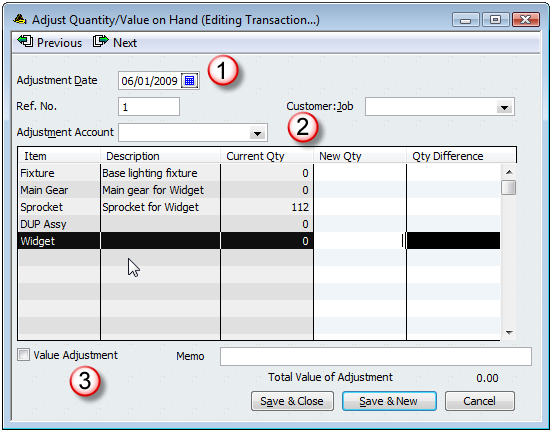
A few key things to point out here:
- The adjustment date is critical. Any adjustment you make takes place on this date. If you are increasing items, they aren’t available until this date. If you enter a date in the future you won’t be able to use these items in a transaction that has an older date. If you use a date in the past then QuickBooks may adjust your Cost of Goods Sold values (if you are making a value adjustment), and if you are going back to an earlier accounting period that might not be a good idea.
- The adjustment account is important in several ways. Obviously, any financial effects of your adjustment will be posted to this account. Less obviously, if you are trying to find an adjustment that you already entered, the previous and next buttons will only scan you through the adjustments for the account that is showing here. That can be frustrating if you are trying to find an adjustment and you can’t remember which account you used.
- Value adjustment is checked if you are making (big surprise) a value adjustment. This has a major impact on how the adjustment affects your financial statements – I’ll discuss this in more detail below.
Quantity Adjustments
If the value adjustment box is not checked, you are making a quantity adjustment. The window appears as I’ve shown you above. This is the most common kind of adjustment that you will make in QuickBooks. You will use this to adjust the quantity of the items you have on hand.
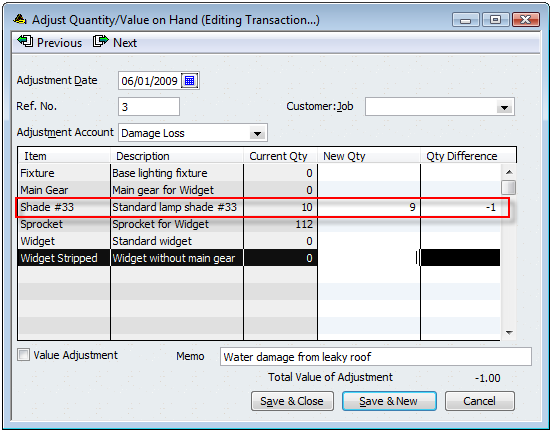
I had 10 of the shade item on hand, but one was damaged in a storm. I enter either the new quantity and let QuickBooks calculate the difference, or I enter the difference and let QuickBooks calculate the new quantity.
QuickBooks is a double entry accounting system, so the adjustment is always going to balance a change in the inventory asset account against the account that you select. In this example this is a decrease in the quantity that I have on hand. That means that my inventory asset account (as specified in the item record) is reduced by the average cost of the item multiplied by the adjustment quantity, and that value is moved into the adjustment account I specified. In this case, I picked an expense account for damages. Most common adjustments are going to involve an expense or COGS account, usually.
Why do you need to enter an account to post against? Well, you can’t just add or subtract inventory items without some explanation. Changing the quantity will change the value of your inventory assets. If you are removing inventory because someone dropped an item and broke it, you have to reduce the value of your inventory (the inventory asset account) and then offset that in some matching account, such as a “damaged goods” expense account.
The keys to remember here are:
- The quantity is changed.
- The accounts are adjusted by an amount equal to the quantity multiplied by the average cost of the item. You are adding or subtracting value in your inventory asset account, and offsetting that in an expense or other kind of account.
- The date is critical, because you may be changing the balance on hand for a date in the past. This can change inventory valuation calculations, turn “build” transactions into pending builds, and more.
Value Adjustments
In the normal course of business it is unusual to make a value adjustment. I’m not a CPA or tax accountant – you should talk to your advisor before making this kind of adjustment. Usually when I see someone trying to make a value adjustment it is because the either don’t understand what is going on, or they are trying to correct an error that should actually be corrected by finding the original transaction and correcting the error there.
When you check the value adjustment box you can now enter not only a new quantity, but a new value for this item.
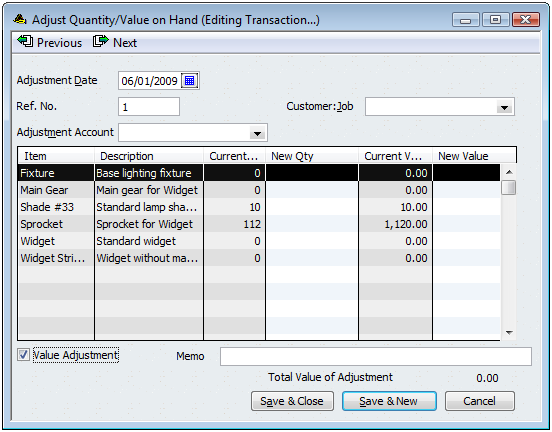
This kind of adjustment will change the average cost calculation for the items you adjust. QuickBooks will take the new quantity, the new value, and calculate the new average cost by the following formula:
Avg cost = (original value + difference in value) /adjusted qty on hand
In some ways this is the equivalent of hitting the QuickBooks inventory valuation system over the head with a baseball bat. You are (potentially) revaluing your inventory – creating (or losing) value in your inventory asset account AND recalculating the average cost of the items you are adjusting. This may be tempting, but I recommend that you do NOT do this unless you are really sure it is what you want.
If you feel that the average cost is not correct, you can enter a new value for the item. Note that the difference in the value is going to be posted to the inventory asset account and the selected account in this transaction. You can’t just create (or lose) inventory value, you have to post it somewhere.
Again, if you think that there is an error in your inventory valuation, it is probably because you have an error in an item receipt. Find that item receipt and correct the problem (if it is fairly recent), rather than making this adjustment.
The date is VERY critical here. You are changing the average cost of the item on the date you have entered. If this is a date that is in a prior accounting period you could be changing your financial statements, and that might not be a good thing to do.
This is really helpful for someone who’s working through figuring QB out on my own! I have a question though. I’m a jewelry maker. I have an asset account called “raw materials” and one called “finished jewelry”. I also track my finished pieces individually as inventory items tied to this asset account. I don’t track each individual raw material (ie each bead, each inch of silver wire, etc) in QB, as I have another program which works amazingly for this, as well as for my pricing. When I make a new piece, I add a new inventory item, for example, silver ring. I price it at whatever price, and leave qty and value on hand empty. I then do a qty/value adjustment, using the “raw materials” asset account as my adjustment account, thereby moving the $10 of raw materials into my “finished jewelry” account. I would do the same thing if I needed to disassemble a piece back into raw materials. From my perspective, the money is going into the right places, and everything balances out. Does this sound “legit”? I’ve been struggling with this aspect of my business for a while, and thought I like to get some feedback on what I came up with. Thanks!
dan
Dan: Peter pretty much covers it (I always like to see others post answers here!). QuickBooks isn’t set up to handle your kind of custom manufacturing very well.
Thanks, Peter…
Dan:
I know Charlie can answer, however I thought I would shoot you a response to your inquiry. The answer is, well perhaps. The perhaps is because in your post, you did not indicate how the raw material inventory purchases are posted to your QB file. That is, when you purchase the raw materials needed to prepare a finished jewelry item, what account do you debit when you are purchasing these raw items, i.e. beads, wire, etc…??? if the account you debit is raw materials, then when you post the inventory adjustment you propose, then I would agree with your accounting entry.
Thank you thank you thank you! I have been so confused about the Value Adjustment thing. It also helps tremendously that you mentioned how important the DATE of the adjustment is. Now I understand why I’ve been having so much trouble with making my inventory adjustments!
Peter, yes, that’s how I do my purchases, they go right into raw materials, with just a memo of what the purchase actually is. Thank you so much for your reply!
Just wanted to add an “amen” to your comment about the friendliness of the inventory adjustment screen. There is a lot of time wasted scrolling to find the handful of items that are needing an adjustment. I don’t know the reasoning behind it but a search feature would certainly make life easier.
A second amen goes to your emphasis on the importance of the adjustment date.
Thanks for your insights.
Karen, you can keep an eye on my other blog (http://ccrqblog.ccrsoftware.info/) for an announcement on the release of a product that will make the adjustment screen easier to deal with – although I’ll have to say that it probably won’t be released until late summer, more or less.
Pls advise if we can scan in inventory items to set them up in QB Premier 2009 ?- what brand of scanner do we need to buy?
the one used by QB for POS ?
thanks for your help
Peggy
Peggy, that is a bit off topic, and it is also something more complicated to help you with in just a comment. There are bar code products that can help you in the Intuit Marketplace. You can use any scanner that plugs into your computer and sends the info to the keyboard, but that might not be exactly what you need, it depends on what you are starting with. Adding items to the item list requires a lot of info and scanning might not help you.
Hi! I just have a simple clarification. Isn’t it that
Avg cost = New Value / adjusted qty on hand
such that New Value = original value + difference in value
?
Thank you for pointing that out Ephraim, I did have the formula upside down (it is corrected now). I wrote that article at the time I was looking at the Australian version, so everything was upside down (sorry, bad joke).
I deal with agriculture and use an equity adjustment account to offset grain inventory on hand. I adjust the value to the local cash price at the end of each month so that the balance sheet is accurate. When the grain is sold, of course, it comes out of inventory, and the income is posted to grain sales, using a sales receipt. There are various accounts set up for the adjustments assessed also.
Is there a reference you can recommend about how to import from Excel into QB? I use a lot of classes and divide some transactions proportionately between them. I have seen group transactions divide for example bills by % between accounts, but not between classes. I would like to be able to memorize a group of classes, with associated %, and divide income or expenses among them by those %. Currently, I have to do it first on an excel ss and then copy the entries into QB.
Beth, that is a bit beyond what we are discussing in this posting. In any case, take a look at a demo version of the transaction importer from Baystate Consulting. I have a review of the Exporter by them at https://qbblog.ccrsoftware.info/2009/06/exporting-quickbooks-transactions-with-transaction-pro-exporter/ – the importer is similar. I don’t know if it will do what you need or not, but you can take a look.
I need help. One of the owners of our business had some inventory items that were basically given to the business as a form of equity. The business sold these inventory items and the funds went into business bank accounts.
I have already created the items in QB, but I didn’t enter the correct beginning qty on hand. There are only 5 pcs of the same item that I need to adjust. I have already sold these items in quickbooks on invoices and received payment.
How can I bring in that inventory and get the correct qty as well as giving the correct equity value to this owner?
James: If this is an “inventory part” item (I assume it is), you established the “inventory asset” account for the item. If you go to the inventory adjustment screen you can make an adjustment to increase the item quantity, and you can select the appropriate equity account as the account to post this value to. You should date the transaction to be before the sale of the item, unless it is in a closed accounting period.
My item list shows -1 as the quantity for one of my assembly items. That is correct, I do not have any assemblies at this time. And if I open the build assembly window is says quantity on hand is -1 because I have one on a sales order. I think this is correct also. However, in the adjust inventory window the qty on hand is zero, not -1. Also now my overall inventory on hand is not correct. How do I fix this?
Deb: In your preferences, under “Items & Inventory”, do you have a check in the box “Quantity on sales order” under “when calculationg quantity available”?
If you do, then in the build assemblies window it will show you the quantity on hand, quantity on sales order, and quantity available.
I’m guessing that you don’t, but I’m not sure. Note that having a -1 on hand means that you sold more than you have on hand. Negative balances aren’t a good thing in QuickBooks. In any case, having one on the sales order will NOT affect the quantity on hand, it only affects the quantity available if you have enabled that calculation (which I usually recommend you turn on, in most cases).
The quantity on hand that is displayed in both the build assemblies and inventory adjustment windows depend on the date that you have for the transaction. If you have the same date set in each window, you should see the same on hand balance in both places. Watch the dates…
thank you for such a quick reply! you guys are great, you give the best answers and yes it all works out now, thanks
Hi Charlie, thanks for some great tips on this site. I couldn’t figure out why my “on hand” sometimes didn’t match the “adjust/quanitites fields” and it was all due to my invoice dates that you warned about.
However, now after reading your info I realize I have some other problems! I have lots of inventory items but I do not manufacture so no assemblies. Every inventory item I have loaded in respective accounts as “COGS” on the cost side, “Sales Income” on the sales side, and “Inventory Asset” under the Inventory Info. So when I make an inventory adjustment I have been using the “Inventory Asset” Adjustment Account. Something tells this isn’t right as QB warns me that this is neither an income or expense account. Should I be using the COGS instead for most adjustments? I realize there are things such as damage, expiration, etc where other accounts would be used. What is an example of when an adjustment account would be “sales income”?
Also, I have located all of the inventory adjustments where the “value adjustment” was checked. I had no idea the impact it was making. Just thought I was adding a column for viewing. Can I go back and uncheck them all to correct some of the avg. costs without a whole lot of damage?
Sorry lots of questions, I know you’re not an accountant.
Sheryl: The account to use in the inventory adjustment depends on what kind of adjustment you are making – but I can’t think of any situation where you would use the “inventory asset” account. THat just doesn’t make sense.
If you have a loss of inventory due to damage or expiration, you should have an expense account for these kinds of things. You want to move the value of the damaged goods OUT of inventory assets and INTO the damaged goods expense account. It is a loss, you want it to reduce your profit AND reduce you inventory asset balance.
QB is a double entry system. The inventory adjustments automatically make one side of the entry “inventory assets”. You select the account that will be the other side.
When would you use “sales income”? Perhaps if a customer returns an item. However, I’d usually do that with a credit memo instead.
Going back to make changes to the existing adjustments? I’d be really careful, because that is changing your financial statements. I can’t really say if that is what you want to do or not based on the small amount of info I have.
Sorry, but another question. You don’t talk much about income here and I run a monthly income report which I don’t think is entirely accurate after reading your info. It must be based on sales price minus avg cost results in income reported. I think, for the most part, my income report is being skewed up because: if I paid $2 for a box of bandaids 4 months ago and received in a new order of bandaids for $2.50 this month (as prices always go up!), making my avg cost say $2.25, my monthly income report isn’t going to be using the true cost of $2.50 for that box of bandaids I just sold but use $2.25. Showing I made $.25 more than I really did for the month? Is the only way to get avg. costs to today’s actual cost is to run them into the negatives and then receive new inventory? Grrrr. Hope this is making sense.
Again, hard to answer – I’m not sure what report you are looking at.
QB is an average costing system. If you paid $2 last month and $2.50 this month, and the average cost is $2.25, then the actual cost of sales (based on average costing) SHOULD be $2.25. That is the way it works. If QB took out $2.50 on the most recent sale, it would throw your books out of balance.
So, yes, it might look like you made a higher profit this month, but that is correct. You are carrying the cost of the item from last month.
Hope that makes sense…
We sell about 150 items, when a sale is recorded, is the CGS journal entry based on the average cost of that item prior to the sale? Does the current average cost of an item go back to the “beginning of time”?
Sidney, when you invoice an inventory part (or assembly) the current average cost is posted to the account you specify as the COGS account. When I say “current average cost” it is the average cost of the item at the date (and time) that you ahve for the invoice date (you can’t see the time). Note that if you later make some inventory adjustments that are dated prior to that invoice date, QB will go through and change the COGS value based on the new average cost at that date.
Tehcnically yes it is the average cost for the history of the item. but the way they calculate it, if you bring the balance to zero at any point in time, the average cost is technically just the average of the received costs since that zero balance. Hope that makes sense.
And if you have negative balances on hand for an item, the COGS values are going to be very odd. Their calculation doesn’t handle negative balances well.
Your answer did clarify my confusion somewhat. If for example, the inventory represented purchases on 3 occasions at different prices and 2 sales would it be using LIFO or FIFO in determining the value and ultimately the average cost of what was still in inventory?
Sidney: LIFO, FIFO and average cost are three ways to evaluate the cost of your inventory. QuickBooks only does average cost, it won’t do LIFO or FIFO. Let me simplify this a bit and talk about purchasing on two occasions. I buy 10 widgets at $10.00 apiece. My cost of inventory by any method is $100 total, or $10 per item. I buy 10 more widgets at $20 apiece. My total cost of inventory is now $300. The average cost of an item per QuickBooks is $15 each.
If I sell one item, QuickBooks will post $15 to COGS, because that is the average cost of your inventory item. Your inventory total valuation is now $285.
If you were using LIFO, the COGS for that one item would be $20, and your valuation would be $280. If you were using FIFO, the COGS for that one item would be $10, and your total valuation would be $290. But, QuickBooks doesn’t do LIFO or FIFO, just average costing.
Have been using quickbooks for some years and have finally decided that it would be a good idea to keep track of each items profitability. We make and sell wine by the case with each wine entered as an inventory item. As we don’t actually buy a case of wine then resell it I have never bothered with it so I am left with hundreds of items with negative values on hand.
To calculate the margin generated from sales of each items is it just a matter of going back a few months to when we last did a stocktake and entering a value and qty on hand adjustment? Do I have to enter a cost price into the items description or would the cost prie be calculated as the total value/total qty. Assume all current sales would be taken into account.
As I don’t purchase a case of wine from a vendor for a price. Could I calculate the cost price by adding all the component bills for a bottling run of wine to a specific account for that item eg wine cost, labelling costs, bottling costs, freight cost; and then have QB calculate a cost price for me.
Thanks
Adam, I’m a bit confused by your statement. You say you don’t actually buy items and resell them, but then you talk about doing a physical inventory count. So I’m not sure what you are doing.
Charlie, sorry my post was bit disjointed. We are a winery and vineyard, so we harvest grapes make them into wine and then get the wine packaged offsite.
So we don’t purchase cases at a certain cost, we manufacture them and keep an inventory count of the amount produced.
I really have two problems;
1. Calculating the cost to produce a case of wine. (can quickbooks do this for me?)
2. Monitoring the profitablity of our sales of the wine.
In the past we have just used quickbooks to invoice out indivdual wine items but have not used it to record how much stock we have on hand and the cost of that stock, hence I my item list is full of wine with negative On hand values. I have now calculated the cost (currenty done outside of quicbooks)of some of my wine items and want to enter a value and a stock on hand count as at 1st July and report on their profitability from then on.
Hope this makes it a bit clearer.
Adam, you are in Australia? Note that I usually work with the US edition, and there could be differences between that and the Australian version. They aren’t quite the same thing.
A couple of things here. You existing items have negative quantities, so your physical inventory count is off, and therefore your inventory asset accounts are off. You have a mess to clean up if you are using QuickBooks to do your financial statements, and it is hard to say what exactly to do without seeing your files. At some point you are going to have to do a physical count of your inventory items and make an adjustment to get the quanityt and total inventory values accurate. And when you do this, it is going to change your balance sheet. You probably should do the adjustments against a clearing account, and then ask your accountant what to do to reconcile that clearing account.
Cost of a case of wine – sure, you can get that once you have things balanced and set up correctly. Again, hard to go into detail without seeing your files and knowing more about your business. You have to decide at what point you are going to move things into inventory (or not). Some vineyards will start with the harvest, some with the crush, some later than that. And how to value the inventory that you grow/crush is an interesting question. Again, a better question to ask your accountant.
Sorry for such a vague answer…
Thanks Charlie,
Indeed I come from the land downunder, but in my trawling through the quickbooks forums I found a recent one on your site (quiet a good one too). I am aware of the points you just made, I suppose I was hoping for a quick easy answer to a question that needs a bit of in depth review of all our accounting proceedures. I’ll review it with our accountant.
Thanks for your help
Sorry, Adam, no quick fixes, because I would need to know a lot more about how things are set up in your file. How you are expensing or amortizing your growing costs (the cost of producing the press, or the bulk grapes if that is where you are inventorying). And it is hard to talk about how to fix old transactions without knowing exactly what you did before.
If you really need to figure out the costs of a particular case of wine, it depends on how you are tracking costs for growing, pressing, processing, bottling, all the steps. I studied viticulture back in the mid 70’s, but all my focus was on on culture of vines, not the business side of things.
You CAN use QB to figure out the cost of a case of wine, but you have to make a lot of decisions on how to account for the costs at various stages. Also, I don’t know if tax and accounting laws differ down there from up here…
Is there a logical explanation as to why Quickbooks would show a different average cost for an item than Excel? When I exported all the purchases and its related costs for that item into Excel, it arrived at a different average cost?
Sidney, I’d have to know how you calculated the average cost in Excel, and some more about the transactions you have. There can be many different reasons. QuickBooks will give you an odd average cost if your current on hand balance is negative, for example, until you bring the balance back up. The average cost calculation is a bit more complicated than just taking every purchase you made and adding them all up.
We are using Quickbooks Pro 2008. Is there a report which could tell me when there are multiple users, which areas cannot be accessed simultaneously by multiple people, specifically in inventory related areas.
Sidney, I don’t believe so…
Is there a logical reason why quantities on hand appearing in the Item List would be different than the quantities on hand in the Inventory Valuation Detail Report?
Sidney: Sure! The simplest place to start is the date of your report. Set the date to “all” – you could have future dated transactions that don’t show in the report otherwise. The item list is not limited by the dates. See this article for a discussion of this kind of thing: https://qbblog.ccrsoftware.info/2009/04/reconciling-quickbooks-inventory-balances/
That link was very informative. Unfortunately, those situations did not occur by us! Any other ideas? Would you happen to know secondly, why the Item List would be different than the “on hand balances” in the Adjust Qty/Value on Hand function? The latter will show -0- balances when in fact the Item List is accurately showing a balance!
Sidney: Again, the adjust quantity/value screen is date dependent. You have a transaction date, it shows the balances ON THAT DATE, and that can vary from the item list.
Pick an item that has an apparent difference. In the item list, right click and choose the “QuickReport”. Set that report date to “all”, then compare the final balance to the item list. It should match.
If not, make a backup copy of your file, run a “rebuild” from the file/utility menu. Then make the same comparison.
Charlie:
A question: We are a manufacturing company (furniture parts). We buy rough, wet lumber. Then we kiln dry it, which adds value to it.
When the lumber is originally bought, its value goes to an Inventory Asset account. Then I have another Asset account, which is Kiln Drying Asset. So when we dry our lumber, the extra value needs to be added to the Drying Asset account. But where does the value come from? COGS or Expense? This lumber is processed further later on and sold, at which time the lumber value AND the drying value would be subtracted from Inventory and added to a COGS account, but we usually Kiln Dry large amounts ahead of time. So the drying value is basically Work In Process. But I cant figure out what account this value would be coming from.
Hope this is clear enough, thanks in advance for any advice you can give!
Jason, this is a question to direct to your accountant or CPA (and I am not either of them). The asset cost of the items have to come from somewhere. I don’t know how your business is set up, so I can’t give you a good answer.
Here is a thought to consider (and, again, I am NOT a CPA). You have costs that are associated with the drying process. To make it simple, perhaps you are paying for natural gas that you are burning to run the drier. How are you paying for that natural gas? Are you writing a check to the gas company? That is probably going to an expense account. You can do an adjustment to move some of that value out of the gas expense account into the inventory asset account, perhaps. Reducing the expense, putting it into inventory asset.
I’m not sure if that is the correct way to do it, however. There are tax implications here, and you may find Federal or State regulations on this. Talk to your CPA…
Is there a way to print an inventory adjustment?
Kandace: That depends on what you are looking for. If you want to see a report that shows all of the items adjusted in the same transaction (if there are multiple items), then “no”. You can right click on an item in the item list and select the “QuickReport” to see all adjustments for a particular item…
Thanks for the info Charlie.
I have been adjusting inventory qty and value by hand with no problems until today, which is the first day of my new fiscal year. If my inventory said 5 and I really had six I was writing new quantity 6 but QB was writting total 11! instead of just adjusting the new. Does anyone knows what the problems is?
Francesca, did you enter the NEW value as 6, or did you say the DIFFERENCE was 6?
I have a tea business. I purchase tea by the pound(bulk) and then package it into saleable units (1.1 ounce/unit). In QB I enter the inventory purchased as $/ounce. What I would like to know is how I’m supposed to account for the labor/burden/packaging/labeling that is added to the finished good. For example, I have 160 ounces of tea at $1/ounce. I will convert this into roughly 145 packages of tea which will then be valued at say $1.40 per ounce. When I create a finished good, will QB automatically deduct the Raw Material and convert to Finished Goods so that I properly account for my inventory at the end of the day? I plan to value my finished product by another unit of measure (1 unit or item). In other words, I will convert 160 units (ounces) to roughly 145 units (FG). Any thoughts on how to do this efficiently/effectively.
Thank you.
Mr Tea: A bit off the topic here. Assuming you are using Premier or Enterprise (you don’t state what you are using), you can create the finished good as an inventory assembly item. You can then create a bill of materials for the item and add your raw materials, as well as packaging and labeling. You can add burden – an estimate of your labor and overhead, if you wish. Then when you build the assembly all that is rolled into the assembled item. There are other articles in this blog about manufacturing issues.
ok i am using pro. What is the diff between Pro and Premier?
Lot’s of differences, too many to list. The basic program is the same as Pro. You have more options. The one that is appropriate here is the “inventory assembly” item, which allows you to create a part list for an item and issue “build” transactions. You can read about this starting at https://qbblog.ccrsoftware.info/2008/04/quickbooks-manufacturing-tutorial/
You also get a “sales order” order type, which is very useful.
Lots of other nice things – I generally don’t recommend Pro for any business that is building or selling things, Premier is better suited. But, then, it is more expensive.
I made a mistake entering a new inventory part with a bill. When creating the new item, I filled in the quantity section. Apparently this was a mistake, and I should have left it blank to fill in automatically when the bill was entered, because I now have double the quantity I should have. I can’t figure out any way to change this number other than going to “adjust quantity.” The problem is the adjustment account. I don’t really want this adjustment recorded at all since it was just a data entry error, but even so, I have no idea what account to post it to. None of them seem appropriate and I don’t want this recorded as an expense that affects my P&L. Please help!
Julia, you have two transactions entered for the item. One from when you added the new item with a quantity, one from the bill receipt. You need to delete one of them, not make another adjustment. Right click on the item in the item list and select the “QuickReport”. Set the date range to “all”. You will see the transactions. One is an adjustment, the other a receipt. Double click on the adjustment to open the window, confirm that it is the quantity you expected, ctrl-D to delete. No more duplicate…
Hi Charlie,
Very good Blog. Congratulations! We buy inventory parts for resale and receive a discount on the entire order. The bill comes in with all the items at the “current” cost, and then there is a line item discount, let’s say 5% off. Is there a way to spread the discount across the items being received? This will give us a truer average cost for the items. We are posting the discounts to a COGS account. This gives us a real number for COGS, but it’s not adjusting the cost of the item on the Inventory Asset Account.
Thank you,
Omar
When you do the receipt you can manually figure out what the discounted receipt cost is, and use that instead of the “real” cost.
Or you can do a “value” inventory adjustment against that COGS account to reduce inventory asset by that amount
Hi Charlie, sure hope you can help me, as I have searched and cannot find an answer for my particular situation. I am using QB Pro 2009. We are a small door manufacturing company, in business for 1 year. Every inventory item I have is loaded in respective accounts as “COGS” on the cost side, “Sales Income” on the sales side, and “Current Asset” under the Inventory Info. We purchase approx. 60 items for inventory such as hinges, screws, thresholds, doorsweeps, etc. Larger doors & glass are input as non-inventory items because they are ordered specifically for a customer. We do not use assembly items. We were told by a CPA in our first month of business, that we could do a quarterly or yearly adjustment to our inventory, but I cannot figure out what adjustment account to use as the adjustment is neither a loss – an expense, or a gain – income, since the items were used for customer jobs and we did receive income from those items.
Hope this makes sense to you. If there’s a better way to set this up, I am open to suggestions. Thank you so much for listenting. Kathy
Kathy, that is a bit hard to talk about in comments in a blog like this. I’d need to know a lot more about how you are using QuickBooks. Your CPA should be able to tell you exactly what adjustments to make. I would need to knwo if you are talking about the inventory items or the non-inventory items, how you are using the items you buy, how you are handling the items you sell, and more. Lots of detail before I can give you much direction.
Hi Charlie,
I have a client who created inventory items for all his items instead of creating “non-inventory” items (which would have been more appropriate).
He uses his items to invoice customers but when he makes purchases from vendors he posts on the expense side rather than the item side and has the expense pointed to his cost of goods sold account.
When creating his items he entered the “purchase price”. Which from what I can tell when he sells an item it is also posting to the cost of goods sold.
He now has negative quantities for his items and a negative balance in his inventory asset account.
How would you suggest this I fix this?
I know what I need to do going forwards; I am just not sure about how to fix it for the past year.
What do you think?
Jennifer, that is a bit complicated to discuss in this format. And I’m not a CPA. And I don’t have enough details. If they posted to COGS directly when purchased, AND they sold the inventory asset items, then they are posting to COGS a second time (the COGS account in the item record is posted to when there is a sale). But, if there is no “value” or cost of the items, then the posting to COGS from the sale may be zero? I’d have to see those transactions to see if a value is there, and if so then you would have to look into doing an adjustment to move the quantity back to zero and post against that COGS account, probably. But that is just a guess, without seeing the actual file. Make a copy of the file before you do any posting!
Hello, all – Just discovered this site, and I have a question related to this topic. I am a small online retailer, in the process of converting to QB Pro 2008. I was working with a CPA who has now retired, so I cannot ask him my last few questions.
Long story short, per his advice, I entered all purchases of inventory items against “Purchase for Resale”, which was set up as a COGS account. I have now created all the individual inventory items with zero quantity and a good average cost, and I have just completed a physical inventory, so I know how many of each item I physicall have in stock.
Our next step was that he was going to show me how to get the $$ out of Purchase for Resale and into the various respective items. It looks to me like I could do this using the Adjust Quantity/Value transaction, but I’m not sure what goes where, and I don’t want to get it wrong, as I will be doing this for well over 100 inventory items.
Let’s use a hypothetical example – say I have actual QOH of 15 for Red Widgets, which have an average cost of $6.00 each, and I have 10 Blue Gizmos, which have an average cost of $5.00 each. And again, the purchases originally went to the COGS account “Purchase for Resale”. How would I move $90 from “Purchase for Resale” to “Red Widgets” (qty 15 * avg cost $6.00) and $50 from “Purchase for Resale” to “Blue Gizmos” (qty 10 * avg cost $5.00)?
And lastly, if after moving most of the $$, I end up short in Purchase for Resale, that is, not enough dollars left in it to be moved into the remaining item(s), what should I do? And same question in reverse – if I end up with too much $$ in Purchase for Resale, that is, I’ve moved everything into individual items and still have $$ in the resale account, this would most likely be due to “shrinkage” or theft, and how would I get those remaining dollars out of Purchase for Resale, which should be zero balance when I’m done?
I am really regretting that we didn’t take the time to get all of this entered correctly at the time! I am not very concerned about having the transaction dates being now versus earlier, as I don’t need the inventory data for prior transactions, but I’m concerned that I may mess other accounts up big time if I don’t do this right.
Thanks,
Sue
Sue, I hate to say this, but I’m not sure that I can help you in a few comments in a blog like this. One problem is that I’m actually “on the road” and out of the office, so I have limited time to look at the blog. Another is that I’m not a CPA so I don’t like to give very specific answers like what you need without having my hands on your system. In a very general sense, inventory value adjustments are what you probably need. If you are expecting to move ALL of the cost from the purchases account, then if you find that you “overdraw” it, that amount has to then be adjusted off against an expense account like “shrinkage” or “loss by theft”, etc., with a journal entry (not an inventory adjustment).
Make a copy of your file, play with things, if you don’t like the results then restore that backup. And perhaps get a local ProAdvisor who can look at your actual files and give you informed answers.
Hi (excuse my English),
What a long discussion (some related and some related in a way…).
After reading through Adam’s (the vineyard), Jason’s (wet lumber) and Mr Tea ($/ounce), and a post https://qbblog.ccrsoftware.info/2009/03/shipping-costs-and-quickbooks-inventory/ , felt that I got the same issue and was hit by the feeling of sometimes……haaaa I got it and sometimes….are you sure ? dilemma.
My story:
I’m a transport company that purchase sand and deliver to my customers. I bill my customer one amount that includes the (sand cost + small markup + transport fees + moving up and down the lorry). The inventory works fine and very pleased with Quickbooks Premier 2008 Asia version.
Now:
I won a tender from my government that enables me to mine (? or sand mining operation) my own sand and pay the government the royalties on the sand. The mining operation will incur various costs relates to the mining process.
It seems that now, I’m not buying any sand from anyone. How to enter into quickbooks the inventory quantity from the mining process and the cost/value.
Thanks all.
Thanks Charlie for a great-great blog.
MNHarun, I’m not an accountant, so I’m not sure what the best would be. Also, accounting practices as far as costing (etc.) of these kinds of resources are usually governed by laws in your country – and will vary from one country to another. This kind of thing is way over my head. Sorry…
I have a several questions. We are currently using Quickbook program. I am facing following problem. Can you give me suggestion? Our inventory items are locating in different places. In other word, we have several warehouses. How can i use Quickbook for moving items from one warehouse to the another? And if one warehouse sell our item, how we should enter sales receipt?
thank you
Inkhy: That is a bit off topic, and comments in a blog article like this aren’t a great way to answer those kinds of questions. There isn’t a great answer for multiple warehouses without using an add-on product. You can use “subitems”, where you create an item “warehouse A” and “warehouse B” and then assign items under that. Then you can use adjustments to move items from one to the other. That might not work in all situations, though.
I am designing handbags and producing it by using subcontract labor. Dan mentioned that he uses a 3rd party program that helps him to track inventory, cost of the item, etc. What is that program? I would like to try one. I have 2009 Mfg Premier, and thinking of trying to keep very detailed inventory outside of QB.Thank you.
I have lets say 10 bags (build in my inventory). I am giving away 1 bag for marketing purposes. What is the best way to process this transaction in 2009 mfg premier QB? Do I adjust quantity by 1 and click ‘value’ as well since the value of my inventory will be reduced by the cost of that 1 bag, OR just leave the value box along and adjust quantity by 1? It is my understanding though that the average cost of other 9 bags will increase if I do not use value adjustment box. Thank you.
Diana, I don’t know that Dan was using an outside program (didn’t see that reference) but there are several available. HOWEVER, please note that these are all (to my knowledge) fairly expensive programs, more expensive than QB itself. And some require that you use Enterprise…
For the adjustment question, if you are removing an item for marketing purposes and you want to use an adjustment, do NOT click the “value” box. You don’t want to adjust the average cost of the items, you just want to expense out that one item. Pick an account to post to that is something like “promotional expenses”. A regular adjustment will remove the cost of that item from inventory asset and post it to that expense. It will NOT adjust the average cost of the remaining items. That would be the typical approach to take.
how do i setup the inventory adj account. i have enventory with a negative number and i need to fix . it ask me for and income or expensive account.? ok, need help.
thanks
Teya, I can’t give you s specific answer. The question is “why is it negative”? Is it because you haven’t been receiving the item correctly? Is it because you have some sort of problem with theft, loss, poor quality, scrap, or what?
We import wines from a range of different countries and purcahse in different currencies. Some slow-moving expensive wines are now significantly more expensive to purcahse today (due to currency changes and supplier price) than our book value shows our current stock. It makes sense to me to adjust the item value of the stock which we have on hand to better reflect current purchase cost/value.
Is this a reasonable scenario to proceed with inventory valuation? Would we set up an income account for these adjustments as we are increasing the value (not qty) of our stock?
Thanks, Graham
Graham, I’m not an accountant or bookkeeper so I’m not qualified to give you advice here. You can use inventory adjustments to change your inventory valuation, but you have to post that difference in cost somewhere. You need to talk to someone who is qualified to determine if you should do that, and how to handle the financial implications.
Graham – You can adjust your inventory valuation to current cost. I would use a Cost of Goods Sold account called Inventory valuation adjustment to distinguish it from other Inventory adjustments (for damages/losses, etc).
This will increase your Inventory asset value and decrease your Cost of Goods Sold.
Then, when you sell that item, you will be increasing your COGS account by a more accurate (higher) amount.
At year end, make the Inventory valuation adjustment (as well as qty adjustment) and be sure to review it with your accountant.
Thank you, Laura. Note that Laura provides QuickBooks and bookkeeping advise (for a fee) – see http://www.centsablebookkeeping.com/
I refer clients to her often, she provides excellent service.
Charlie we import and resell products. We were using simply accounting but swithced to quickbooks premier 2010. We are small so we are in the process of reloading everything for 2010. In carrying over 2009 inventory we failed to fill in inventory cost. So we have for Jan to march inventory volume but no value. We have reloaded everything up until June and would not like to have to start over again.
You said “In the normal course of business it is unusual to make a value adjustment”
What do you suggest. Thanks for your help
Kim, I can’t give a specific answer without seeing your data. Yes, I said “in the normal course of business”, but this isn’t a “normal” situation. It is possible that you could do a value adjustment to get everything back to what it should be, IF you know the proper values.
Another possibility – if the ONLY time that you were missing costs was when you entered the carryover transactions, you could go back and edit those transactions to add the cost value. I can’t tell if that would work for you or not.
There are a number of variables here.
Hi Charlie, I love your site, thanks for all the help you provide! I have a couple of questions in my mind as a result of reading all the prior discussion.
1) The earlier question from Diana about using the inventory adjustment to accommodate a bag to give away for marketing purposes was curious to me. It seems a lot easier to do it that way as opposed to what I’ve been doing. In the past, for a transaction like this or a charitable donation, I’ve always posted the transactions required to essentially sell the item from the business to the business with the customer set to business use. The form of payment ultimately ends up posting to the donation or marketing expense account. Obviously this approach requires a lot more transactions to deal with versus just doing an inventory adjustment posted to the right expense account. Is there any difference in the underlying accounting that makes my burdensome approach different?
2) I’m using Pro version so I’m having to do a little hokey workaround to use inventory adjustments to build an “assembled” handmade craft item for sale. All the raw materials are entered as negative inventory adjustments. Value adjustment is not checked. Once all the raw materials were removed from inventory, the “Total value of adjustment” amount at the bottom of the screen showed me the valuation of that build which I then used to calculate the cost of the handmade items. Since I built 10 items, I divided that “Total value of adjustment” amount by 10 to arrive at the cost of each handmade item. Then I went to the item list for the new built items and entered the cost per item to be that calculated cost. In the same inventory adjustment transaction I adjusted the new item quantities to +10. The “Total value of adjustment” amount then dropped down to $0.00. This is what I would expect and think I desired since I didn’t want to change any valuation, just wanted to reposition it from the raw materials to the finished products. Am I overlooking damage I’m doing to the underlying accounting by doing it this way? I’ve got the Adjustment account set to a COGS account, but since there is a net $0 for the transaction, does it matter what this is set to?
Thanks in advance!!
I just had a delayed reaction… I remember now that the reason I was doing my burdensome approach in #1 above was because I had to account for use tax and it was the only way I could automatically calculate and keep track of it throughout the transaction. I guess you can ignore my #1 question unless you have a suggestion for accounting for Use Tax while doing the inventory adjustment approach. Still looking for validation or criticism for my #2 question, though! TIA
Karen, not being an accountant, AND not having hands on your file, I’ll not go into the “use tax” issue. That is always complicated, and there are many different approaches depending on what your local regulations are on this kind of tax. That goes way beyond what I can answer in comments like these. Most likely an inventory adjustment isn’t what you want here, but that is an open question.
For the second item, essentially what you are doing is OK from what you describe. If you are entering a transaction for just one type of item – quantity 10 of one particular item, after you enter the component costs and then get the total value at the bottom, you shouldn’t have to do any dividing. Just post that total amount to the appropriate quantity of the finished product. You can do it all in one transaction. As you say, it doesn’t matter what account you use as it is a zero net transaction, but I wouldn’t normally use a COGS account. I would use an other asset account myself, one set up only for this. You are moving asset value from one item/account to another. Note that if you upgrade to Premier you can save yourself a lot of trouble, as then you have the Inventory Assembly item type and that takes care of all of that for you easily.
Charlie. I just completed a physical inventory of about 300 line items. Now, how do I enter the QOH into QB? Is it through Adjust Qty/Value on Hand? Thanks for your reply in advance.
Dipesh: Yes…
Kathy/Jennifer, my situation is very similar to both of yours(only for furniture not doors). Did you ever find a solution?
Charlie, I think we are referring to the non-inventory items since those are ordered as needed but are showing as negatives due to poor account setup previously. The inventory of the hardware is easy to reevaluate since there will be an actually number to input whereas the order on demand items should never have gone negative to begin with. So although we can adjust the quantity deciding on the adjustment account is proving to be a elusive.
Erica, if they are negative quantities, then they are not non-inventory items. Those don’t have a quantity. If you are talking about account balances, then yes you are probably talking about an incorrect setup. There are many ways of diagnosing those kinds of things, but it really isn’t the kind of thing I an do for you via blog comments. You should talk to a ProAdvisor who is familiar with inventory issues. Or possibly get Laura Madeira’s QuickBooks Solutions Guide book (it is listed in the widget in the right column of this page).
Hi Charlie, I use quickbooks to track bar liquor inventory. Invoices are entered by inventory item and used bottles are accounted for in an inventory adjustment, thus decreasing inventory amounts. But when I take physical inventory, to do an adjustment, I may have a number such as 1.6. When I enter this adjustment, and then do a used bottle adjustment later on, I can end up with a negative inventory amount… do you have any suggestions?
If you do a physical count and adjust to the count, and then later make an adjustment that brings you to a negative level, then you either have a problem in tracking your usage or you are having a problem with loss, theft or whatever. A negative value says that you have either entered a value incorrectly (entering 16 instead of 1.6, for example), that you have missed a transaction (you forgot an adjustment when you added something to the bottle? or someone is removing inventory without recording it), that you are mismeasuring transactions (very good chance of this I would guess – you entered 1.6 but really used 1.8).
You have to determine what the cause of the discrepancy is, take a physical count of the item, adjust it to the appropriate level and to the appropriate account.
DAN-Your question was identical to the one I had – thanks so much! If you ever read this, I’d love to know what software you’re using for inventory tracking of the “little stuff” and pricing – I’m in the exact same boat as you and can’t use the Manufacturing version of QkBks due to operating system incompatibility.
CHARLIE – GREAT BLOG! Have never had more clear explanations of some really complicated concepts. I’ve bookmarked it and I’m sure my accountant will thank you for saving her the headaches 🙂
Mindy – are you using a Mac version, perhaps?
Thank you for the compliment – note that MOST of my new articles are appearing in a new blog, “QuickBooks and Beyond”, found at http://www.sleeter.com/blog/
I have a client which as of 12/31/10 had 900,000 of inventory and as of 1/1/11 the inventory stated 788,000 leaving a discrepancy of 112,000 on the balance sheet. I have recently taken on the project of fixing this and have discovered the issue. I don’t know why or how this happened as there were no transactions b/w these two dates, considering they are 1 day apart, there shouldn’t be.
How do I go back to fix this issue or how to I adjust the inventory to the correct amount so that the balance sheet balances?
Shiraz, you don’t want to adjust the inventory (most likely) without knowing what is creating the problem. It is hard to determine without having hands on your file. You don’t mention what year or product or edition of product you are using, either.
Sometimes the data is corrupted – there is a “rebuild” option that you can run to try to clean up the file. However, Rebuild doesn’t fix everything. You might find it best to work with a qualified ProAdvisor who can look at the file for you. ProAdvisors have a version of QB that has additional diagnostic tools for inventory (depending on what year of product you have).
How would I go about changing the date of an adjustment?
If it is an existing adjustment, just locate that adjustment and then change the date. Note that this can affect other transactions, so be careful. For example, if you move an adjustment out to a farther date, and that reduces the quantity on hand of an item that is used on an existing build, you could turn that build transaction into a pending build. Lots of things can change.
How do you locate the adjustment? i am having the hardest time finding an adjustment that i made that was incorrect.
Celeste, there are different ways to find adjustments depending on what the circumstances are. Sawaya just asked how to change the date, the assumption is that the adjustment is already known. If you want to locate a particular adjustment to change it, you must have some clue that something should be changed? I’d have to know more about the circumstances to give a good answer.
If you right click on the item in the item list you can select the “QuickReport” for the item, which lists all the adjustments made. If you know a date (for example) you can just list the transactions for that date. Double click on the listed adjustment, that opens the transaction window that created the adjustment.
I need to know what I can do about inactive items still showing up on my “adjust quantities on hand” page. It makes it very difficult to keep track of items that are still active and items no longer sold. I run a flooring business and multiple items we no longer sell are still listed on that page.
Nora, I don’t see that in my Premier 2012 (US) version. What product are you using?
Hi there
I wondered if I could ask a quick question – how far back can Quickbooks cope with adjust stock values?
Basically we set up a new file at the beginning of last year (as our old file was too large) and brought across all the balances, stock levels, name lists etc. Unfortunately it has now come to our attention that the average costs were not entered correctly.
If we were to go back to the 1/1/11 and do a stock value adjustment, would it be too much for QBs to cope with then recalculating a years worth of data?
Appreciate any help you can give.
Thanks.
Narelle, I’ll assume that the UK version works like the US version (it should) – you can go back anywhere in time and make adjustments to try to work things out, without too much trouble. The only big things to watch for (and, make backup copies of your file before you try anything!) is if you change quantities, and you are building assemblies, you may find that this creates issues with availability of components. ALso if you change costs in a prior financial period it will change your financial statements for those periods.
I need to know if I can re-adjust a previously made adjustment to Inventory in Quickbooks. It is very difficult to keep exact numbers because of warehouse error, broken items, parts added from salvaged unusable systems, items counted and warehoused with similar but not their correct part number, etc.
I would love to be able to correct adjustments because I am rewarded monthly if I keep numbers exact. And the owner hates to see too many adjustments – especially if they counteract eachother.(ie (2) added one one date and (2) subtracted on another date.
THANKS!
If someone hasn’t closed off a prior period with a password, you can go back to any transaction and change it. Note that the “audit trail” may record that they transaction was edited at a later date.
You have to be careful with changing things in the past, as that may have some impact on your financial statements for a prior period, and if you adjust quantities of inventory down then you could impact things like Assembly Builds or other calculated values. There are some risks and issues…
Charlie, I am setting up inventory in quickbooks for a new business. I entered all items into quickbooks. After entering the first three items, I realized I was putting the quantity in as beginning balance from the invoice. Those are the only items I entered that way. When I went to put the invoice in the 3 items quantity is already included in inventory. If I adjust out the beginning amounts to balance to current inventory and invoice, what account should I use to make adjustment. Quickbooks is asking for either an expense or income account.
If I understand what you are saying, you added a new item to the item list, you entered a cost and a quantity, and then later you want to enter the quantity as an item receipt? And you are trying to adjust out the transaction created by the “add new item”? If this has all just happened, I would just delete the transaction that is created by the “add item”. If you right click on the item in the item list and select the “QuickReport”, and set the date range to “all”, you will see an inventory adjustment representing that initial value. Double click on the record in the report to open the transaction, then delete it.
Charlie, this is complicated but we bring items in and sometimes change them to different items (ex. item 123 is purchased for $2.00 a case, item 124 at $3.00, 125 at $1.00, and 126 at $4.00. At a later date we move all the items to item 999 to be sold as a variety pack). Most the time though items 123, 124, 125 and 126 are sold as their regular item numbers. We do an inventory adjustment entry and deduct all of items 123, 124, 125 and 126 and increase item 999 by the number of units being moved in. Why is it that the value adjusts instead of staying the same when we do that? Usually it increases. How does that affect our P&L? Because I don’t understand the value increase I will instead do the adjustment on the original receiving for the items (when I can, because that takes a lot longer).
Kathy, any kind of adjustment is going to make some kind of financial change,. You don’t mentionwhat adjustment type you are using.
If you do just a quantity change, then the total value of the receiving item will go up. You are moving a quantity, that has a value, from one item to the other. But the AVERAGE cost of the items won’t change.
If you do a value change (or quantity and value) then you are recalculating the average cost of the item. You can keep the total value the same, or change it as well.
We are doing a quantity adjustment, moving several items with various costs to one item. I think what you are saying means that if we move a quantity of 10 of one item that cost $10 each, or $100 total, to a quantity of 10 of another item that costs $5 each, or $50 total, we will see a value adjustment of $50, but the average cost of the item we are moving it to will remain $5. Does that $50 increase our net earnings on the P&L at the time of the quantity adjustment?
If the above is correct, it presents a problem for us in job tracking. We would like to be able to move the 10 items to the new item and have the price of the new item adjust instead of stay the same so that we can look at the job we sell the item on and see our true profit on that job. Is there a way to do that?
If you are doing a quantity-only adjustment, you are not changing the average cost of the item. You only change the total value. So if your first item has an average cost of $10.00, and you adjust it down by a quantity of 10, you are removing $100 of value from that item’s valuation and putting it into whatever account you specify in the transaction. Then, when you increase some other item by 10, you are increasing it’s total valuation by 10 times whatever the existing average cost is of that item. If that item has an average cost of $5.00, then you’ve added $50.00 to that item, takeing that cost from the account you specify.
If you use a value adjustment you can take $100 out of the first item and put $100 into the second item, so there isn’t a variance left over in some account, but that is going to change the average cost of the receiving item.
“net earnings” – that may or may not be changed, as that depends on what account you use when you do the transfer. Usually you are adjusting the inventory asset accounts, or possibly an inventory variance account. How this all affects your P&L is dependent on the accounts you use in the adjustments. Usually these are balance sheet accounts, but it is totally up to you as to what you use.
For “true profit”, that is a hard term to work with. Keep in mind that QuickBooks values inventory on the average cost method, not a specific identification method.
Thanks for your help and explaining that. From what you said, it sounds like I want to do a value adjustment as well as a quantity adjustment. I’ve always been scared to do that because I’ve heard that can mess up your financials. I want to change the average cost of the new item so that when I look at each job where that item is sold, I can see the true profit or loss on that job (I am moving from one item in my COGS to another item in the COGS). I played around with some test data after reading your response and it looked like if I didn’t do the value adjustment, any change in value on the quantity adjustment immediately changed the net income, but didn’t allow me to see what job caused the change. If I did the value adjustment as well, it didn’t change the net income at the time of the adjustment, but if I entered an invoice selling all the items, the net income was affected to the same degree. Does that sound right? I have been doing these changes by going to the original bill where item one was purchased, deducting the item from the invoice and adding the new item and paying the same amount that I did for item one so that the bill did not need to be recalculated (this takes a lot longer), and I believe it has the same effect as doing the value adjustment along with the quantity adjustment. Does that also sound right?
Kathy, this is getting way more complicated than what should be worked out in comments in a blog. You really should find an advisor who can work with you directly, look at how you are setting things up. QuickBooks isn’t really suited for using inventory items to see “true profit or loss” on a job, that is usually done through the job costing features. Manipulating things in detail with value adjustments isn’t normally a good thing to do, in most situations, other than for occasional adjustments. I don’t have a good enough handle on what you are doing to give you good recommendations – and if your adjustments are affecting the P&L then I’m concerned that you are using accounts in the adjustments that aren’t the ones you would normally use in an adjustment in QB.
Charlie,
I found your article very useful.
I am having some questions with our transition to Quickbooks Enterprise 2012 from Quickbooks Pro 2011.
Is there a way to print out these adjustments, we have our account set as COGS and the customer job is saved as a inventory adjustment customer, but we would like to print this and cannot find a way to make either a template/form/use the input screen to do this without printscreen and powerpoint.
Is there a way to print this from the input screen upon completion of inputting the adjustment?
Just print the one transaction as you are doing it? No way to do that.
Print a register of the transactions? Use a “custom transaction detail report” filtered to Inventory Adjustments.
Charlie, I read a couple of your replies and it seems you might be able to help me.
I recently updated my QuickBooks version at work to 2012, we were using 2007 still.
Yesterday we entered a P.O and we just realized today that an item was entered wrong, so I tried to change it after the P.O was already received in Full, which obviously didn’t work, so I decided to delete de P.O and re-enter it. I did that, but after receiving it in full the second time I just realized that my Quantities in the Inventory were also doubled. Usually, I would do an Adjustment in Quantity by Hand, but my total is very high, aroud 26K and i’m afraid this is not correct. Is there a different way of changing it or revert the transaction? Your answer would be greatly appreciated. Thank you!
Otilia, you should have edited the item receipt in the first place, not the PO. When you created a new PO and then received that, as you found you duplicated the receipt because you have the new receipt and the original receipt both in the system. The PO doesn’t increase the quantity on hand, the item receipt (and/or bill, depending on what product you are using and how it is set up) is what adjusts the quantity.
You don’t want to use an inventory adjustment to correct this, you want to delete the duplicate receipt/bill. You can delete the new one, then correct the original, or delete the original and keep the new one.
Charlie, thank you very much! I appreciate your quick response and I found your answer very helpful since it helped me fix my error.
Thank you again!
The correct way to fix imported valuations that are missing, is in the Inventory Center. Look up each item and then correct the imported transaction just like any other transaction. Shame on QB for not highlighting in the import instructions the CRITICAL need to map the “Total Value” on each line of newly imported inventory.
I only have to correct 3000 or so items. Thanks QB.
Charlie,
Here’s my issue. I have 1000 pieces of ItemX that I have been selling at $5 each. They come case packed 10, and now I want to sell them as case packs only.
So I want to adjust the description to state case pack 10, and make the cost of each item $50, and make the inventory say 100 instead of 1000.
However, this makes a HUGE adjustment value – in reality over $150,000 by the time I do each item.
Is there any logical way to change an items case count?
I still have the same amount of product, and they are still worth the same, so I would like to not have a value adjustment on my balance sheet.
Thanks!
colin
Colin, the simplest way to do that is to use the “multiple unit of measure” feature – but without knowing what edition of QuickBooks you have I can’t say if that is available to you or not. You would leave it as “each” for the base unit, set up a “case” unit that is 10 each per case – then you can buy or sell them in cases. If one each is $5, then one case of 10 would be $50, without you having to do anything.
If that doesn’t work for you, do a “value & quantity” inventory adjustment. You have 1000 on hand at an average cost of $5.00 each, for $5000 value. Make a value/quantity adjustment to change the quantity to 100, but the value remains at a total of $5000. So the total value has not changed, the quantitye HAS changed, and you now have 100 at an average cost of $50 each. If you make JUST a quantity adjustment, it won’t work.
We own a bar restaurant. When updating the inventory, what adjustment account do I use. I have my inventory split by Kegs, Bottle, Liquor and Wine. I am having difficulties calculating the profit margin. A bit confused!!!
What account you would use would depend on why you are making an adjustment, Colleen.
You might want to take a look at this article for restaurants: http://www.sleeter.com/blog/2011/04/quickbooks-for-restaurants/
I have an issue that I can’t seem to find a good course of action for regarding our inventory. We have a golf cart parts wholesale business and have inventory well over 8000 unique types of parts at location 1, and only about 200 unique parts at location 2 (location 2 just fills orders mostly from location 1’s inventory). Both locations use QB Enterprise 2012 and each location is a unique company. Because location 2 makes orders from location 1’s inventory and needs to be able to create invoices accordingly we imported the full item list via excel from location 1 to location 2’s company file. With this import came the “items on hand”. Well we obviously don’t have the same number of every item on hand at both locations so we needed to basically zero out the inventory on hand at location 2, do a physical inventory, and enter the accurate numbers. Our accountant tells us that she fears this will screw up our past invoices and COGS etc. We don’t want to pay taxes on inventory we do not have but don’t want to cause a bunch of unneccessary work fixing accounts and inventory if we change quanities. Are our concerns justified or can anyone offer some guidance?
Thomas, it is hard to say, as there are several ways to transfer items from one file to another. Even using Excel. The IIF export/import is different than the Advanced Excel method, which is different than using the Add/Edit Multiple List Entries method.
I’m guessing you used the IIF import/export – which isn’t the way that I would normally do this. I would look at the Advanced Excel import/export (and not map out the quantity field) or the Add/Edit Multiple List Entry method.
I have a pretty major problem that I have no idea how to resolve. Our business is made up of hundreds of items we sell but do not stock. We are primarily a construction or “on order” business. So, most items in our item list are “non inventory” and has been that way for years. We recently had an admin that seemed to think she knew a lot about Quickbooks and without telling me what she was doing changed over 700 items to “inventory” items for tracking purposes. This procedure can’t be reversed and as you can imagine years of selling and buying non-inventory items that have now been converted to inventory has created a substantial issue. We have items that show negative inventory by the hundreds and some with positive by the hundreds.
I need to fix this as we are running into tax filing time and I really have no idea of the best course of action. Oh, the other critical piece of information is that this happened at the end of September and I discovered it in Jan working on year end issues. Since then I have been trying to figure out a way to fix it. Going back to a beginning of September backup and re-entering months of data seems more than daunting if not impossible due to time constraints.
If this is best handled in a phone call I am more than willing.
Thank you
Dave, this isn’t something that I can help you with via blog comments. You need to work with someone who has some experience with this. Feel free to email me charlie@ccrsoftware.com (and let me know where you are located) and I will see if I can refer you to someone who could help.
I would like to be able to, when I invoice a client, adjust the quantity of an item and have the price automatically change as per the quantity. For example, one item costs R180, but if the customer then orders 4 items – which then discounts the item to R170 each – when I change the quantity on the invoice to 4 the price then automatically adjusts to R170 each.
Is there a way of setting this up?
Emma, that isn’t something that QuickBooks supports. The best you can do, without going to some add-on product for invoicing, is to set up per-item price level lists (if your version of QB supports that) for the different quantity breaks – and then you have to select the appropriate price level manually.
I have QB Premier 2011 and it does not show Current Quantity, New Quantity, Current Value, and New Value as your example above, and my older version of QB did. In thE older version of QB I could adjust value and quantity on one screen. Now it looks like I will have to do two different adjustments – one for value, and one for quantity. I like the old way better Quickbooks!
Melody, in newer versions of QuickBooks (including 2011), their is an “adjustment type” dropdown list at the top of this form. You can select “quantity” to just change quantity,”total value” to just change the value, and “quantity and total value” to do both all in one transaction. The minor hassle in the last type is that you don’t see the “current value” – you see the old and new quantity and the new value.
Thanks for the clarification Charlie, I did notice that. I did like the old way better so I could see everything at once, not sure why Quickbooks goes backwards sometimes. I always look for any of your posts first when looking for info on Quickbooks because it is well thought out, stated, and demonstrated. I have never posted before, so want to tell you thanks for all the help I receive from your site!
Thanks! Most of my new articles are in QuickBooks and Beyond, at http://www.sleeter.com/blog/
I don’t see a big difference – in the new system you click a dropdown list, in the old system you had to put a check in that box…
I am realizing that my inventory number in Quickbooks is way off. I use a separate inventory tracking software. We do the accounting in Quickbooks. I have been putting in PO’s, Receiving and Entering Bills and Paying Bills. I set up an item called Inventory in the list (there are 1000’s of parts, merchandise etc…and they change quarterly). We were just tracking the value. However, I was not putting in the Qty….just bypassing it. Could that be where the problem lies? And if so, how do I fix this?
Thank you.
Trish, I can’t answer that without knowing a lot of details about how you are doing things. I’m going to guess that you have some problems here, but I can’t say how to best fix it without hands on the system. I suggest that you find a qualified accounting professional that understands QuickBooks who can sit down with you and go through this in detail.
There are items from the inventory resale/retail that the owner is using as part of Office Supplies, would you please indicate the best way to enter this adjustment in POS and verify in QB Financial? Thank you
What if I simply miscounted the qty when I added the inventory item. I’m off by 1. I need to add 1 to the quantity, what adjustment account should be used? Or what type of account should I create?
Hard to say, Joe. Was the miscount for a prior inventory adjustment? Or was it in an item receipt? It sounds like you entered the value when you added the item – in the “add item” window? In that case, when you added the item, the balance was posted to “opening balance equity”. You can use that same account to correct the adjustment, or you can find the original adjustment transaction and correct that. But, you should have been making some adjustment to clear out “opening balance equity”…
Good day Charlie,
I just want to ask How can i enter a bill without affecting the adjust quantity on hand of an item?
Thank you!
Sincerely,
Jewel
That depends on why you are looking to do this. You can use the Expense tab, and directly adjust an account, for example (don’t use “inventory asset”). You could do the receipt to the item, then do an inventory adjustment to change the quantity only. It all depends on “why”…
Ok noted on that… thank you charlie….
I send demo inventoried equipment to potential customers. I use the inventory adjustment, and add the customer name along with the account (sales). But if I run a ‘transaction by customer’ report it shows the adjustment to both credit, and debit the customer account. So I have 2 line items, one for the customer as an inventory adjustment (positive number), and one is for the account to the customer (negative number). So it ends up zeroing out the balance of what was sent to the customer. How do I change this?
What are you trying to change? Just the report so that it only shows you one half of the transaction?
I need to make an inventory adjustment because the quantity in our warehouse doesn’t match QB. What should I name the account and what type of account should I create?
Hanna, that is something you need to discuss with your financial advisor / accountant. The question is, why is there a difference? Is it because someone stole material, or material was damaged? Is it because you didn’t receive something properly? Lots of reasons that there can be a difference. You have to post the cost of the difference (an increase or decrease) to some account. It can be an expense of some sort, for example. But it does depend on the reason for the discrepancy…
I took over a small shop but kept on using their QB files to retain the customers, vendors and stock database. the vendors and customers were all started at zero but kept inventory with whatever they had in the system. Somehow I am seeing occassional inventory adjustments processed automatically by QB and there is a huge merchandise lost or stolen balance though there is no loss as it is only my wife and I in the store. We make all sales in Point of Sale and receive all stock purchases through receiving items in POS. Somehow there is a disconnect between QB & POS. The only transactions we post in QB is via online banking and matching off the sales to deposits. Purchases from vendors are posted to Cost of Goods upon importing from online banking.
Really appreciate your help with two problems – What can be causing the Merchandise Lost and Stolen balance and 2. Accounts Payable balance has a hugh negative balance…how can I clear these numbers? Thank you!
Scott, I can’t answer questions that relate to QBPOS, as I don’t work with that, or how it integrates with QB Desktop. As for posting from online banking, it does depend on what version of QB you have and what posting method you are using, if you are using a rules based system it sounds like one of your rules is set up incorrectly. Hard to tell without hands on the system.
Thanks Charlie. The accounts I am having problems with are in QB so thought you might have some insight what could be driving the Merchandise Lost or Stolen (just read your blog about initial balance of Inventory and think that may help) and the Accounts Payable balances(this is probably because we paid the vendors when we matched the transactions in online banking but no bills created in QB hence a negative balance). We go to Banking/online banking in QB and match the transactions off, adjusting income/expense accounts to be posted to accordingly. Not sure what rule base system there is. Anyway we can have you look at the books via team viewer or something to help us figure it out? Thanks!
You can look at the account registers to see what activity there is in an account, and trace that back to the transaction.
I’m not taking on new clients at this time, but if you contact me directly I can refer you to some very good people.
QuickBooks Premier 2013. Long time QB user, first time retailer with this kind of inventory tracking. New small business…apparel and accessories. We purchase blank items and add embroidered or printed designs. The blank items are in inventory and all is good. I entered a mock embroidery invoice and posted to an expense acct. I did a value adjustment so the additional cost of the item was reflected in inventory, and posted it to the same expense account. It was a wash, so nothing is on the P&L. Is that right? So, when the item is sold will the all inclusive average cost then show up on the P&L? Just want to be sure I’m doing it right from the start before I get in too deep. I appreciate your time and assistance.
Kelly, I’m not sure what exactly you are trying to accomplish. You are buying blanks, and then doing some value added work to them? When you sell the finished item, you want to have the cost of the blank posted to COGS, but what accounting do you want to do for the design? Is that something you are stocking, or something you create, or what? It sounds like you are making this much more complicated than it needs to be.
Dear Charlie, HappyNewYear
I run books for a Maize Mill where by i buy Grain and process it into Flour which also gives me a byproduct of Bran and the process i also have a loss. i have set up four inventory asset accounts ie Grain, Flour, Bran and Loss. When the Grain store issues say 100kgs to the milling section i may get 65Kgs of Flour, 25Kgs of Bran and the difference is a loss. I buy the grain at $1 per a kg and sale the flour at $1.50 per a kg on the other hand i sale the bran at $.75 per a kg.
This what i do when make adjustments, (i do not use value adjustments, i just use quantity adjustments and i primarily use value difference) Grain -100, flour 65, bran 25, loss 10. My adjustment account is an “Other Expenses” account. after i have made such an adjustment i discover that the adjustment value posted on the Adjustment account is either DR or CR. I am doing my adjustments correctly? Would you please help me understand what exactly is going on with these transactions?
Thank you,
Sam
Samuel, the accounting aspects of your kind of business tend to be a bit complicated. You need to ask your financial advisor how they want you to track these costs, and then make QuickBooks match that. The accounting side of the question is not something that I’m qualified to comment on.
If you are doing “quantity” adjustments, the costs that are involved are the “average cost” of the item at that time. So if an item’s average cost is $1.00 per unit, and you reduce the quantity by 10, you are removing $10 of value from that item’s inventory asset account and posting that to the chosen account. If you then increase the quantity of another item by some amount, you increase that item’s asset value by its existing average cost per unit. I don’t think that this is what you want to do.
I didn’t track my inventory last year and am setting up QB now. How do I enter my inventory I have from last year? I’m sure this is a big no no (that I didn’t track it last year – or even report it)…I have a small embroidery business so I have embroidery blanks (t-shirts and bags and such that I sell and embroider on). Do I go into QB and adjust the inventory to match what I have on hand or is there another way to do this?
Amy, my first question would be, why do you want to track inventory? Do you need to know how many you have, are the items expensive or hard to find? Sometimes for a small business you don’t need to actually track the inventory.
Charlie,
Charlie,
I don’t know that this is the right topic but I need help. We purchase items individually and then sell them as a group. Is there a way to have QB group two or three items together as its own item? For example I buy gift boxes from vendor A and bows from vendor B and sell as a set “gift wrapping”. In inventory I have a count of bows and boxes and an item “gift wrapping”.
By the way you have helped out so much with the above info.
Thank you.
Sure! Take a look at the “Group” item, which is designed exactly for that. I discuss them in this article: http://www.sleeter.com/blog/2011/02/groups-vs-assemblies/
I have a client that has a difficult situation. They “received inventory and turned it into a bill to pay” based upon a “unit of measure” of a Spool. They then continued to sell the product using a wrong unit of measure by using “Feet” vs the Spool. Long story short the CPA just did a aje’s to correct inventory in 2012. So now in 2013 runing an inventory valuation reports shows these 2 wrong inventory items as a large negative and millions of dollars off in inventory. the general ledger is accurate but not the valuation report. I cant figure out a why to just tell QB to adjust the inventory to zero. as well as the negative valuation amount with out a large offsetting adjustment on the profit and loss ( and like I said the CPA already adjusted this) Not sure what the best suggestion is for this client with out recreating every entry this item was involved in, so report it using the correct unit of measure.
any suggestions?
I can’t give you specifics without hands on the file and more details. However, in a general sense, I would make a backup copy of the file (for safekeeping, if you end up not liking the results), print a balance sheet and P&L for reference (both for the current timeframe as well as end of 2012), look at the journal entry adjustments that were made to see what the amounts where and what accounts were adjusted, delete those journal entries, and then make a inventory value adjustment that woudl correct the quantity of items and reset the values to what the journal entries did. Not use GJE’s, instead you inventory adjustments to achieve what you want. This probably should be dated the same date as the GJE’s. Then you look at new financial statements to compare with the ones you made before the change, to be sure that you end up with the same values there. If you don’t like the results, you can always restore the backup.
At least, in general, that is what I would consider.
Hello Charlie,
I m sure i can get help here. I have a client that maintains books(titles) stock in QB. He publishes his own books and has his own warehouses as well. His all titles are tracked via warehouses. we have listed all his warehouses and respective books as items in QB. When we create invoices for those warehouses in books, instaed of selecting those items we have been selecting Books sold(Inventory item) for respective warehose and selecting class as name of title. To maintain stock each month we have been doing inventory adjustments by selecting cogs account as adjustment account. Everything is messed up in his books as it is not working the way we want. Please advise how can we correct this in books.
There isn’t a simple short answer, Karin. There are a lot of decisions to make as far as how to set things up, and there are a lot of decisions to make as far as how to correct the problems. I am assuming you aren’t using QuickBooks Enterprise with Advanced Inventory, which supports multiple locations. Without that it is a bit difficult to track inventory of a given item that is at various warehouses. You don’t say if any given book may be stored at multiple warehouses.
Warehouses wouldn’t be “items”. If you are trying to track the quantity of books at a given warehouse, the books need to be items. How to set up the items for the warehouses depends on many factors that I just don’t know about your situation.
Classes can be used for some of the tracking of sales per warehouse, if you wish, but that won’t tie in with quantities of the items.
Hello Charlie,
Thanks for the prompt reply.
I did realize use of enterprise version. We bought it too. However i m not sure how will i change things in my new books as it should be in enterprise version. I want to start from 2014 the correct way at least.I have created books as well as items and these are sub items of respective warehouses. However on invoice for a warehouse i select books sold warehouse#1 as item and select respective class for item sold. When at the month end warehouse report shows me QTY of books sold and beginning and ending inventory with them. I set that up through inventory adjustment window and select cogs account as adjustment account Please advise if i m doing it the right way. if not how can i fix prior entries for 2013 and start correct way in 2014.
Karin, it is very difficult to tell if you have things set up correctly, working through blog comments. I can’t see your list, or how you are handling invoicing. On the surface, it sounds like you are heading the right direction.
Thanks Charlie,
I will explain u little bit more. I have set up all inventory item and created them as subitems of respective warehouses. When i create monthly invoices of respective warehouse..i select not the actual inventory item but a service item named as books sold (warehosue #1). and select respectve class of title which is geeting sold.simmilary i distribute cahrges (charged by warehose) in titles via classes. when at the month end i get stock ending report from each warehosue. I create an inventory adjustment showing ending QTY in each warehouse and select COGS account as adjustment account. All in one i ll say that instead of creating one invoice entry with inventory item selected and affectingg 4 accounts( inv asset,cogs,sales income and AR) i am doing 2 seperate entires in books. One to affect sales income and AR. and 2nd entry inventory adjustment to affecy cogs and inv asset account. It appears right to me. Please suggest,.
Hi Charlie, thanks for the above advice, this certainly helped with my re-accreditation exam. It’s just not possible to know about every scenario quickbooks features. I found the quantity adjustment feature but couldn’t see the tick box for the value adjustment!
Hi Charlie. Great article (even though I know it’s already quite a bit old). I have a question that I can’t seem to figure out. I reentry started a new company and I brought in my first product. Its a type of glove and I ordered a total of 300 pairs. There are 2 sizes and each size is a different inventory item. So I received 150 of each size. I accidentally (don’t ask me how) entered that I received 300 of each item instead of 150 each (300 total). I don’t know how to go back and change the initial amount of each item to 150 instead of 300. What adjustment account do I use? It’s not a loss or damage? I just entered the wrong amounts to begin with. Any suggestions on how to go about correcting it? Do I use a date prior to when I even received the items? Any help would be treaty appreciated. Thanks.
Daniel, the answer depends on the details. How did you enter the original items – as an “Item Receipt” or “Bill”, or something else? And, how long ago did you do this – in the same financial period or in a prior fiscal year?
If you used the “item receipt” or “bill” transaction, and it is the same period as current, you can just go back and correct that original receipt to reflect what was accurate. But, make a backup copy of your file first in case there is something that is dependent on those parts that changes a way you don’t like (unlikely, but possible).
i get this message, as I’m trying to close the books
“You can’t close the books when any product has a quantity-on-hand of less than zero as-of the prospective close date.”
I’ve isolated the date 02/20/12; when I look at the inventory on that date and prior and forward there are no items that reflect a negative quantity.
What QuickBooks product are you using, Miriam? This article is about the desktop product, the only time I’ve seen that error message was with QuickBooks Online. If you are using that product, make sure your list is showing all “inactive” items, and then look to see if an inactive item has a negative quantity.
Thanks for the great information. I’m helping someone with their QB file and had a couple of COGS questions. 1. An item that was purchased last year doesn’t have an average cost associated with it and therefore isn’t reporting correctly to COGS. The only way I know of getting the cost to populate on the P&L is to do a value adjustment for the item but that’s obviously skewing the financials for the month. Is there any other way of fixing this? 2. There are items that have an average cost but are reporting as a zero under COGS. This doesn’t make sense to me. Any suggestions would be greatly appreciated. Thank you.
If you don’t want to change your financials for the prior year, you can enter a value adjustment with a date in THIS year. The only issue is that you will then be creating a value for that item, and you have to decide on what account to post it to.
As for the other item, I can’t say specifically without seeing the file for details. However, keep in mind that if you look at the item in the Edit Item window you are seeing an average cost that reflects all transactions at all dates. You need to look at the average cost on the date of the transaction, which may be different. Looking at the inventory valuation reports will help with this.
Thanks for the quick response. I appreciate your help.
Hiii…i want to how record all my stock in quick book…as i will have too many items..and how to check remaining stock after doing my invoicing entry or complete my sales order
I believe this is among the such a lot vital information for me.
And i’m happy reading your article. But wanna commentary on some
basic issues, The web site taste is wonderful, the articles is
truly excellent : D. Just right task, cheers
We have done a stock count for thr first time in 3 years and had some inventory adjustments to make.
After making these adjustments we had a look at our average cost of some items but do not understand how QB gets the value as it’s much less than what we have ever paid for this specific item?
We import our products and our cost for this item has increased with every shipment so this does not make sense?
You would have to look at the history of the item (right click on the item in the item list, select the “QuickReport” and set a long date range). And, if you have a negative quantity on hand, the average cost figure is not going to make sense to you.
My inventory accountant made a value adjustment to finished good items at the prior monthend to account for an increase in the cost of an ingredient purchased by our co-packer. This resulted in minor changes to cost of product in Quickbooks for two months prior which periods were closed. What is the logic here?
Can’t say without having hands on the file. Do you have a negative inventory balance? If so, that creates all kinds of odd issues.
I have an item that has a “0” On Hand Qty but a “2” Available QTY. When i select the orders button next to Available QTY no orders are displayed. How can i clear out this number? Should i just ignore it? Does it change anything on the accounting side.
Thank you for your help.
Hard to say without looking at the file. Do a “rebuild” of the file (after making a backup) to see if that makes a change. Available quantity doesn’t affect the accounting side. You don’t mention what year and version of QB you have.
We are a small distribution company, working with 2016 manufacturing and wholesale quickbooks for the past 4 years. The company file and inventory counts were set up at least 6 months before we switched over to Quickbooks. In that time a container arrived of goods that was not reflected in the system. As a result, our inventory numbers have been off (in some cases negative) and we’ve had to create manual inventory reports based on our actual warehouse counts at tax time. I’d like to update the quantity on hand for all of our inventory. How can I do this without throwing off all of our financial reports? Thank you.
Well, if you have received the items, and paid for the items, somehow you did have to take them into account in SOME fashion at that time. What did you do? A full answer would depend on what you did originally.
You can enter an adjustment to change the quantity but NOT the value of those items, but the date of that transaction is critical. To be honest, I can’t fully answer this without a lot more information. The negative inventory quantities that you have been dealing with have themselves been creating problems in your accounts over time. Just changing the quantity on hand can affect COGS, depending on the details.
You need to sit down with a QB inventory expert who can work out the details with you.
I’m still a little unclear about why an inventory adjustment would go against the COG account. If I buy 10 items at $10 each, then my COG = $100. From this point forward, the COG does not change. If I later do an inventory account and discover that I only have 9 items (perhaps 1 was damaged), my COG hasn’t changed. But I need to adjust the quantity by one. Certainly, the adjustment should go into a different expense account, but not COG?
If you look through all the comments in the discussion of this article that relate to COGS, you will see that I generally don’t recommend that you do a posting against COGS. You only want to post there when you are consuming an item in a sale, and I generally recommend that you don’t use an inventory transaction to do that. The COGS discussions generally come from people who are trying to “fix” other errors, or do something that is very odd.
If you are entering an inventory adjustment that changes the on hand value of the item then you need to enter an account to post that change in value to. What account you choose depends on the reason for the adjustment. It is very, very unusual to want that to be COGS.
In your example, you are “consuming” one item due to some reason, perhaps damage. The total value of your inventory is being decreased. It would be lower by $10.00 IF you don’t have any other items here (you don’t mention if there are items in inventory before the purchase of ten items). The item has an average cost that incorporates the cost of that purchase of 10, as well as possibly the cost of the purchase of prior items if you had some on hand before the purchase. By just decreasing the quantity on hand by one you will reduce the cost of items on hand by the average cost of the item at that time, and that would be posted to some account. You could have “inventory variance”, or “damaged inventory”, or whatever you wish.
Thank you.
Using QuickBooks POS 2013. I have these challenge…I have Items received earlier but I entered them into the system like a week later and tried adjusting the date to the day it was received. But its not recognizing my date adjustment….. Please can someone help me out on these…
Thanks.
Unfortunately, I don’t work with QuickBooks POS, so I can’t answer this. I recommend that you contact Will English, one of the best QB POS experts I know. However, he will most likely charge a consulting fee. https://www.englishmanagement.com/ Or, contact Intuit.
QB 2014 Manufacturing and Wholesale edition: We use quantity adjust to track raw materials used in production. Automated production runs two batches at the same time, A & B. After entering the raw materials for batch A, is there any way to copy the entire “adjust screen” for batch B instead of re-entering all the raw materials used again.
Not in QB 2014 Premier, exactly as you state.
If these are repeatable then you might look into using assembly items and a Bill of Materials.
If there are variations, you could use a bill of material and adjust the “build” transaction if you upgrade to QuickBooks Enterprise.
You could look into using an outside product like Transaction Pro Importer, although you would want to check with them first to see if it can handle what you want.
If there is a common core to the builds, with just some variations when you build, you might look at the procedure in this article: https://qbblog.ccrsoftware.info/2008/06/groups-for-custom-manufacturers/
hi, i wanted to know the easy way to update cost per unit for all the items. for some reason, the costs are wrong, hence the stock valuation been affected.
I would first want to explore WHY the costs are wrong – if in fact they are wrong. Often people find that the cost value isn’t what they expect, but in fact it is correct based on how QB values things. If they are in fact wrong, and you don’t know what caused the issue, then if you correct the values without solving the cause, they’ll go wrong again. Also, if you are changing the inventory valuation, that has a big impact on your financial statements. And, finally, there really isn’t a good way to do a bulk update of all items, if you are talking about stock valuation. My recommendation is to talk to an QB ProAdvisor who understands inventory valuation in QB, to determine what is going on.
Thanks For Sharing